



Completely read through the operating instructions, the "Warranty and Additional Information" booklet as well as the latest information under the internet link at the end of these instructions. Follow the instructions they contain. This document must be kept in a safe place and if the laser device is passed on, this document must be passed on with it. !
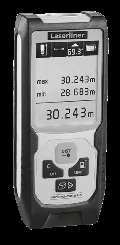
Laser distance meter – with green DLD laser technology – Functions: distances, area, volume, continuous measurement,
angle function 1 + 2 + 3, digital bubble level and tilt sensor calibration – 360° inclination sensor for determining the horizontal and
– The device must only be used in accordance with its intended
purpose and within the scope of the specifications. – The following persons may use the device only when they are
either supervised by a person who is responsible for their safety or have received instruction from this person on how to use the device: – Persons with restricted physical, sensory or mental abilities – Persons with no knowledge and/or experience in the use
of the device – Children (under the age of 14) – The device and its accessories are not toys. – Modifications or changes to the device are not permitted,
this will otherwise invalidate the approval and safety specifications. – Do not expose the device to mechanical stress, extreme temperatures,
moisture or significant vibration. – The device must no longer be used if one or more of its functions
fail or the battery charge is weak. – Please ensure compliance with the safety regulations set out
by local and national authorities with regard to the correct and proper use of the device.
Safety instructions Using class 2 lasers
Laser radiation! Do not stare into the beam!
Class 2 laser < 1 mW · 515 nm EN 60825-1:2014/AC:2017
vertical distance

– Attention: Do not look into the direct or reflected beam. – Do not point the laser beam towards persons. – If a person‘s eyes are exposed to class 2 laser radiation,
they should shut their eyes and immediately move away from the beam. – Tampering with (making changes to) the laser device is not
permitted. – Under no circumstances should optical instruments
(magnifying glass, microscope, binoculars)
Safety instructions Dealing with electromagnetic radiation
– The measuring device complies with electromagnetic compatibility
regulations and limit values in accordance with EMC-Directive 2014/30/EU. – Local operating restrictions – for example, in hospitals, aircraft,
petrol stations or in the vicinity of people with pacemakers – may apply. Electronic devices can potentially cause hazards or interference or be subject to hazards or interference. – The measuring accuracy may be affected when working close
to high voltages or high electromagnetic alternating fields.
Laser modules in DLD design stand for high line quality as well as a clean and clear and therefore easily visible line image. Unlike previous generations they are more temperature-stable and energy efficient.
Furthermore, the human eye has a higher sensitivity to the wave range of the green laser than the red laser, for example. This makes the green laser diode appear much brighter than the red one.
Green lasers, especially in the DLD design, thus offer advantages with regards to how visible the laser line is under unfavourable conditions.
6 times brighter than a typical 630 - 660 nm laser


Open the battery compartment and insert batteries (2 x typ AA) according to the symbols. Be sure to pay attention to polarity.

+
measurement / area / volume / angle function 1 + 2 + 3


Switch on, measure and switch off:


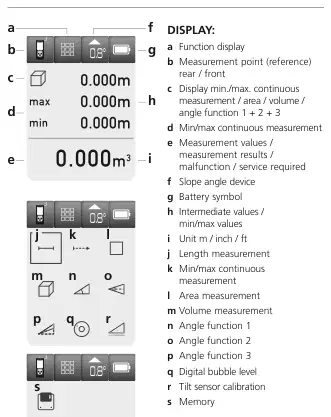
To select functions: Length / min/max continuous measurement / area / volume / angle function 1 + 2 + 3 / digital bubble level / tilt sensor calibration / memory

Device on Laser on Measure

The LC display shows the max value, the min value and the current value.
Area Laser on 1. measure- Laser on 2. measure- ment ment

Volume 1. measurement 2. measurement 3. measurement

1 sec · Min/max · Stop

Angle function 1 Measurement
The measurement results are determined automatically by the 360° inclination sensor.
The back of the device can be used as a reference surface for measuring angles. !
Angle 1. measurement 2. measurement function 2
1x 2x 3x 4x
The measurement results are determined automatically by the 360° inclination sensor.
The back of the device can be used as a reference surface for measuring angles. !
Angle 1. measurement 2. measurement function 3

The measurement results are determined automatically by the 360° inclination sensor.
The back of the device can be used as a reference surface for measuring angles. !
Results · Results

The digital bubble level is used to horizontally align the measuring device. Digital bubble level:
To calibrate the tilt sensor follow the instructions on the display. Tilt sensor calibration:
The device has 50 storage locations. Memory function:
Replace the battery Data transfer error Calculation error Outside the measuring range Received signal too weak Tilt sensor calibration error

Technical Data (Subject to technical changes without notice. 21W08)
Inside measurement range 0.05 m - 50 m
Precision (typical)* ± 2 mm
Measuring range ± 90°
Resolution 0.1°
Precision 0.1°
Laser class 2 < 1 mW
Laser wavelength 515 nm
-10°C … 40°C, max. humidity 20 … 85% rH, no condensation, max. working altitude 2000 m above sea level
Storage conditions -20°C … 70°C, max. humidity 80% rH
Automatic switch-off 30 sec laser / 3 min device
Power supply 2 x AA 1.5 volt batteries
Dimensions (W x H x D) 50 x 122 x 27 mm
Weight (incl. batteries) 140 g
* measuring distance up to 10 m with strongly reflective target surface and at room temperature. The measurement deviation may increase by ± 0.2 mm/m for greater distances and under unfavourable measuring conditions such as strong sunlight or weakly reflective target surfaces.
This device complies with all necessary standards for the free movement of goods within the EU.
This product is an electric device and must be collected separately for disposal according to the European Directive on waste electrical and electronic equipment.
Further safety and supplementary notices at: http://laserliner.com/info?an=lrmgi5
Distance measurement · Angle measurement · Operating conditions
In dieser Anleitung genannte Seiten – Hersteller, Support und Downloads.
Besitzer und unser Team antworten in der Regel innerhalb eines Tages – und Ihre Frage hilft auch anderen weiter.
Stellen Sie die erste Frage — andere Nutzer oder unser Team antworten Ihnen.