DE
Apple logo
Offizielle Bedienungsanleitung

Apple iPhone

1 Seiten·43 KB·Smartphones & Handys·PDF·EN
Apple iPhone
Inhaltsverzeichnis 1 Abschnitte SET UP WEBMAIL through the Apple iPhone AnzeigenAusblenden
Page 1 of the Apple iPhone user manual — E
Seite 1 · Zum Vergrößern klicken
Seite 1

SET UP WEBMAIL through the Apple iPhone

1. Tap Settings, then Passwords and Accounts.
Apple iPhone — SET UP WEBMAIL through the Apple iPhone diagram (page 1)
Abb. 1 · SET UP WEBMAIL through the Apple iPhone
2. Select Add Account.
3. Choose Other, then Add Mail Account.
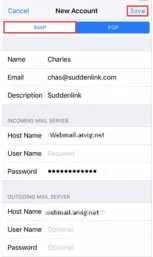
4. Enter your Name, Email (full address), Password and Description (recommended if you have multiple emails), then tap Next.
Apple iPhone — SET UP WEBMAIL through the Apple iPhone diagram (page 1)
Abb. 2 · SET UP WEBMAIL through the Apple iPhone
5. Select IMAP at the top of the screen.
6. Enter the following under Incoming Mail Server:
A. Host Namewebmail. arvig.net
B. Usernamefull email address
C. Passwordyour email password
7. Enter the following under Outgoing Mail Server:
Apple iPhone — SET UP WEBMAIL through the Apple iPhone diagram (page 1)
Abb. 3 · SET UP WEBMAIL through the Apple iPhone
D. Host Namewebmail. arvig.net
E. Usernamefull email address
F. Passwordyour email password
8. Tap Next, then close Settings.
9. Open the Mail app and pull/swipe down on the screen to refresh and check for mail.

A

webmail.arvig.net

B

D

webmail.arvig.net

888.99.ARVIG | arvig.net

E

F

Based on Arvig service area; some restrictions apply. ©Arvig 2021

Quellen

Referenzen & Links

In dieser Anleitung genannte Seiten – Hersteller, Support und Downloads.

Frage zu Apple iPhone stellen

Besitzer und unser Team antworten in der Regel innerhalb eines Tages – und Ihre Frage hilft auch anderen weiter.

Add your email to get notified when it’s answered — no spam, ever.

0 questions
Noch keine Fragen zu Apple iPhone

Stellen Sie die erste Frage — andere Nutzer oder unser Team antworten Ihnen.

Originaldokument

Apple iPhone PDF-Anleitung

1 Seiten·43 KB·Smartphones & Handys·PDF
Klicken Sie oben auf eine Seite, um sie hier zu öffnen
Seite 1 / …
100%
Seiten werden geladen…