DE
Offizielle Bedienungsanleitung

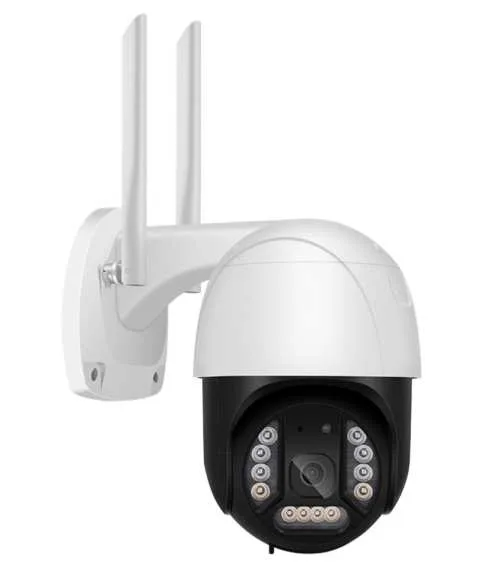
PTZ WiFi IP Camera

20 Seiten·358 KB·Kamera·PDF·EN
PTZ WiFi IP Camera
Inhaltsverzeichnis 13 Abschnitte WIFI IP CAMERA A Quick Manual for Android and iOS Devices · Product List: · Package content: · Product Features: · … AnzeigenAusblenden
Page 1 of the PTZ WiFi IP Camera user manual — WIFI IP CAMERA A Quick Manual for Android and iOS Devices
Seite 1 · Zum Vergrößern klicken
Seite 1
PTZ WiFi IP Camera — WIFI IP CAMERA A Quick Manual for Android and iOS Devices diagram (page 1)
Abb. 1 · WIFI IP CAMERA A Quick Manual for Android and iOS De…

WIFI IP CAMERA A Quick Manual for Android and iOS Devices

Page 2 of the PTZ WiFi IP Camera user manual — Product List:
Seite 2 · Zum Vergrößern klicken
Seite 2

Product List:

After you open your product, please check that the product and accessories resemble the images below:

Page 3 of the PTZ WiFi IP Camera user manual — Package content:
Seite 3 · Zum Vergrößern klicken
Seite 3

Package content:

When you open the package, please check that the product and accessories match the images listed below:

PTZ WiFi IP Camera — Package content: diagram (page 3)
Abb. 2 · Package content:

PTZ Camera DC12V/2A Adapter

PTZ WiFi IP Camera — Package content: diagram (page 3)
Abb. 3 · Package content:

Waterpprof Cap Screw Set

PTZ WiFi IP Camera — Package content: diagram (page 3)
Abb. 4 · Package content:

User Manual

Page 4 of the PTZ WiFi IP Camera user manual — Package content:
Seite 4 · Zum Vergrößern klicken
Seite 4
Page 4 of the PTZ WiFi IP Camera user manual — Package content:
Page 5 of the PTZ WiFi IP Camera user manual — Product Features:
Seite 5 · Zum Vergrößern klicken
Seite 5

Product Features:

Page 6 of the PTZ WiFi IP Camera user manual — Product characteristics:
Seite 6 · Zum Vergrößern klicken
Seite 6

Product characteristics:

PTZ WiFi IP Camera — Product characteristics: diagram (page 6)
Abb. 5 · Product characteristics:
PTZ WiFi IP Camera — Product characteristics: diagram (page 6)
Abb. 6 · Product characteristics:

原文 WiFi Microphone White LEDs

Page 7 of the PTZ WiFi IP Camera user manual — Product characteristics:
Seite 7 · Zum Vergrößern klicken
Seite 7
TFCardSlot IR.Sensor Array LEDs Lens Power LAN
Page 8 of the PTZ WiFi IP Camera user manual — Operation:
Seite 8 · Zum Vergrößern klicken
Seite 8

Operation:

1. Download the App
Page 9 of the PTZ WiFi IP Camera user manual — Functioning:
Seite 9 · Zum Vergrößern klicken
Seite 9

Functioning:

PTZ WiFi IP Camera — Functioning: diagram (page 9)
Abb. 7 · Functioning:
2. Turn on the camera Install the TF card and connect the camera to the power outlet.
Page 10 of the PTZ WiFi IP Camera user manual — Functioning:
Seite 10 · Zum Vergrößern klicken
Seite 10
3. Camera Configuration Option 1 - Wireless Network Configuration:
PTZ WiFi IP Camera — Functioning: diagram (page 10)
Abb. 8 · Functioning:
1. Open the App and click ‘Login’. If you do not have an account, you will need to register first.
2. Click the '+' symbol in the top right-hand corner.
Page 11 of the PTZ WiFi IP Camera user manual — Functioning:
Seite 11 · Zum Vergrößern klicken
Seite 11

Option 1 Continued...

PTZ WiFi IP Camera — Functioning: diagram (page 11)
Abb. 9 · Functioning:
2. Click ‘add device’. Choose your Wifi router and enter the router password.
Page 12 of the PTZ WiFi IP Camera user manual — Operation:
Seite 12 · Zum Vergrößern klicken
Seite 12

Operation:

Page 13 of the PTZ WiFi IP Camera user manual — Functioning:
Seite 13 · Zum Vergrößern klicken
Seite 13

Functioning:

Option 1 Continued...

PTZ WiFi IP Camera — Functioning: diagram (page 13)
Abb. 10 · Functioning:
4. After you hear 'Connect Successfully', you will be asked to enter a password.
5. Click 'confirm' and enter a Username.
Page 14 of the PTZ WiFi IP Camera user manual — Functioning:
Seite 14 · Zum Vergrößern klicken
Seite 14

Option 1 Continued...

PTZ WiFi IP Camera — Functioning: diagram (page 14)
Abb. 11 · Functioning:
5. Click 'Save' and you will be brought to a video preview. Your connection is now successful.
Page 15 of the PTZ WiFi IP Camera user manual — Functioning:
Seite 15 · Zum Vergrößern klicken
Seite 15
3. Camera Configuration

Option 2 - Wired Network Configuration:

PTZ WiFi IP Camera — Functioning: diagram (page 15)
Abb. 12 · Functioning:
1. After logging in, click the '+' icon in the top right hand corner of your device. Select the

third option Add device in the same WI_AN'.

2. Click 'Device Searching Interface' then click 'xmjp_bullet_****'.
3. The camera will now show as 'online' which indicates the connection was successful..
Page 16 of the PTZ WiFi IP Camera user manual — Functioning:
Seite 16 · Zum Vergrößern klicken
Seite 16
4. You can click on the product icon to change settings.
Page 17 of the PTZ WiFi IP Camera user manual — FAQ:
Seite 17 · Zum Vergrößern klicken
Seite 17

FAQ:

Q - How do you save videos on the camera?

A - The camera supports FAT32G format Class6, Classic, TF Card with a maximum memory of 128G. When the memory on the TF card is full, it will delete the oldest video automatically and loop recording.

Q - How do you restore to factory settings?

A - Open camera settings by following ‘Settings - General - About Equipment’ and click ‘Restore Factory Settings'. IMPORTANT: Do not turn off the camera during this process. A - Q - The camera is offline - what do I do?

A -1) Check the power source and the Wifi connection. 2) Restart your camera. 3) Reconfigure your camera.

Page 18 of the PTZ WiFi IP Camera user manual — Notice:
Seite 18 · Zum Vergrößern klicken
Seite 18

Notice:

Whilst using the camera, please amend the user password for your own security. Please ensure when installing the equipment, your environment isdust and damp free.

Page 19 of the PTZ WiFi IP Camera user manual — Customer Support: Email: support@aiboostpro.com Tel :+1(707)520-0808
Seite 19 · Zum Vergrößern klicken
Seite 19

Note:

While using the camera, change the user password for your own safety. When installing the equipment, make sure its environment is free from dust and moisture.

Updates:

Please ensure you update the App when prompted to do so. Updates: Please be sure to update the application when prompted.

AIBOOSTPRO

Customer Support: Email: [email protected] Tel :+1(707)520-0808

Model NumberA12 Country of Origin: Made in China

Please retain this information for future reference.

Page 20 of the PTZ WiFi IP Camera user manual — Note:
Seite 20 · Zum Vergrößern klicken
Seite 20
PTZ WiFi IP Camera — Note: diagram (page 20)
Abb. 13 · Note:

Frage zu PTZ WiFi IP Camera stellen

Besitzer und unser Team antworten in der Regel innerhalb eines Tages – und Ihre Frage hilft auch anderen weiter.

Add your email to get notified when it’s answered — no spam, ever.

0 questions
Noch keine Fragen zu PTZ WiFi IP Camera

Stellen Sie die erste Frage — andere Nutzer oder unser Team antworten Ihnen.

Originaldokument

PTZ WiFi IP Camera PDF-Anleitung

20 Seiten·358 KB·Kamera·PDF
Klicken Sie oben auf eine Seite, um sie hier zu öffnen
Seite 1 / …
100%
Seiten werden geladen…