



USER'S MANUAL MANUEL UTILISATEUR BEDIENUNGSANLEITUNG
Model PW1 32PD5000 42PD5000 42PMA500
This model is not classed as HD Ready because it cannot accept a signal of 720p 50.
It can however accept 1080i 50 signals and display HD material in this format.
READ THE INSTRUCTIONS INSIDE CAREFULLY. KEEP THIS USER'S MANUAL FOR FUTURE REFERENCE.
For future reference, record the serial number of your monitor.
SERIAL NO.
The serial number is located on the rear of the monitor.

This monitor is ENERGY STAR® compliant when used with a computer equipped with VESA DPMS. The ENERGY STAR® emblem does not represent EPA endorsement of any product or service. As an ENERGY STAR® Partner, Hitachi,Ltd. has determined that this product meets the ENERGY STAR® guidelines for energy efficiency.
NOTE: The information in this manual is subject to change without notice. The manufacturer assumes no responsibility for any errors that may appear in this manual. TRADEMARK ACKNOWLEDGEMENT VGA and XGA are registered trademarks of International Business Machines Corporation. APPLE and Macintosh are registered trademarks of Apple Computer, Inc. VESA is a trademark of a nonprofit organization, Video Electronics Standard Association. All brand or product names are trademarks or registered trademarks of their respective holders.
REMARQUE: Les particularités de l’écran couleur à plasma sont les suivantes. Les informations contenues dans ce manuel peuvent être modifiées sans préavis. Le constructeur n’accepte aucune responsabilité pour les erreurs qui peuvent éventuellement apparaître dans ce manuel. MARQUES DÉPOSÉES VGA et XGA sont des marques déposées d’International Business Machines Corporation. APPEL et Macintosh sont des marques déposées d’Apple Computer Inc. VESA est une marque déposée d’une organisation sans but lucratif, La Video Electronics Standard Association. Toutes les marques ou noms de produit sont des marques de commerce ou des marques déposées de leur dépositaire respectif.
HINWEIS: Die Informationen in dieser Anleitung unterliegen Änderung ohne Vorankündigung. Der Hersteller übernimmt keine Verantwortung für etwaige Fehler in dieser Anleitung. WARENZEICHEN-BESTÄTIGUNG VGA und XGA sind eingetragene Warenzeichen der International Business Machines Corporation. APPLE und Macintosh sind eingetragene Warenzeichen von Apple Computer, Inc. VESA ist ein Warenzeichen einer gemeinnützigen Organisation, Video Electronics Standard Association. Alle Marken- oder Produktnamen sind Warenzeichen oder eingetragene Warenzeichen der jeweiligen Inhaber.
Model PWT001 Installation Instructions
Thank you for purchasing the Hitachi Plasma TV Wall-mount Unit.
To ensure correct usage, please read this instruction manual thoroughly. After reading, please store this
manual in a safe place for future reference.
This plasma TV wall-mount unit is for use with the following models:
32PD5000, 32PD5200, 32PD5300, 37PD5200, 42PD5000, 42PD5200, 42PD5300, CMP4211/2, CMP4213/4
Special techniques are necessary for installation of the plasma TV.
improper installation and handling.
anchor bolts for the mounting unit left on the wall. Also note that a long use of the plasma TV set may
discolor the wall around it due to its heat and air flow.
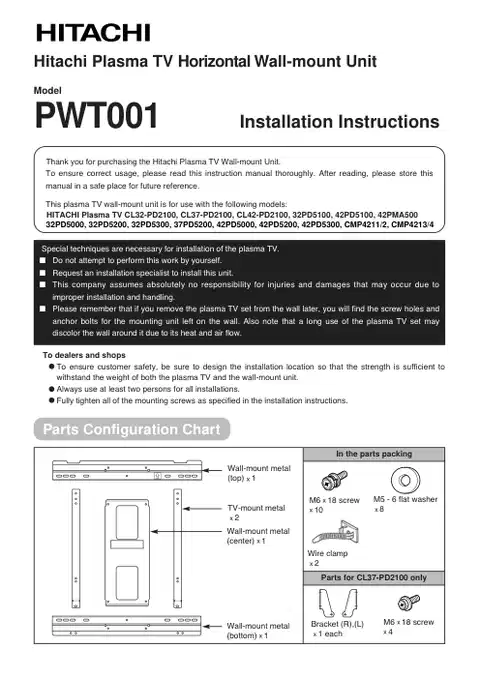
Wall-mount metal (top) x 1
M6 x 18 screw x 10
M5 - 6 flat washer
Wall-mount metal (center) x 1
M6 x 18 screw x 4
Wall-mount metal (bottom) x 1
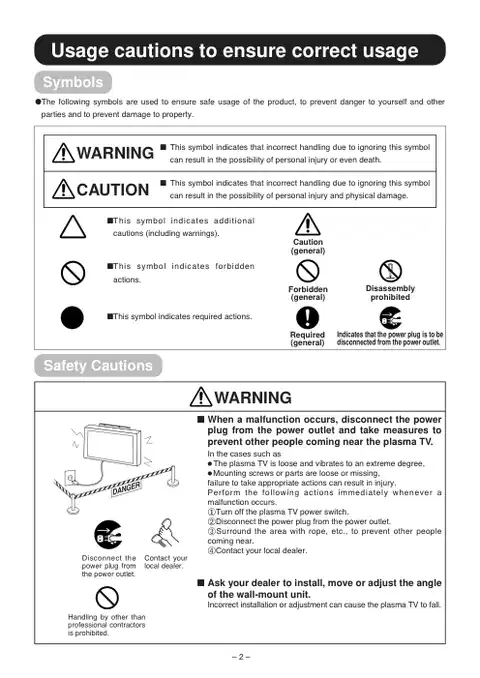

parties and to prevent damage to property.
can result in the possibility of personal injury or even death.
actions.
Disassembly
(general)
prohibited
Indicates that the power plug is to be disconnected from the power outlet.
Safety Cautions
WARNING
plug from the power outlet and take measures to prevent other people coming near the plasma TV. In the cases such as
Contact your local dealer. Disconnect the power plug from the power outlet.
of the wall-mount unit. Incorrect installation or adjustment can cause the plasma TV to fall.
Handling by other than professional contractors is prohibited.
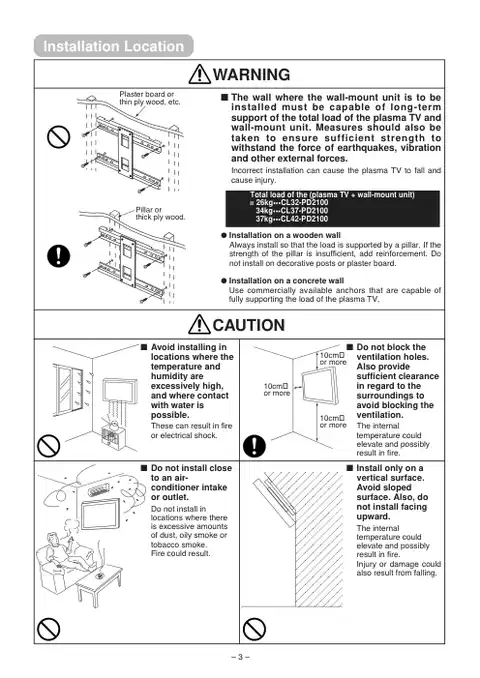
WARNING
Plaster board or thin ply wood, etc.
installed must be capable of long-term support of the total load of the plasma TV and wall-mount unit. Measures should also be taken to ensure sufficient strength to withstand the force of earthquakes, vibration and other external forces. Incorrect installation can cause the plasma TV to fall and cause injury.
Pillar or thick ply wood.
locations where the temperature and humidity are excessively high, and where contact with water is possible. These can result in fire or electrical shock.
ventilation holes. Also provide sufficient clearance in regard to the surroundings to avoid blocking the ventilation. The internal temperature could elevate and possibly result in fire.
10cm or more
to an air- conditioner intake or outlet. Do not install in locations where there is excessive amounts of dust, oily smoke or tobacco smoke. Fire could result.
vertical surface. Avoid sloped surface. Also, do not install facing upward. The internal temperature could elevate and possibly result in fire. Injury or damage could also result from falling.
10cm or more · 10cm or more
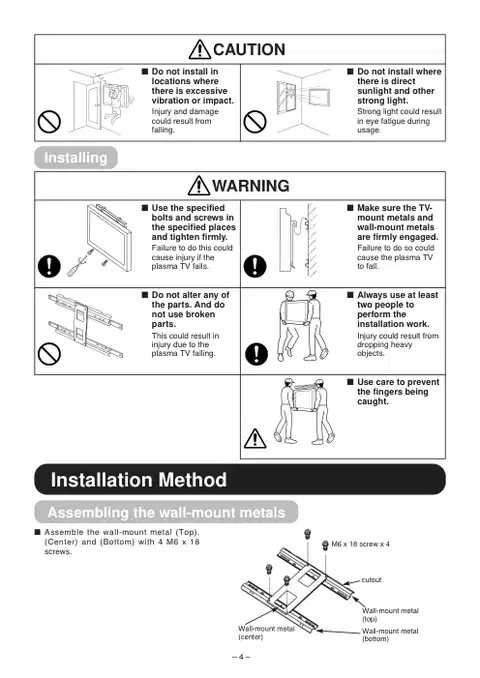
locations where there is excessive vibration or impact. Injury and damage could result from falling.
there is direct sunlight and other strong light. Strong light could result in eye fatigue during usage.
WARNING
bolts and screws in the specified places and tighten firmly. Failure to do this could cause injury if the plasma TV falls.
mount metals and wall-mount metals are firmly engaged. Failure to do so could cause the plasma TV to fall.
the parts. And do not use broken parts. This could result in injury due to the plasma TV falling.
two people to perform the installation work. Injury could result from dropping heavy objects.
the fingers being caught.
Assembling the wall-mount metals
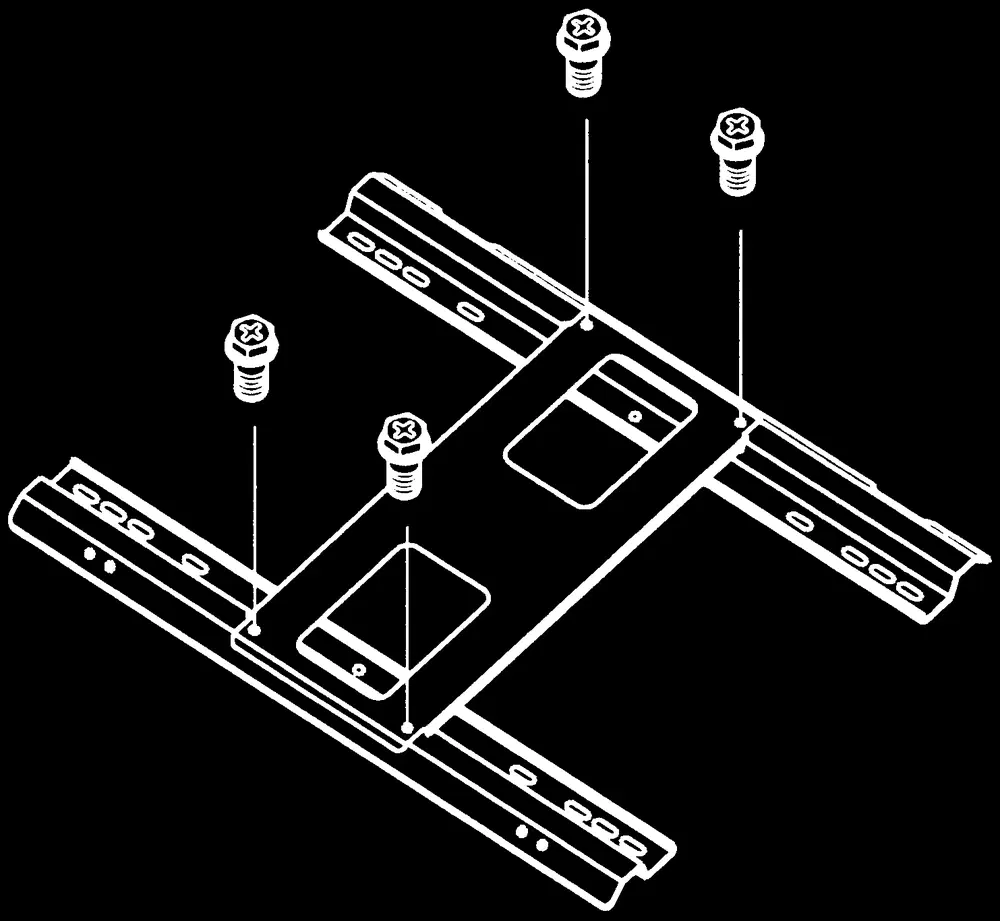
(Center) and (Bottom) with 4 M6 x 18 screws.
M6 x 18 screw x 4
Wall-mount metal (top) Wall-mount metal (center)
cutout · Wall-mount metal (bottom)
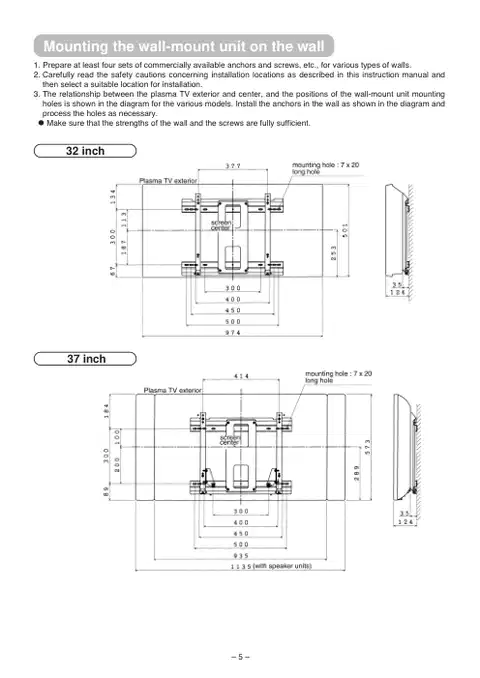
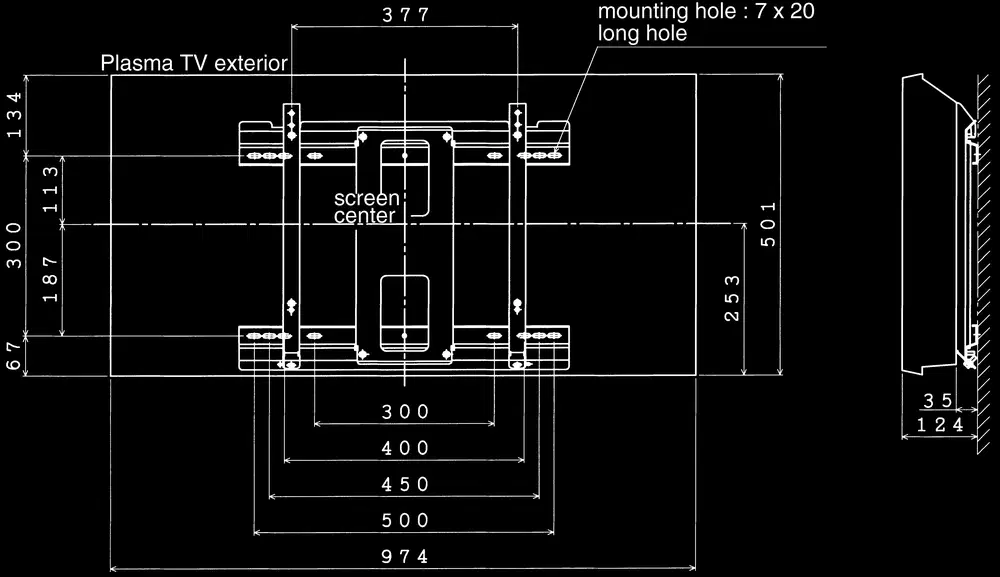
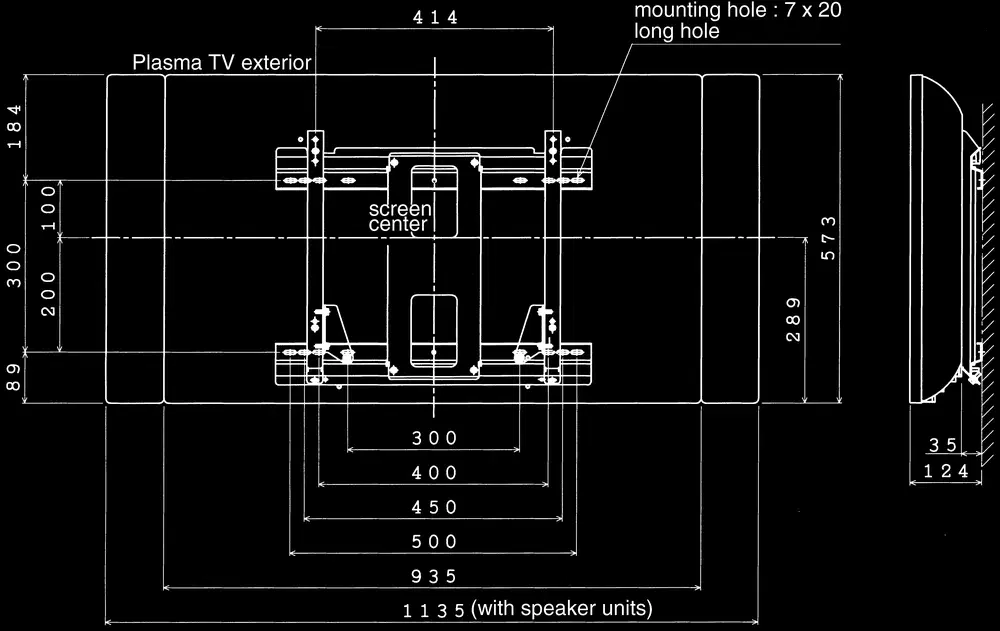
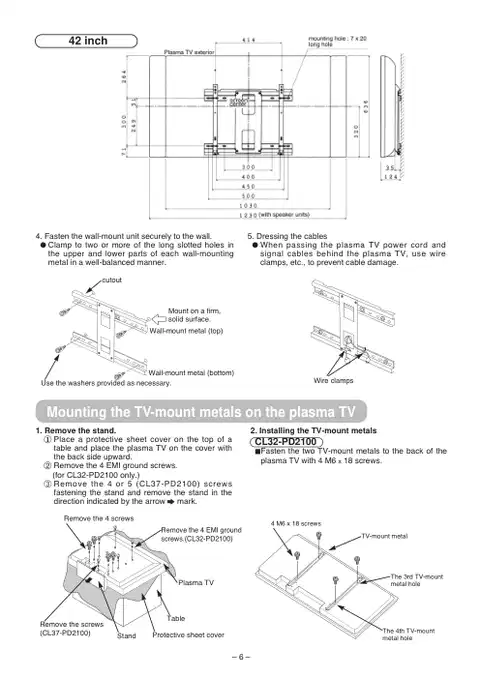
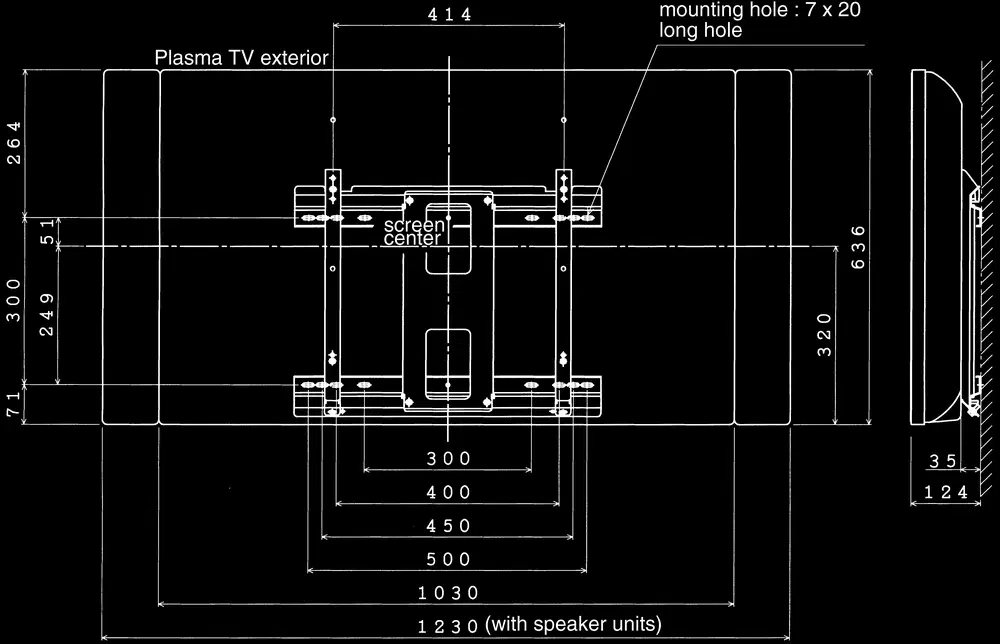
1. Prepare at least four sets of commercially available anchors and screws, etc., for various types of walls. 2. Carefully read the safety cautions concerning installation locations as described in this instruction manual and then select a suitable location for installation. 3. The relationship between the plasma TV exterior and center, and the positions of the wall-mount unit mounting holes is shown in the diagram for the various models. Install the anchors in the wall as shown in the diagram and process the holes as necessary. ●Make sure that the strengths of the wall and the screws are fully sufficient.
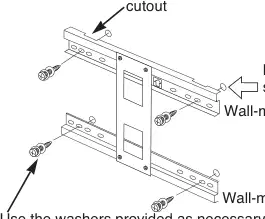
Mount on a firm, solid surface.
Wall-mount metal (bottom) Use the washers provided as necessary.
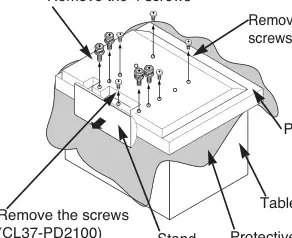
CL32-PD2100
table and place the plasma TV on the cover with the back side upward. ➁Remove the 4 EMI ground screws.
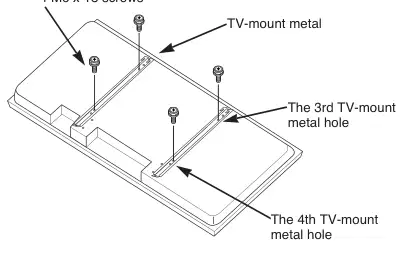
plasma TV with 4 M6 x 18 screws.
fastening the stand and remove the stand in the direction indicated by the arrow mark.
Remove the 4 screws
4 M6 x 18 screws
Remove the 4 EMI ground screws.(CL32-PD2100)
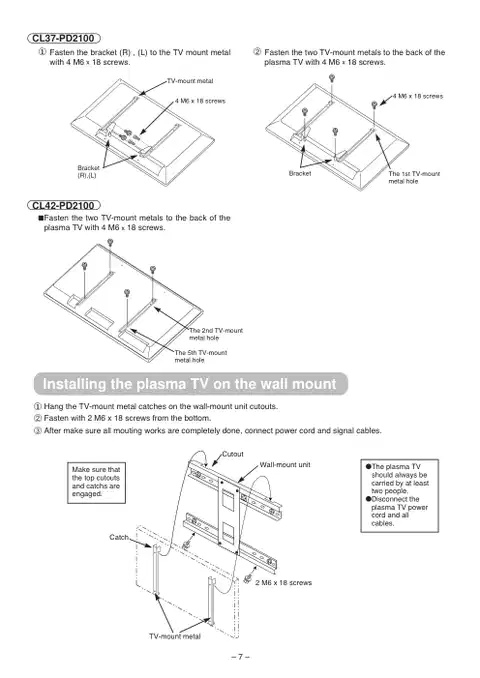
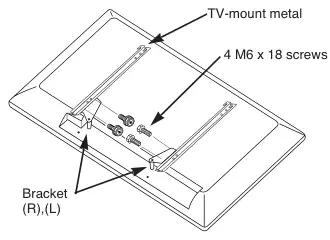
① Fasten the bracket (R) , (L) to the TV mount metal
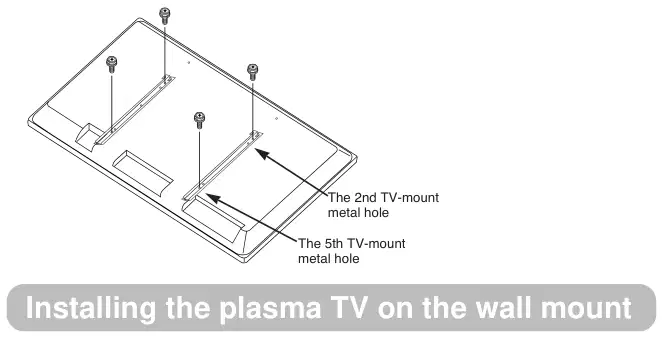
➁ Fasten the two TV-mount metals to the back of the
with 4 M6 x 18 screws.
plasma TV with 4 M6 x 18 screws.
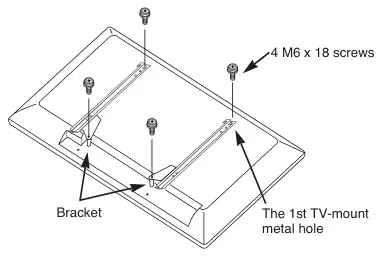
plasma TV with 4 M6 x 18 screws.
①Hang the TV-mount metal catches on the wall-mount unit cutouts. ➁Fasten with 2 M6 x 18 screws from the bottom. ➂After make sure all mouting works are completely done, connect power cord and signal cables.
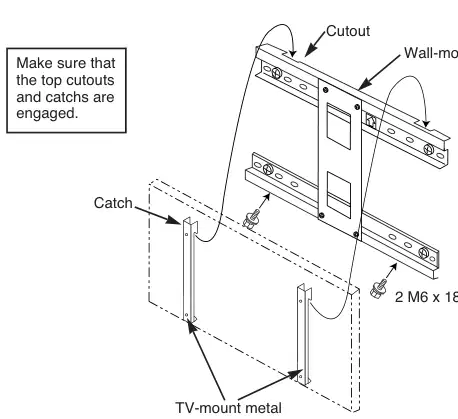
Make sure that the top cutouts and catchs are engaged.
2 M6 x 18 screws
Wall-mount unit
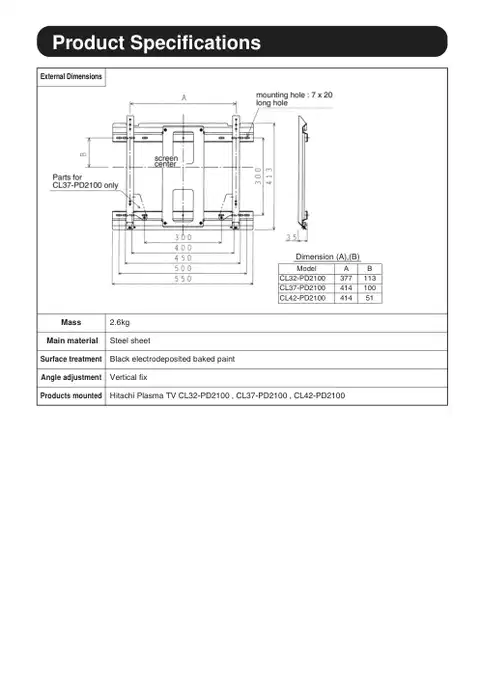
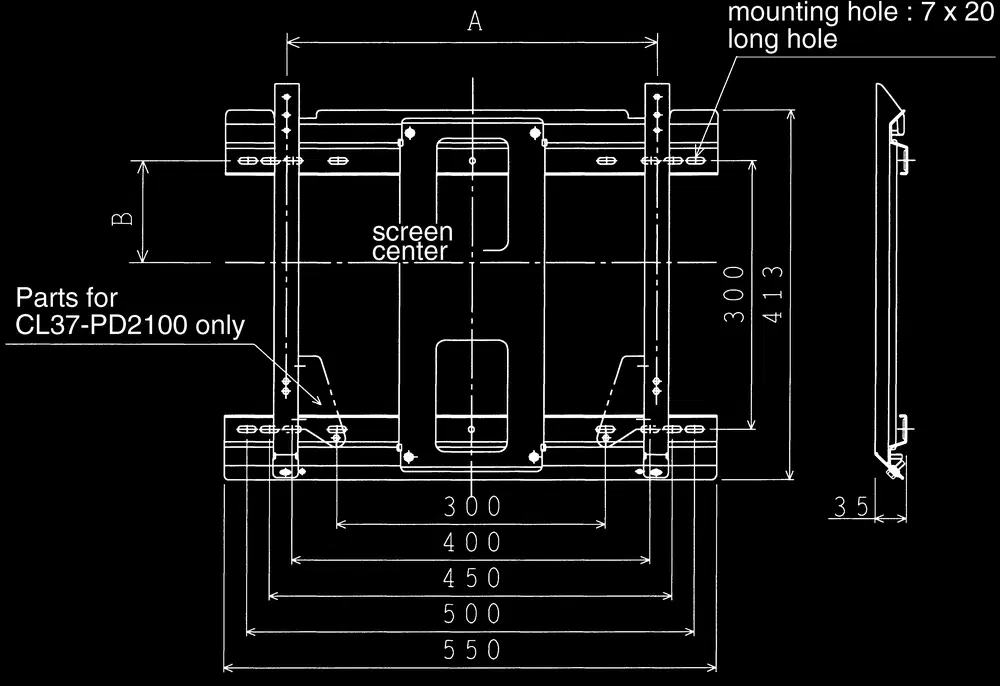
Model A B CL32-PD2100 377 113 CL37-PD2100 414 100 CL42-PD2100 414 51
Mass 2.6kg
Main material Steel sheet
Surface treatment Black electrodeposited baked paint
Angle adjustment Vertical fix
Products mounted Hitachi Plasma TV CL32-PD2100 , CL37-PD2100 , CL42-PD2100
External Dimensions · Dimension (A),(B)
Hitachi, Ltd. Tokyo, Japan
International Sales Division THE HITACHI ATAGO BUILDING, No. 15 –12 Nishi Shinbashi, 2 – Chome,
Minato – Ku, Tokyo 105-8430, Japan.
HITACHI EUROPE LTD, Whitebrook Park Lower Cookham Road Maidenhead Berkshire SL6 8YA UNITED KINGDOM Tel: 01628 643000 Fax: 01628 643400 Email: consumer-service@hitachi-eu.com
HITACHI EUROPE S.A. 364 Kifissias Ave. & 1, Delfon Str. 152 33 Chalandri Athens GREECE Tel: 1-6837200 Fax: 1-6835964 Email: service.hellas@hitachi-eu.com
HITACHI EUROPE GmbH Munich Office Dornacher Strasse 3 D-85622 Feldkirchen bei München GERMANY Tel: +49-89-991 80-0 Fax: +49-89-991 80-224 Hotline: +49-180-551 25 51 (12ct/min) Email: HSE-DUS.service@hitachi-eu.com
HITACHI EUROPE S.A. Gran Via Carlos III, 86, planta 5 Edificios Trade - Torre Este 08028 Barcelona SPAIN Tel: 93 409 2550 Fax: 93 491 3513 Email: atencion.cliente@hitachi-eu.com
HITACHI EUROPE srl Via Tommaso Gulli N.39, 20147 Milano, Italia ITALY Tel: +39 02 487861 Tel: +39 02 38073415 Servizio Clienti Fax: +39 02 48786381/2 Email: customerservice.italy@hitachi-eu.com
HITACHI Europe AB Box 77 S-164 94 Kista SWEDEN Tel: +46 (0) 8 562 711 00 Fax: +46 (0) 8 562 711 13 Email: csgswe@hitachi-eu.com
HITACHI EUROPE S.A.S Lyon Office B.P. 45, 69671 BRON CEDEX FRANCE Tel: 04 72 14 29 70 Fax: 04 72 14 29 99 Email: france.consommateur@hitachi-eu.com
HITACHI EUROPE LTD (Norway) AB STRANDVEIEN 18 1366 Lysaker NORWAY Tel: 67 5190 30 Fax: 67 5190 32 Email: csgnor@hitachi-eu.com
HITACH EUROPE AB Egebækgård Egebækvej 98 DK-2850 Nærum DENMARK Tel: +45 43 43 6050 Fax: +45 43 60 51 Email: csgnor@hitachi-eu.com
HITACHI EUROPE AB Neopoli / Niemenkatu 73 FIN-15140 Lahti FINLAND Tel : +358 3 8858 271 Fax: +358 3 8858 272 Email: csgnor@hitachi-eu.com
Hitachi Europe Ltd Bergensesteenweg 421 1600 Sint-Pieters-Leeuw BELGIUM Tel: +32 2 363 99 01 Fax: +32 2 363 99 00 Email: sofie.van.bom@hitachi-eu.com
HITACHI EUROPE LTD Na Sychrove 975/8 101 27 Praha 10 – Bohdalec CZECH REPUBLIC Tel: +420 267 212 383 Fax: +420 267 212 385 Email: csgnor@hitachi-eu.com
Besitzer und unser Team antworten in der Regel innerhalb eines Tages – und Ihre Frage hilft auch anderen weiter.
Stellen Sie die erste Frage — andere Nutzer oder unser Team antworten Ihnen.