





accredited organisation that ensures competence in handling refrigerants according to a specific evaluation recognised by associations in the industry.
SYMBOLS EXPLAINED
These images are for reference only, please refer to your product.
If you find you’re missing any parts from your order, please contact our customer care team by emailing help@probreeze.com for fast and friendly help.

Turning On/Off:
Setting a Timer:
The timer can be set to automatically turn the dehumidifier on or off.
Setting a Timer for Turning On:
Setting a Timer for Turning Off:
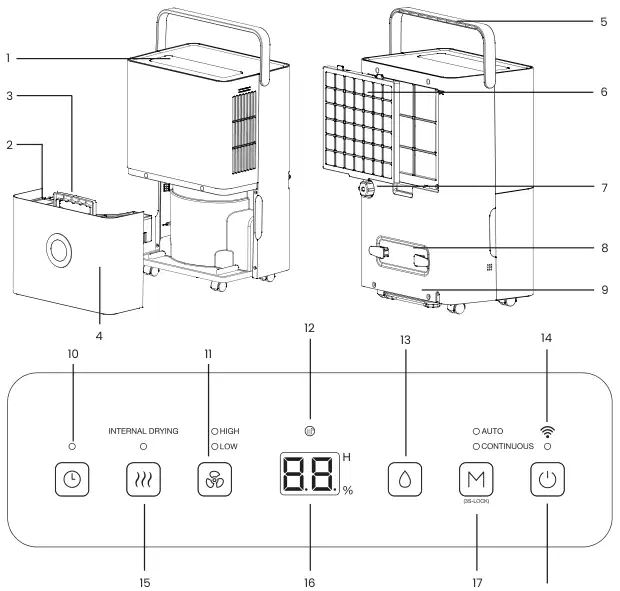
Body:
Control Panel:
Setting the Mode:
Auto Mode:
When in auto mode, the default relative humidity is 50%. To change the relative humidity, follow the below steps:
Getting started

Continuous Mode:
When in continuous mode, the dehumidifier will run regardless of the room’s humidity percentage. The change the fan speed, follow the below steps:
Internal Drying:
Internal drying can help prevent mould caused by damp from forming inside your dehumidifier.
Smart Life is a centralised app for smart device management. With Smart Life, you can control your smart devices remotely and set up a complex chain of commands and automations. To connect this dehumidifier to a smartphone via Wi-Fi throughthe Smart Life app, follow the below steps.
Child Lock:
Activate child lock to deactivate all buttons on the control panel.
Emptying the Water Tank:
When the water tank is full, the water tank indicator light will illuminate and the dehumidifier will beep 10 times, then turn off.
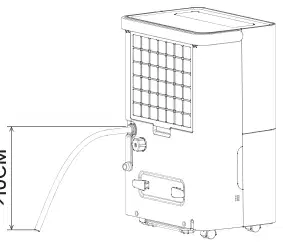
Setting Up Continuous Drainage:

Amazon Echo and Google Home (see below).
Amazon Echo Set-Up:
Before connecting the appliance to an Amazon Echo device via WiFi, ensure:
Amazon Alexa and Google Home Control
The following commands can be controlled via Alexa and Google Home:
To connect this dehumidifier to an Amazon Echo device via Wi-Fi through the Smart Life app follow the below steps.
Google Home Set-Up:
Before connecting the appliance to a Google Home device via Wi-Fi, ensure:
To connect this dehumidifier to a Google Home device, via Wi-Fi through the Smart Life app, follow the below steps.

appliance when not in use to prevent mould.
Waste electrical products (WEEE) can be sent to One Retail Group for recycling and disposal when you purchase a new product from One Retail Group, on a like-for-like basis. For more information on how to recycle this product please visit www.probreeze.com
The end-user of electrical and electronic products (WEEE) is responsible for separating old batteries and lamp bulbs before they are handed over to a designated disposal and recycling service. Waste batteries can also be disposed of in collection bins, which can be found in most local supermarkets and household waste recycling centres.
Electrical and electronic products (WEEE) may contain personal user data, depending on the type of product. This may include app-linked products that connect to wifi. The end-user is responsible for deleting the data on the waste electrical and electronic products prior to disposal.
Waste electrical and electronic products (WEEE), batteries, accumulators, and packaging should not be disposed of with general household waste. This is to prevent possible harm to the environment and human well-being, and to help conserve our natural resources. Most electrical products with a plug, battery, or cable can be recycled. Contact your local council, household waste disposal service, or the store where you purchased the product for information regarding the collection schemes in your area.
Take-Back Scheme · Personal Data Protection

30L KOMPRESSOR LUFTENTFEUCHTER MODELL PB-20
If you experience any issues with this product, please try these troubleshooting tips. If the issue is not solved, please contact our customer care team by emailing help@probreeze.com
Vielen Dank, dass Sie sich für den Kauf eines Produkts von Pro Breeze entschieden haben. Bitte lesen Sie das gesamte Handbuch vor der ersten Nutzung sorgfältig durch und bewahren Sie es für später an einem sicheren Ort auf.
Dieses Produkt wird mit einer zwei (2) Jahre dauernden beschränkten Garantie von Pro Breeze geliefert, die ab dem Kaufdatum gültig ist. Diese eingeschränkte Garantie wird von Pro Breeze gewährt und beeinträchtigt nicht Ihre gesetzlichen Rechte als Verbraucher gemäß den geltenden nationalen Verbrauchergesetzen bezüglich des Verkaufs von Waren.
BITTE LESEN UND BEWAHREN SIE DIESE WICHTIGEN SICHERHEITSHINWEISE AUF.
Bei der Verwendung von Elektrogeräten sollten stets grundlegende Sicherheitsvorkehrungen getroffen werden, um das Risiko von Feuer, Stromschlag und Verletzungen zu verringern, einschließlich der folgenden:
In dieser Anleitung genannte Seiten – Hersteller, Support und Downloads.
Was die auf dem Display angezeigten Fehlercodes bedeuten und wie man sie behebt.
| Code | Bedeutung | Lösung | |
|---|---|---|---|
| E1 | The coil sensor detects an issue. | Seek a professional to check the coil sensor and related circuits. | p.8 |
| E2 | The room temperature sensor detects an issue. | Seek a professional to check the room temperature sensor and related circuits. | p.8 |
| P1 | The appliance is defrosting. | This is normal. When defrosting is complete, use the appliance as normal. | p.8 |
Häufige Probleme, wahrscheinliche Ursachen und Lösungen.
| Problem | Mögliche Ursache | Abhilfe | |
|---|---|---|---|
| The dehumidifier is not collecting water. | The doors or windows in the room where the appliance is in use are open. | Close all doors or windows. | p.9 |
| The dehumidifier is not collecting water. | The air vents are blocked. | Remove any blockages. | p.9 |
| The dehumidifier is not collecting water. | The humidity in the room is increasing. | Turn off any appliances that may be creating steam. | p.9 |
| The dehumidifier is not turning on. | It is not connected to power. | Check to ensure the power cord is correctly plugged in and the wall socket is turned on. | p.9 |
| The dehumidifier is not turning on. | The water tank is full or in the wrong position. | Remove, empty, and replace the water tank, positioning it correctly. | p.9 |
| The dehumidifier is not turning on. | The temperature of the room is unsuitable. | Use within a temperature range of 5ºC and 32ºC. | p.9 |
| The dehumidifier is making an abnormal noise. | It has been placed on an incline. | Move it to a flat, stable surface. | p.9 |
| The dehumidifier is making an abnormal noise. | The air filter is blocked. | Clean the air filter according to the above instructions. | p.9 |
| Water is leaking from the dehumidifier. | The continuous drainage hose is loose. | Securely connect the continuous drainage hose to the port. | p.9 |
| Water is leaking from the dehumidifier. | The drainage system is blocked. | Remove any blockages and ensure the hose is not kinked. | p.9 |
Besitzer und unser Team antworten in der Regel innerhalb eines Tages – und Ihre Frage hilft auch anderen weiter.
Stellen Sie die erste Frage — andere Nutzer oder unser Team antworten Ihnen.