DE
Dometic logo
Offizielle Bedienungsanleitung

Dometic Refrigerator (HC302)

68 Seiten·635 KB·Kühlschrank·PDF·EN
Dometic Refrigerator (HC302)
Inhaltsverzeichnis 30 Abschnitte 1 Explanation of symbols · 2 Safety instructions · 2.1 General safety · 2.2 Operating the refrigerator safely · … AnzeigenAusblenden
Page 1 of the Dometic Refrigerator (HC302) user manual — NL
Seite 1 · Zum Vergrößern klicken
Seite 1

REFRIGERATION

SILENCIOHC

Dometic Refrigerator (HC302) — REFRIGERATION diagram (page 1)
Abb. 1

Medication refrigerator Installation and Operating Manual 9

DE

Medikamentenkühlschrank Montage- und Bedienungsanleitung 23

Réfrigérateur pour médicaments Instructions de montage et de service 38

FR

Medicamentenkoelkast Montagehandleiding en gebruiksaanwijzing 53

NL

Page 2 of the Dometic Refrigerator (HC302) user manual
Seite 2 · Zum Vergrößern klicken
Seite 2

© 2021 Dometic Group. The visual appearance of the contents of this manual is protected by copyright and design law. The underlying technical design and the products contained herein may be protected by design, patent or be patent pending. The trademarks mentioned in this manual belong to Dometic Sweden AB. All rights are reserved.

Page 3 of the Dometic Refrigerator (HC302) user manual
Seite 3 · Zum Vergrößern klicken
Seite 3
Dometic Refrigerator (HC302) diagram (page 3)
Abb. 2
Page 4 of the Dometic Refrigerator (HC302) user manual
Seite 4 · Zum Vergrößern klicken
Seite 4
Dometic Refrigerator (HC302) diagram (page 4)
Abb. 3
Page 5 of the Dometic Refrigerator (HC302) user manual
Seite 5 · Zum Vergrößern klicken
Seite 5
Dometic Refrigerator (HC302) diagram (page 5)
Abb. 4
Page 6 of the Dometic Refrigerator (HC302) user manual
Seite 6 · Zum Vergrößern klicken
Seite 6
Dometic Refrigerator (HC302) diagram (page 6)
Abb. 5
Page 7 of the Dometic Refrigerator (HC302) user manual
Seite 7 · Zum Vergrößern klicken
Seite 7
Dometic Refrigerator (HC302) diagram (page 7)
Abb. 6
Page 8 of the Dometic Refrigerator (HC302) user manual
Seite 8 · Zum Vergrößern klicken
Seite 8
Dometic Refrigerator (HC302) diagram (page 8)
Abb. 7
Page 9 of the Dometic Refrigerator (HC302) user manual — 1 Explanation of symbols D ! !
Seite 9 · Zum Vergrößern klicken
Seite 9

HC302, HC502 Explanation of symbols

Please read these instructions carefully and follow all instructions, guidelines, and warnings included in this product manual in order to ensure that you install, use, and maintain the product properly at all times. These instructions MUST stay with this product. By using the product, you hereby confirm that you have read all instructions, guidelines, and warnings carefully and that you understand and agree to abide by the terms and conditions as set forth herein. You agree to use this product only for the intended purpose and application and in accordance with the instructions, guidelines, and warnings as set forth in this product manual as well as in accordance with all appli- cable laws and regulations. A failure to read and follow the instructions and warnings set forth herein may result in an injury to yourself and others, damage to your product or damage to other property in the vicinity. This product manual, including the instructions, guidelines, and warnings, and related documentation, may be subject to changes and updates. For up-to-date product information, please visit dometic.com.

Table of contents

1 Explanation of symbols 9

2 Safety instructions 10

3 Scope of delivery 12

4 Intended use 12

5 Technical description 13

6 Installing and connecting the refrigerator 14

7 Operation 16

8 Cleaning and maintenance 19

9 Troubleshooting 20

10 Warranty 21

11 Disposal 21

12 Technical data 22

1 Explanation of symbols D ! !

Page 10 of the Dometic Refrigerator (HC302) user manual — 2 Safety instructions
Seite 10 · Zum Vergrößern klicken
Seite 10

Safety instructions HC302, HC502

A I

2 Safety instructions

2.1 General safety !

  • Ensure that the refrigerator has been installed by a qualified technician in accordance with the Dometic installation manual.
  • Do not operate the refrigerator if it is visibly damaged.
  • If this refrigerator's power cable is damaged, it must be replaced by the manufacturer, service agent or a similarly qualified person in order to prevent safety hazards.
  • This refrigerator may only be repaired by qualified personnel. Inadequate repairs may cause serious hazards.
  • The refrigerant in the refrigerant circuit is highly flammable. In the event of any damage to the refrigerant circuit: – Switch off the refrigerator. – Avoid naked flames and sparks. – Air the room well.
  • Do not store any explosive substances, such as spray cans with propellants, in the refrigerator.
  • This refrigerator can be used by children aged from 8 years and above and persons with reduced physical, sensory or mental capabilities or lack of experience and knowledge if they have been given supervision or instruction concerning use of the refrigerator in a safe way and understand the hazards involved.
  • Children shall not play with the refrigerator.
Show 4 more labels / short text on this page
Electrocution hazard · Fire hazard · Explosion hazard · Health hazard
Page 11 of the Dometic Refrigerator (HC302) user manual — 2.2 Operating the refrigerator safely D
Seite 11 · Zum Vergrößern klicken
Seite 11

HC302, HC502 Safety instructions

  • Cleaning and user maintenance shall not be made by children without supervision.
  • Children aged from 3 to 8 years are allowed to load and unload the refrigerator. !
  • Do not put your fingers into the hinge. A
  • Check that the voltage specification on the type plate is the same as that of the power supply.
  • The refrigerator is not suitable for storing substances which are caustic or contain solvents.
  • Keep the drainage outlet clean at all times.
  • Do not open the refrigerant circuit under any circumstances.
  • Only carry the refrigerator upright.

2.2 Operating the refrigerator safely D

  • Do not touch exposed cables with your bare hands. !
  • Before starting the refrigerator, ensure that the power supply line and the plug are dry.
  • The medicine and vaccines may only be stored in their original packaging or in suitable containers.
  • Check if the required temperature range for the medicine or vaccine suits with the temperature range of this appliance.
  • Opening the door for long periods can cause significant increase of the temperature in the compartments of the refrigerator.
  • Clean regularly accessible drainage systems.
Show 4 more labels / short text on this page
Risk of crushing · Electrocution hazard · Electrocution hazard · Health hazard
Page 12 of the Dometic Refrigerator (HC302) user manual — 4 Intended use
Seite 12 · Zum Vergrößern klicken
Seite 12

Scope of delivery HC302, HC502

  • If the refrigerator is left empty for long periods: – Switch off the refrigerator. – Defrost the refrigerator. – Clean and dry the refrigerator. – Leave the door open to prevent mold developing within the refrigerator. A
  • Do not use electrical devices inside the refrigerator unless they are recommended by the manufacturer for that purpose.
  • Do not place it near naked flames or other heat sources (heaters, direct sunlight, gas ovens etc.).
  • Ensure that the ventilation vents are not covered.
  • Never immerse the refrigerator in water.
  • Protect the refrigerator and the cable against heat and moisture.

3 Scope of delivery

1 Installation and operating manual

4 Intended use

The medication refrigeration (also referred to as refrigerator) is designed to keep heat sensitive medicines according to DIN 58345 between +2 °C and +8 °C in enclosed buildings, such as:

  • In hospitals, and health centers
  • In retirement homes, and nursing homes

The refrigerator is not suitable for installation in caravans or mobile homes.

The refrigerator is intended to be used either as a built-in appliance or as freestand- ing refrigeration appliance. Refer to the installation instructions.

Show 4 more labels / short text on this page
Quantity Description · 1 Refrigerator · 1 Handle · 1 Battery (CR1632)
Page 13 of the Dometic Refrigerator (HC302) user manual — 5.1 Function description
Seite 13 · Zum Vergrößern klicken
Seite 13

HC302, HC502 Technical description

The refrigerator is designed exclusively for cooling and storing medicines and vac- cines in closed containers.

  • It's not suitable for storing any kind of body fluids like e.g. blood or plasma, or any body parts like e.g. human organs.
  • It's not suitable for cooling and storing of beverages and foods, storing fresh foods, or freezing foodstuffs.

This refrigerator is only suitable for the intended purpose and application in accor- dance with these instructions.

This manual provides information that is necessary for proper installation and/or operation of the refrigerator. Poor installation and/or improper operating or mainte- nance will result in unsatisfactory performance and a possible failure.

The manufacturer accepts no liability for any injury or damage to the product resulting from:

  • Incorrect assembly or connection, including excess voltage
  • Incorrect maintenance or use of spare parts other than original spare parts provided by the manufacturer
  • Alterations to the product without express permission from the manufacturer
  • Use for purposes other than those described in this manual

Dometic reserves the right to change product appearance and product specifications.

5 Technical description

5.1 Function description

All materials used in the refrigerator are compatible for use with medicines.

The refrigerant circuit is maintenance-free.

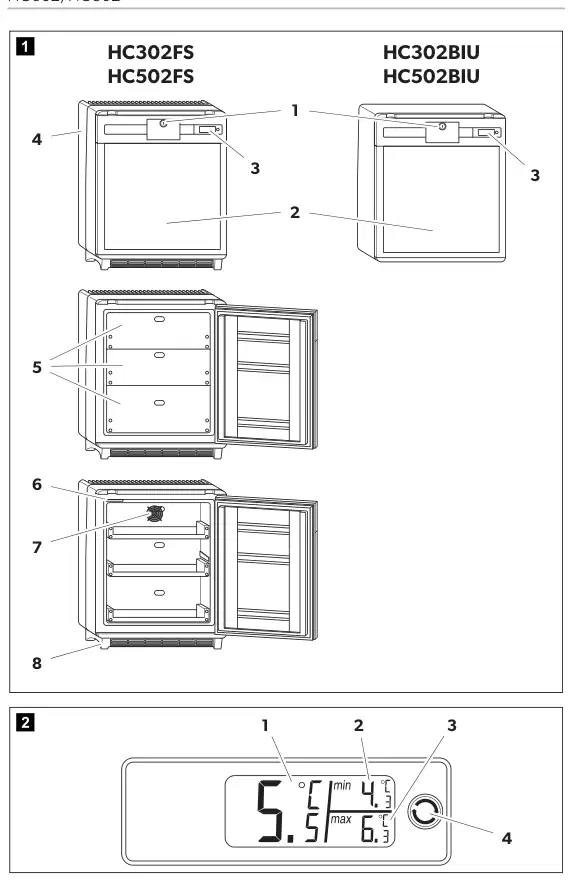
The refrigerator is available as freestanding version (FS) and as built-in version (BIU).

The freestanding version (HC302FS, HC502FS) is intended for freestanding use. The cooling unit cover protects the warm parts of the cooling units. The foot frame with ventilation openings ensure sufficient ventilation. By removing the foot frame and cooling unit cover the refrigerator can be used as a built-in version.

The built-in version (HC302BIU, HC502BIU) is intended to be mounted into furni- ture. It doesn‘t have a foot frame or cooling unit cover.

Page 14 of the Dometic Refrigerator (HC302) user manual — 6.1 Unpacking the refrigerator
Seite 14 · Zum Vergrößern klicken
Seite 14

Installing and connecting the refrigerator HC302, HC502

The digital thermometer shows and stores the minimum and maximum inner temperatures from the last reset so that you can check whether the medicines have been stored at the appropriate temperatures.

5.2 Control elements

No. in fig. 1,

3 Digital thermometer (see fig. 2, page 3)

4 Cooling unit cover

Key to fig. 2, page 3

No. Explanation

1 Current inner temperature (in °C)

2 Minimum inner temperature (in °C)

3 Maximum inner temperature (in °C)

6 Installing and connecting the refrigerator

6.1 Unpacking the refrigerator

1. Check that the packaging is not damaged.
2. Remove the cardboard packaging.
3. Check that the refrigerator is not damaged.
Show 9 more labels / short text on this page
Explanation · page 3 · 1 Door lock · 2 Door · 5 Drawers · 6 Interior light · 7 Fan · 8 Foot frame · 4 Reset button
Page 15 of the Dometic Refrigerator (HC302) user manual — 6.3 Installing built-in version !
Seite 15 · Zum Vergrößern klicken
Seite 15

HC302, HC502 Installing and connecting the refrigerator

If you find damage on the packaging or at the refrigerator resulting from transport, report it immediately to the transportation firm.

6.2 Installing freestanding version

Observe the following instructions when installing:

1. Install the refrigerator so that the warm air produced can easily flow away, either upwards or to the sides.
2. Place the refrigerator at the chosen place.
3. Leave the refrigerator to stand for at least four hours before you connect it to the power supply so that the refrigerant can flow back into the compressor.

6.3 Installing built-in version !

Observe the following instructions when installing:

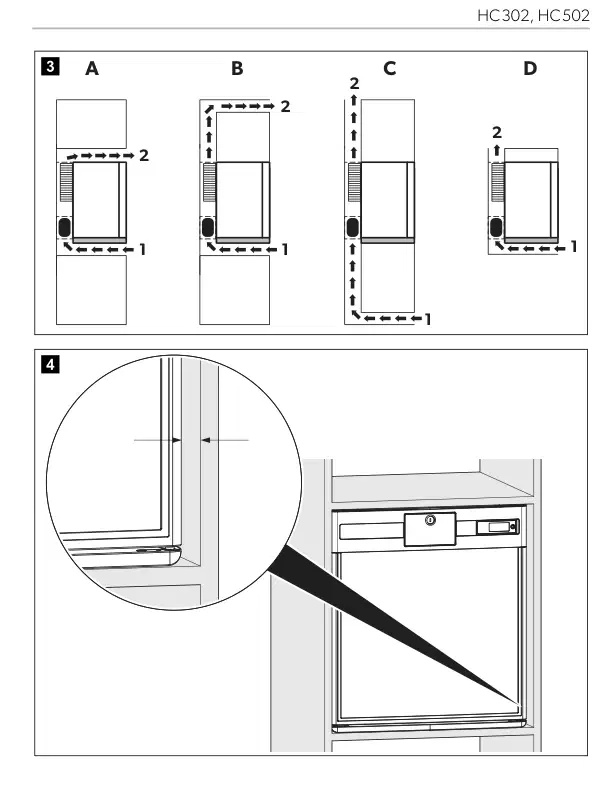
  • Install the refrigerator so that the warm air produced can easily flow away (either upwards or to the front, see fig. 3 , page 4).

Key to fig. 3, page 4

No. Explanation

1 Cold intake air

2 Hot waste air

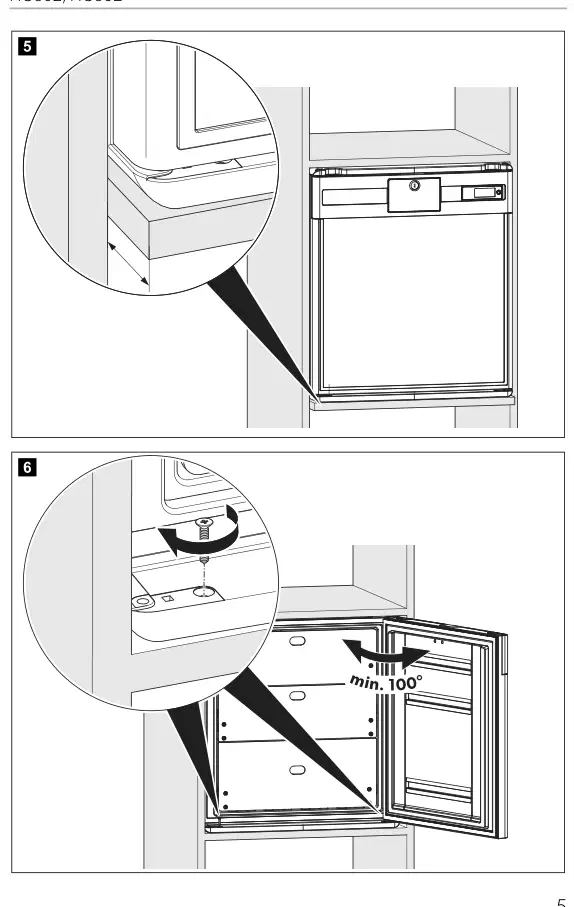
  • Make sure that the refrigerator door is able to open at least 100°. Otherwise the drawers cannot be used.
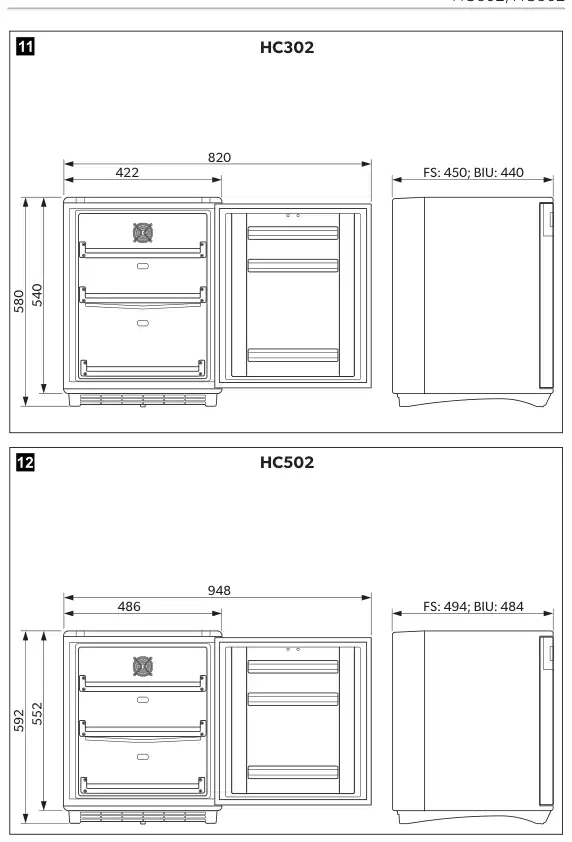
1. Check the dimensions of the refrigerator (fig. a , page 8 or fig. b , page 8).
2. Place the refrigerator according to fig. 4 , page 4 or fig. 5 , page 5.
3. Mount the refrigerator to the furniture by two screws through the fittings at the bottom (fig. 6 , page 5).
4. Leave the refrigerator to stand for at least four hours before you connect it to the power supply so that the refrigerant can flow back into the compressor.
Page 16 of the Dometic Refrigerator (HC302) user manual — 7.2 Saving energy
Seite 16 · Zum Vergrößern klicken
Seite 16

6.4 Connecting the refrigerator to the power supply A

NOTICE!

  • Connect the refrigerator to a separate circuit to prevent malfunctioning due to problems with other electrical equipment. Never connect the refrigerator to a single socket with other electrical equipment by means of a multi-socket.
  • UK only: The refrigerator is supplied with a plug fitted with 3 A fuse. In case this fuse has to be to changed, a 3 A ASTA approved (BS 1362) fuse must be used.
1. Connect the plug of the connection cable into the AC mains.
2. Insert the battery into the thermometer (see chapter “Replacing the battery of the thermometer” on page 18).

✔The display turns on.

For the first two seconds the display will not show temperature values; it shows “--.-”. Then the temperature read from the sensor is shown.

6.5 Mounting and removing the door handle

1. Mount the handle as shown (fig. 7 , page 6).
2. Remove the handle as shown (fig. 8 , page 6).

7 Operation

7.1 Before first use

Before first use, clean the refrigerator inside and outside with a damp cloth for hygienic reasons (see also chapter “Cleaning and maintenance” on page 19).

7.2 Saving energy

  • Only open the medication refrigerator as often and for as long as necessary.
  • For optimal energy consumption, position the shelves and drawers according to their position on delivery.
  • On a regularly basis, make sure the door seal still fits properly.
  • Clean dust and dirt from the condenser at regular intervals.

Operation HC302, HC502

Page 17 of the Dometic Refrigerator (HC302) user manual — 7.5 Setting the temperature
Seite 17 · Zum Vergrößern klicken
Seite 17

7.3 Switching on !

AAfter the first start, after replacing the battery or after switching off the refrigerator for a longer time the display of the digital thermometer (fig. 2, page 3) shows the cur- rent ambient temperature. When the inner temperature reaches the operating range the thermometer should be reset to avoid showing wrong maximum temperature value.

➤Press the reset button (fig. 2 4, page 3) for 5 s.

The thermometer has a blue backlight which makes the temperature values easier to read.

➤Press the reset button (fig. 2 4, page 3) briefly.

✔The blue backlight lights for 2 s.

The thermometer stores the values of the minimum and maximum inner temperature since the last reset. These values are deleted when the thermometer is reset or the battery is changed.

7.4 Using the refrigerator !

A

7.5 Setting the temperature

The refrigerator is equipped with an automatic temperature regulation function. The temperature cannot be set.

HC302, HC502 Operation

Page 18 of the Dometic Refrigerator (HC302) user manual — 7.7 Defrosting the refrigerator I
Seite 18 · Zum Vergrößern klicken
Seite 18

7.6 Replacing the battery of the thermometer

Replace the battery of the thermometer as follows (fig. 9, page 7):

1. Pull the key ( 1 ) from the lock.
2. Remove the lock cover rosette using two standard screwdrivers.
3. Remove both screws ( 2 ) from front panel.
4. Push the front panel ( 3 ) a bit upwards and remove it by slightly pulling.

5. Remove the battery ( 4 ). A

6. Insert the new battery (CR1632) in its holder.
7. Remount the front panel and lock cover rosette in reversed order.

7.7 Defrosting the refrigerator I

Humidity can cause frost to form in the interior of the refrigerator or on the vaporizer.

A slight layer of frost or water droplets could form in the interior of the refrigerator if it has been cooling for longer periods. This is normal because the moisture in the air condenses to water when the temperature in the refrigerator drops. The refrigerator is not defective.

The condensate flows out through a water drain duct into a water container at the back of the refrigerator at top of the compressor, where it evaporates.

It is recommended to defrost the refrigerator every three weeks.

Proceed as follows:

1. Switch off the refrigerator: press the button for more than 5 seconds.
2. Disconnect the refrigerator from the mains.
3. Remove the drawers (see chapter “Removing the drawers” on page 19).
4. Leave the door open.
5. After defrosting wipe out the cabinet interior with a clean, damp cloth.
6. Assemble the drawers.

Operation HC302, HC502

Page 19 of the Dometic Refrigerator (HC302) user manual — 8 Cleaning and maintenance ! A
Seite 19 · Zum Vergrößern klicken
Seite 19

HC302, HC502 Cleaning and maintenance

7.8 Switching off and storing the refrigerator

If you do not intend to use the refrigerator for a long time, proceed as follows:

1. Disconnect the refrigerator from the mains.
2. Clean the refrigerator (see chapter “Cleaning and maintenance” on page 19).
3. Leave the door slightly open. This prevents smells from building up.

7.9 Removing the drawers

You can remove the drawers, e.g. for cleaning.

Proceed as follows (fig. 0, page 7):

1. Open the door ( A ).
2. Pull out the drawer ( B ).
3. Push the fixing pins from the outside to the inside ( C ).
4. Remove the drawer ( D ).
5. Assemble the drawers in reverse order.

8 Cleaning and maintenance ! A

  • NOTICE! Damage hazard
  • Do not use abrasive cleaning agents or hard objects during cleaning as these can damage the refrigerator.
  • Never use hard or sharp tools to remove ice or to free objects frozen onto the device.
  • Do not use any mechanical tools or any other tools to speed up the defrosting process.

➤Clean the refrigerator regularly and as soon as it becomes dirty with a damp

cloth.

➤Make sure that no water drips into the seals. This can damage the electronics.

➤Wipe the refrigerator dry with a cloth after cleaning.

➤Check the condensate drain regularly.

Page 20 of the Dometic Refrigerator (HC302) user manual — 9 Troubleshooting
Seite 20 · Zum Vergrößern klicken
Seite 20

Clean the condensate drain when necessary. If it is blocked, the condensate collects on the bottom of the refrigerator.

➤Clean the door seals regularly.

Freestanding version: Clean the grid of the condenser and the compressor on the back of the refrigerator with a vacuum cleaner regularly.

9 Troubleshooting

Water in or under the refrigerator

Fault Possible cause Remedy

Water is leaking into the inside of the refrigerator.

The condensate drain duct is clogged.

Clean the drain.

Medicines are preventing the water from flowing to the collector.

Make sure that medicines do not touch the rear wall.

Water is leaking onto the floor.

There is too much water in the water container.

Clean the water container.

General error The display blinks each second.

The display shows alternately the current inner temperature and the active error code (fig. 2 1, page 3) (E1 or E2, see below).

Sensor failure The display blinks and shows “E1”.

The minimum and maximum values will be kept as the last known values.

Low battery The display blinks and shows “E2” alternately with the current tem- perature.

The minimum and maximum inner temperatures are still visible and will be updated from the current inner temperature reading.

Troubleshooting HC302, HC502 · Display signals · Signal Explanation

Page 21 of the Dometic Refrigerator (HC302) user manual — possible. M
Seite 21 · Zum Vergrößern klicken
Seite 21

10 Warranty

The statutory warranty period applies. If the product is defective, please contact the manufacturer's branch in your country (see dometic.com/dealer) or your retailer.

For repair and warranty processing, please include the following documents when you send in the device:

  • A copy of the receipt with purchasing date
  • A reason for the claim or description of the fault

11 Disposal A

➤Place the packaging material in the appropriate recycling waste bins wherever

possible. M

If you wish to finally dispose of the product, ask your local recycling centre or specialist dealer for details about how to do this in accordance with the applicable disposal regulations.

HC302, HC502 Warranty

Page 22 of the Dometic Refrigerator (HC302) user manual — 12 Technical data
Seite 22 · Zum Vergrößern klicken
Seite 22

Technical data HC302, HC502

12 Technical data

Total volume33 l 49 l
Connection voltage220 – 240 V
Energy consumption0.42 kWh/24 h 0.44 kWh/24 h
Power consumption0.54 A
Cooling capacity+2 °C to +8 °C
Climatic classSN

Intended ambient temperature use:

+10 °C to +32 °C

RefrigerantR134a
Refrigerant quantity38 g
CO 2 equivalent0.054 t

Global warming potential (GWP):

Dimensionssee fig. a , page 8 see fig. b , page 8
Weightapprox. 20 kg approx. 22 kg

Inspection/certification:

This product contains fluorinated greenhouse gases.

The cooling unit is hermetically sealed.

Quellen

Referenzen & Links

In dieser Anleitung genannte Seiten – Hersteller, Support und Downloads.

Frage zu Dometic Refrigerator (HC302) stellen

Besitzer und unser Team antworten in der Regel innerhalb eines Tages – und Ihre Frage hilft auch anderen weiter.

Add your email to get notified when it’s answered — no spam, ever.

0 questions
Noch keine Fragen zu Dometic Refrigerator (HC302)

Stellen Sie die erste Frage — andere Nutzer oder unser Team antworten Ihnen.

Originaldokument

Dometic Refrigerator (HC302) PDF-Anleitung

68 Seiten·635 KB·Kühlschrank·PDF
Klicken Sie oben auf eine Seite, um sie hier zu öffnen
Seite 1 / …
100%
Seiten werden geladen…