DE
Voltcraft logo
Offizielle Bedienungsanleitung

Voltcraft Round Cell Charger (1997931)

44 Seiten·379 KB·Batterieladegerät·PDF·ENFRITNLJA
Voltcraft Round Cell Charger (1997931)
Inhaltsverzeichnis 30 Abschnitte 1. Introduction · 2. Explanation of Symbols · 3. Intended Use · 4. Delivery Content · … AnzeigenAusblenden
Page 1 of the Voltcraft Round Cell Charger (1997931) user manual — 1. Introduction
Seite 1 · Zum Vergrößern klicken
Seite 1

1. Introduction

Thank you for purchasing this product.

This product complies with the statutory national and European requirements.

To maintain this status and to ensure safe operation, you as the user must observe these operating instructions!

These operating instructions are part of this product.

They contain important notes on commissioning and handling. Also consider this if you pass on the product to any third party. Therefore, retain these operating instructions for reference!

If there are any technical questions, please contact:

www.conrad.com/contact

Dear customer,

Page 2 of the Voltcraft Round Cell Charger (1997931) user manual — 2. Explanation of Symbols
Seite 2 · Zum Vergrößern klicken
Seite 2

2. Explanation of Symbols

The symbol with the lightning in the triangle is used if

there is a risk to your health, e.g. due to an electric shock.

The symbol with the exclamation mark in the triangle

is used to indicate important information in these operating instructions. Always read this information carefully.

The arrow symbol indicates special information and

advice on operation.

The product is intended for use in dry indoor rooms only; it must not become damp or wet.

Page 3 of the Voltcraft Round Cell Charger (1997931) user manual — 3. Intended Use
Seite 3 · Zum Vergrößern klicken
Seite 3

3. Intended Use

The product is intended for use as a battery charger. It has a USB Type-CTM power input port and a high contrast LCD display. Each charging slot is independently controlled, and the battery type is automatically detected when inserted.

Safety features include protection against short circuits, overcharging and reverse polarity.

It is intended for indoor use only. Do not use it outdoors. Contact with moisture, e.g. in bathrooms, must be avoided under all circumstances.

For safety and approval purposes, you must not rebuild and/or modify this product. If you use the product for purposes other than those described above, the product may be damaged. In addition, improper use can result in short circuits, fires, electric shocks or other hazards. Read the instructions carefully and store them in a safe place. Make this product available to third parties only together with its operating instructions.

All company names and product names are trademarks of their respective owners. All rights reserved.

Page 4 of the Voltcraft Round Cell Charger (1997931) user manual — 5. Features and Functions
Seite 4 · Zum Vergrößern klicken
Seite 4

4. Delivery Content

  • Charger
  • USB type-C TM to USB type-A charging cable
  • Operating instructions

1 Up-to-Date Operating Instructions

Download the latest operating instructions at www.conrad.com/downloads or scan the QR code shown. Follow the instructions on the website.

5. Features and Functions

  • High contrast LCD display showing battery and charging status.
  • Independently controlled charging slots
  • Auto-detect battery type
  • Pulse width modulated (PWM) charging controller
  • Short circuit, reverse polarity, over-charge, over temperature protection
Page 5 of the Voltcraft Round Cell Charger (1997931) user manual — a) General Information
Seite 5 · Zum Vergrößern klicken
Seite 5

6. Safety Instructions

Read the operating instructions carefully and especially observe the safety information. If you do not follow the safety instructions and information on proper handling in this manual, we assume no liability for any resulting personal injury or damage to property. Such cases will invalidate the warranty/guarantee.

a) General Information

  • The device is not a toy. Keep it out of the reach of children and pets.
  • Do not leave packaging material lying around carelessly. This may become dangerous playing material for children.
  • Protect the device from extreme temperatures, direct sunlight, strong jolts, high humidity, moisture, flammable gases, steam and solvents.
  • Do not place the product under any mechanical stress.
Page 6 of the Voltcraft Round Cell Charger (1997931) user manual — 6. Safety Instructions
Seite 6 · Zum Vergrößern klicken
Seite 6
  • If it is no longer possible to operate the product safely, take it out of operation and protect it from any accidental use. Safe operation can no longer be guaranteed if the product:

- is visibly damaged,

- is no longer working properly,

- has been stored for extended periods in poor

- has been subjected to any serious transport-related stresses.

  • Please handle the product carefully. Jolts, impacts or a fall even from a low height can damage the product.
  • Consult an expert when in doubt about the operation, safety or connection of the device.
  • Maintenance, modifications and repairs must only be completed by a technician or an authorised repair centre.
  • If you have questions which remain unanswered by these operating instructions, contact our technical support service or other technical personnel.
  • In schools, educational centres, hobby and self-help workshops, the operation of the product is to be supervised by trained employees.

ambient conditions or

Page 7 of the Voltcraft Round Cell Charger (1997931) user manual — c) Charger
Seite 7 · Zum Vergrößern klicken
Seite 7

b) Connected Devices

  • Also observe the safety and operating instructions of any other devices which are connected to the product.
  • Before connecting, make sure that the USB power source can deliver sufficient current, otherwise you may damage the source. Do not use a USB port of a computer, keyboard or USB hub without a power adapter as the current supplied by these ports is insufficient.

c) Charger

  • This charger only works with Ni-MH, Ni-Cd, LiFePO4, and Li-ion type batteries. Never use the charger with other types of batteries as this could result in explosion, cracking or leaking causing damage to property and/or personal injury.
  • Never use the product immediately after it has been brought from a cold room into a warm one. The condensation generated could destroy the product. Allow the product to reach room temperature before connecting it and putting it to use. This may take several hours.
  • When the charger is not in use, disconnect it from the power supply and remove any batteries from the charging slots.
Page 8 of the Voltcraft Round Cell Charger (1997931) user manual — d) Rechargeable Battery
Seite 8 · Zum Vergrößern klicken
Seite 8
  • The battery data displayed on the LCD is for reference only and may differ from those measured with professional equipment.

d) Rechargeable Battery

  • Correct polarity must be observed while inserting the rechargeable batteries.
  • Rechargeable batteries should be removed from the device if it is not used for a long period of time to avoid damage through leaking. Leaking or damaged rechargeable batteries might cause acid burns when in contact with skin, therefore use suitable protective gloves to handle corrupted rechargeable batteries.
  • Rechargeable batteries must be kept out of reach of children. Do not leave rechargeable batteries lying around, as there is risk that children or pets swallow them.
  • Rechargeable batteries must not be dismantled, short-circuited or thrown into fire. Never recharge non-rechargeable batteries. There is a risk of explosion!
  • Never charge the rechargeable battery of the product unattended.
  • Never damage the rechargeable battery. Damaging the casing of the rechargeable battery might cause an explosion or a fire!
Page 9 of the Voltcraft Round Cell Charger (1997931) user manual — e) Installation Site
Seite 9 · Zum Vergrößern klicken
Seite 9
  • Never short-circuit the contacts of the rechargeable battery. Do not throw the battery or the product into fire. There is a danger of fire and explosion!
  • The instructions given by the manufacturer of the respective rechargeable batteries must be followed during the charging process.

e) Installation Site

  • Do not cover the charger
  • When charging, place the product on a surface that is not heat-sensitive. It is normal that a certain amount of heat is generated during charging.
  • Select a stable, flat, clean, sufficiently large place for the charger.
  • Do not place the charger on a flammable surface (e.g. carpet, tablecloth). Always use a suitable, non-flammable, heatproof base.
  • Do not place the charger on the surface of valuable furniture without suitable protection. The impact of heat could lead to colour or material changes. Scratches or pressure points may occur on the furniture surface.
  • Keep the device away from easily flammable materials (e.g. drapes, paper), liquids (e.g. gasoline) or gases. There is a risk of fire and explosion! .
Page 10 of the Voltcraft Round Cell Charger (1997931) user manual — 7. Operating Elements
Seite 10 · Zum Vergrößern klicken
Seite 10

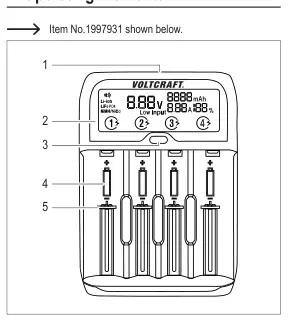
7. Operating Elements

Voltcraft Round Cell Charger (1997931) — 7. Operating Elements diagram (page 10)
Abb. 1 · 7. Operating Elements

1 USB Type-CTM power input 5 V/DC 2 A

3 Mode buttonBattery slot select / alerts / back light

4 Battery slot with polarity marking

5 Spring-loaded battery holder

2 LCD display

Page 11 of the Voltcraft Round Cell Charger (1997931) user manual — Display Description
Seite 11 · Zum Vergrößern klicken
Seite 11

8. LCD Display

Display Description

Low Input Power source is less than 5V/DC

A flashing indicates that charging is in pro- gress. The number indicates which slot is active.

Alert for reverse polarity, non-rechargeable batteries and bad batteries inserted

Li-ion Lithium-ion battery.

LiFePO4 Lithium iron phosphate battery.

NiMH: Nickel metal hydride battery.

NiCd: Nickel-cadmium battery.

Null Battery not connected

Full Battery is fully charged

Err Battery polarity is reversed, bad battery, non- rechargeable battery inserted.

Show 5 more labels / short text on this page
NiMH/NiCd · V Battery voltage · mAh Battery capacity · % Percentage charged · A Charging current
Page 12 of the Voltcraft Round Cell Charger (1997931) user manual — a) Connect Charger to Power Supply
Seite 12 · Zum Vergrößern klicken
Seite 12

9. Operation

When not using the device, disconnect the charger

from the power supply and remove any inserted batteries.

a) Connect Charger to Power Supply

For the maximum charging output, the power supply

should be capable of delivering 5V/DC. If the power supply is less than 5V/DC, Low Input will show on the LCD display (2).

  • Connect the supplied USB cable to the USB Type-C TM power input (1) on your charger.
  • Connect the other end to a suitable power supply.

A beep will sound to indicate it is receiving power. If

no batteries are inserted, the LCD display (2) will show Null.

Page 13 of the Voltcraft Round Cell Charger (1997931) user manual — b) Charging Batteries
Seite 13 · Zum Vergrößern klicken
Seite 13

b) Charging Batteries

When charging LiFePO4 type batteries, you must

manually set the correct battery type.

Overcharge protection is available for LiFePO4 type batteries only after the correct battery type has been set.

1Ni-MH/NiCd and Li-ion batteries

The product will automatically detect the correct charge settings for battery types: Ni-MH/NiCd, Li-ion.

1. Insert an Ni-MH/NiCd, or Li-ion battery into an available slot.
2. Remove the battery when fully charged.

You should manually set the charge settings for battery type: LiFePO4.

1. Insert an LiFePO4 battery into an available slot. Li-ion will flash on the display.
2. Press and hold the Mode Button to select the battery type. LiFePO4 should appear on the display.
3. Repeat the above steps if inserting additional LiFePO4 batteries.
4. Remove the battery when fully charged.

- The battery slot will return to default settings after the bat-

tery is removed.

- When a battery is fully charged, the LCD display will show:

100%, 0.00 A, Full.

2LiFePO4 batteries

Page 14 of the Voltcraft Round Cell Charger (1997931) user manual — 10. Care and Cleaning
Seite 14 · Zum Vergrößern klicken
Seite 14

c) Mode Button

Description Mode Button (3)

Battery status Press repeatedly to cycle through active slots and view the battery status.

Audio alerts Double press to toggle alerts on /off.

Backlight Press to switch the backlight on after the 30 sec auto shut off.

Press and hold to select the correct bat- tery type.

10. Care and Cleaning

Do not use any aggressive cleaning agents, rubbing

alcohol or other chemical solutions as they can cause damage to the housing and malfunctioning.

  • Disconnect the product from the power supply, remove any inserted batteries and allow to completely cool down before each cleaning.
  • Clean the product with a dry, fibre-free cloth.

Select battery type

Page 15 of the Voltcraft Round Cell Charger (1997931) user manual — b) Rechargeable Batteries
Seite 15 · Zum Vergrößern klicken
Seite 15

11. Disposal

a) Product

Electronic devices are recyclable waste and must not

be disposed of in the household waste. At the end of its service life, dispose of the product in accordance with applicable regulatory guidelines.

Remove any inserted rechargeable batteries and dispose of them separately from the product.

b) Rechargeable Batteries

You as the end user are required by law (Battery

Ordinance) to return all used rechargeable batteries. Disposing of them in the household waste is prohibited.

Contaminated rechargeable batteries are labeled with this symbol to indicate that disposal in the domestic waste is forbidden. The designations for the heavy metals involved are: Cd = Cadmium, Hg = Mercury, Pb = Lead (name on rechargeable batteries, e.g. below the trash icon on the left).

Used rechargeable batteries can be returned to collection points in your municipality, our stores or wherever rechargeable batteries are sold.

You thus fulfill your statutory obligations and contribute to the protection of the environment.

Page 16 of the Voltcraft Round Cell Charger (1997931) user manual — a) General
Seite 16 · Zum Vergrößern klicken
Seite 16

12. Technical Data

a) General

Input voltage / current 5 V/DC 2 A via USB Type-CTM

Charging slots Item No. 1997931

4x independent channels Item No. 1997932 2x independent channels

LCD backlight 30 s automatic shut off

Trickle charge 30 mA (Ni-MH only)

PWM charge controller LiFePO4/Li-ion (TC-CC-CV)

Ni-MH / Ni-Cd (pulse)

Protection Short circuit, reverse polarity,

over charge, over temperature shut off >60 °C

Operating conditions 0 to +40 °C, 0 – 45 % RH

Storage conditions -20 to +80 °C, 0 – 85 % RH

USB cable length 60 cm

Dimensions (L x W x H) Item No. 1997931

130 x 96 x 33 mm Item No. 1997932 121 x 60 x 33 mm

Weight (charger only) Item No. 1997931 (168 g)

Item No. 1997932 (95 g)

(non-condensing) · (non-condensing)

Page 17 of the Voltcraft Round Cell Charger (1997931) user manual — AAAA, AAA, AA, A, SC, C
Seite 17 · Zum Vergrößern klicken
Seite 17

b) Supported Battery Types

1LiFePO4 (3.2 V) / Li-ion (3.6 V, 3.7 V )

10440, 14500, 14650, 16340, 17335, 17500, 17670, 18350, 18500, 18650, 18700, 20700, 21700, 22650, 22700, 26500, 26650

2Ni-MH / Ni-Cd

AAAA, AAA, AA, A, SC, C

c) Maximum Charging Output

Values are for a 5 V/DC 2 A input. Output is related

to the type, quanitity, and combination of batteries inserted.

Ni-MH and Ni-Cd 1.5 V ±0.05 V, 1000 mA

LiFePO4 3.65 V ±0.05 V, 2000 mA

Li-ion battery 4.2 V ±0.05 V, 2000 mA

Page 18 of the Voltcraft Round Cell Charger (1997931) user manual — 5 V/DC 2 A
Seite 18 · Zum Vergrößern klicken
Seite 18

1Item No. 1997931

Input:

Number of Batteries Inserted

5 V/DC 2 A

1 2 3 4

Ni-MH / Ni-Cd 1000 mA 1000 mA 1000mA 1000 mA

Li-ion 2000 mA 1000 mA 650 mA 500 mA

LiFePO4 2000 mA 1000 mA 650 mA 500 mA

  • With 1x battery inserted in slot 1 or 4, charging current is max. 2000 mA.
  • With 1x battery inserted in slot 2 or 3, charging current is 1000 mA.

2Item No. 1997932

Input:

Number of Batteries Inserted

5 V/DC 2 A

Ni-MH / Ni-Cd 1000 mA 1000 mA

Li-ion 2000 mA 1000 mA

LiFePO4 2000 mA 1000 mA

Li-ion / LiFePO4

Page 19 of the Voltcraft Round Cell Charger (1997931) user manual — 5 V/DC 2 A
Seite 19 · Zum Vergrößern klicken
Seite 19

Dies ist eine Publikation der Conrad Electronic SE, Klaus-Conrad- Str. 1, D-92240 Hirschau (www.conrad.com). Alle Rechte einschließlich der Übersetzung sind vorbehalten. Reproduktionen jeder Art, z. B. Fotokopie, Mikroverfilmung oder die Erfassung in elektronischen Datenverarbeitungsanlagen bedürfen der schriftlichen Genehmigung des Herausgebers. Nachdruck, auch auszugsweise, ist verboten. Die Publikation entspricht dem technischen Stand bei Drucklegung. Copyright 2021 by Conrad Electronic SE.

This is a publication by Conrad Electronic SE, Klaus-Conrad-Str. 1, D-92240 Hirschau (www.conrad.com). All rights including translation reserved. Reproduction by any method, e.g. photocopy, microfilming, or the capture in electronic data processing systems require the prior written approval by the editor. Reprinting, also in part, is prohibited. This publication represent the technical status at the time of printing. Copyright 2021 by Conrad Electronic SE.

1997931.1997932_v3_0321_02_dh_m_2L

Frage zu Voltcraft Round Cell Charger (1997931) stellen

Besitzer und unser Team antworten in der Regel innerhalb eines Tages – und Ihre Frage hilft auch anderen weiter.

Add your email to get notified when it’s answered — no spam, ever.

0 questions
Noch keine Fragen zu Voltcraft Round Cell Charger (1997931)

Stellen Sie die erste Frage — andere Nutzer oder unser Team antworten Ihnen.

Originaldokument

Voltcraft Round Cell Charger (1997931) PDF-Anleitung

44 Seiten·379 KB·Batterieladegerät·PDF
Klicken Sie oben auf eine Seite, um sie hier zu öffnen
Seite 1 / …
100%
Seiten werden geladen…