



1 Package contents
2 Cautions Before using the device please read this manual carefully. Notes for safe operation:
2.1 Recycling of components and batteries Recycling of the keyboard and its components should be done according to local regulation. This may require you to dispose of the entire device or its parts at a local recycling centre or at a designated container. Please consult local legislation for details.
Batteries should never, under any circumstances, be disposed of with general household waste (as indicated by the crossed out bin symbol below). The end user is legally obliged to return used batteries. Batteries can be returned to us to be disposed of. The batteries are to be returned to the sender - for more information contact us on info@pine64.org.

3.1 Mounting the keyboard Power OFF your PinePhone and remove the back case. To remove the back case of the PinePhone use your fingernail or another soft object to pry up the back case. A notch to easily remove the cover is located at the bottom left of the PinePhone with the backcover facing the user.
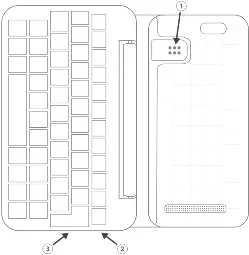
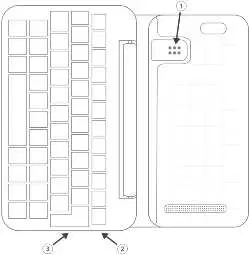
Open and place the keyboard flat on a hard surface with the hinge fully extended. Proceed to insert the PinePhone into the keyboard at an angle of approx. 15 degrees. Make sure that the PinePhone’s pogo pins and the corresponding pads ① on the keyboard are aligned. The leading edge with volume and power buttons should make contact first. Firmly press the PinePhone into place. Multiple clicks should be heard as the two snap into place.
The PinePhone can be removed from the keyboard easily using a notch similar to the one found on the back case. The notch is located at the bottom of the leading edge with the power and volume buttons.
3.2 Keyboard and internal battery operation The keyboard will function automatically once a PinePhone running a compatible operating system is mounted. For alterations to physical layout and firmware see sections 4.1 and 5.1 respectively.
The keyboard features an in-built 6000mAh battery. The battery can be turned ON/OFF using the button on the right leading edge of the keyboard ②. A short button press activates the internal battery while a long (15 seconds) press deactivates it. Compatible operating systems display both the PinePhone’s and keyboard’s battery status.
You should charge the PinePhone and the keyboard only using the USB-C ③ port on the keyboard. The keyboard’s USB-C port cannot be used for peripherals. The PinePhone’s USB-C port remains operational when mounted in the keyboard and can be used for data and peripherals.

Detailed keyboard specifications including schematics can be found on our Wiki: https://wiki.pine64.org/wiki/PinePhoneKeyboard
Key hardware specifications:
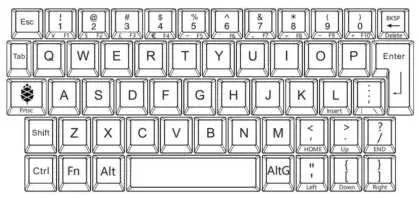
○ Charging and battery IC chip: IP5209 power management IC with charge indicate controller and boost converter 4.1 Keyboard layout and alterations The keyboard features a default layout (pictured below) created and agreed upon by the community. The keyboard layout can be altered using software (see section 5.1) as well as by physically repositioning keycaps. All keycaps, with the exception of space and return keys, can be easily and safely relocated for alternative layouts corresponding to software settings.
PinePhone’s keyboard firmware was developed independently by Ondřej Jirman as a free-of-charge contribution to PINE64. The firmware source code is freely and publicly available and you can modify it, and the supporting utilities, using common FOSS tools.
5.1 Firmware and supporting utilities The design of the firmware allows the keys, modifier keys, and their combinations to be handled in virtually unlimited ways, without a need to flash a customized version of the firmware. Mapping of keys is

defined at runtime, using the supporting utilities, and is not hardcoded in the firmware. Different keyboard layouts can be loaded dynamically to support various use cases.
The repository that contains the source code of the firmware, supporting utilities and associated documentation is located at https://xnux.eu/pinephone-keyboard/.
You are welcome to contribute patches and improvements to the firmware and the supporting utilities. A summary of firmware development history is available at https://xnux.eu/log/ alongside other development updates from the firmware author.
Much time and effort went into the development of this firmware. If you wish to send a token of appreciation or support the development efforts in any way, please consider making a donation to the author via one of the methods listed at the bottom of this web page: https://xnux.eu/contribute.html.
Copyright (C) 2021 Ondřej Jirman
This program is free software: you can redistribute it and/or modify it under the terms of the GNU General Public License as published by the Free Software Foundation, with either version 3 of the License or (at your discretion) any later version.
This program is distributed in the hope that it will be useful, but WITHOUT ANY WARRANTY; without even the implied warranty of MERCHANTABILITY or FITNESS FOR A PARTICULAR PURPOSE. See GNU General Public License for more details.
GNU General Public License http://www.gnu.org/licenses/
The PinePhone keyboard is CE and FCC certified.
Detailed hardware and software documentation can be located on our Wiki (wiki.pine64.org).
In dieser Anleitung genannte Seiten – Hersteller, Support und Downloads.
Besitzer und unser Team antworten in der Regel innerhalb eines Tages – und Ihre Frage hilft auch anderen weiter.
Stellen Sie die erste Frage — andere Nutzer oder unser Team antworten Ihnen.