




USER MANUAL
10/2020. Rev.1.0

Français
Ελληνικά
Deutsch
Slovenščina
Italiano
Slovenčina
Español
Čeština
Magyar
Türkçe
Polski
ภาษาไทย
فارسی
Română
العربية
Български
Hrvatski
Русский
Srpski
Українська
Қазақ тілі
Português
Latviešu
Lietuvių kalba
Español (Castellano)
Eesti
Nederlands
繁體中文 ( 台灣 )
Svenska
Français (Canada)
Norsk
Português (Brasil)
Suomi
한국어

Please read this manual before using the device to ensure safe and proper use.

Package contents
Check the product box for the following items:

and Galaxy Buds charging
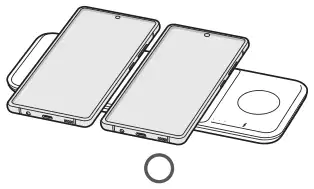
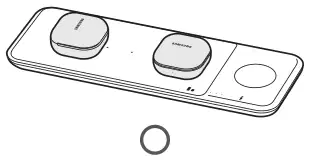
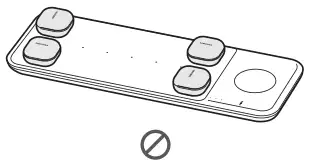
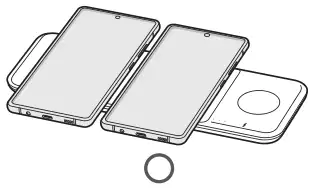
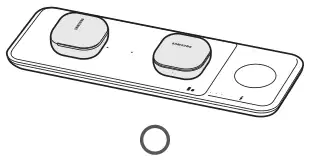
The Wireless charger can charge up to two devices on the mobile device and Galaxy Buds charging coil.

1 Connect the charger to the wireless charger.
When the charger is correctly connected to the wireless charger, the indicator light flashes red, green, and orange, and then turns off.
Use only the charger (9V/2.77A) and cable supplied with the device.
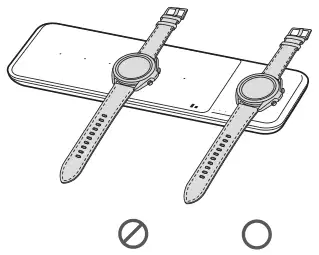
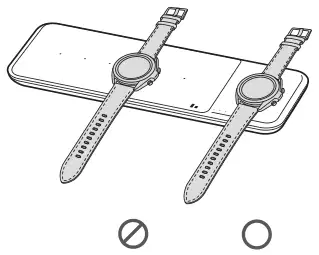
2 Place the center of supported mobile device and Galaxy Buds on the charging coil center ( ) to charge it ( ). You can also charge the Galaxy Watch on the watch charging coil of the wireless charger ( ).

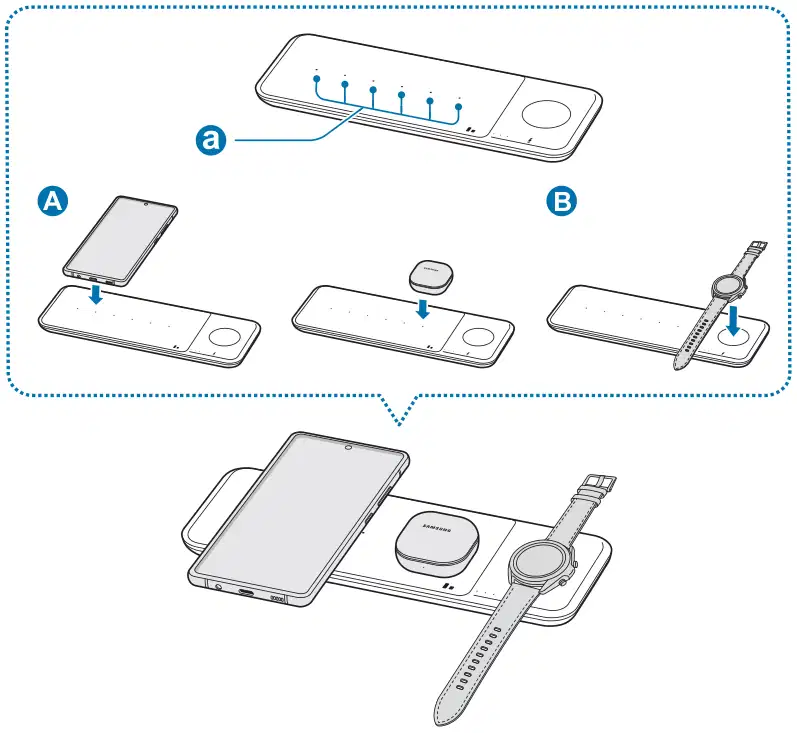

3 When the mobile device, Galaxy Buds or the Watch is fully charged, remove the mobile device, Galaxy Buds or the Watch from the wireless charger.
Precautions for mobile device, Galaxy Buds or the Watch charging
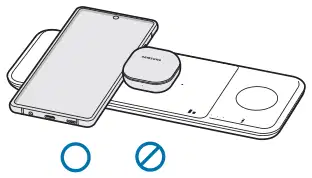
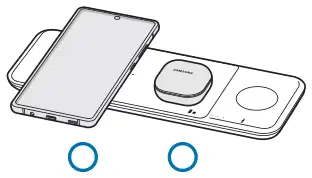
The mobile device, Galaxy Buds or the Watch may not charge properly or may overheat, or the mobile device, Galaxy Buds, Galaxy Watch, or the cards may be damaged.


► Charging the mobile device and Galaxy Buds
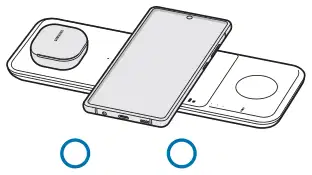
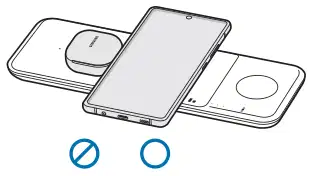
► Charging the Galaxy Watches
► Charging the mobile devices

► Charging the Galaxy Buds
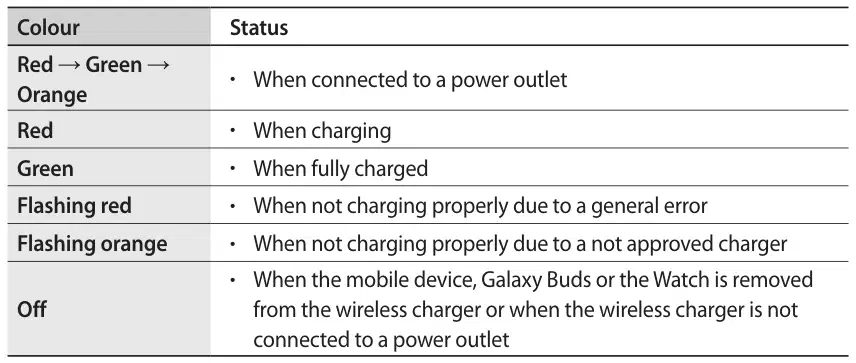
The indicator light alerts you to the wireless charger’s status.

Copyright © 2020 Samsung Electronics Co., Ltd.
This manual is protected under international copyright laws.
No part of this manual may be reproduced, distributed, translated, or transmitted in any form or by any means, electronic or mechanical, including photocopying, recording, or storing in any information storage and retrieval system.

Please read this manual before using the device to ensure safe and proper use.

Package contents
Check the product box for the following items:

and Galaxy Buds charging
The Wireless charger can charge up to two devices on the mobile device and Galaxy Buds charging coil.

1 Connect the charger to the wireless charger.
When the charger is correctly connected to the wireless charger, the indicator light flashes red, green, and orange, and then turns off.
Use only the charger (9V/2.77A) and cable supplied with the device.
2 Place the center of supported mobile device and Galaxy Buds on the charging coil center ( ) to charge it ( ). You can also charge the Galaxy Watch on the watch charging coil of the wireless charger ( ).


3 When the mobile device, Galaxy Buds or the Watch is fully charged, remove the mobile device, Galaxy Buds or the Watch from the wireless charger.
Precautions for mobile device, Galaxy Buds or the Watch charging
The mobile device, Galaxy Buds or the Watch may not charge properly or may overheat, or the mobile device, Galaxy Buds, Galaxy Watch, or the cards may be damaged.


► Charging the mobile device and Galaxy Buds
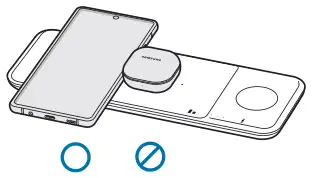
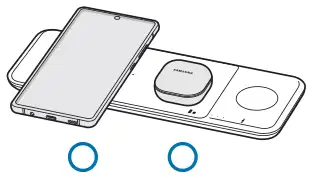
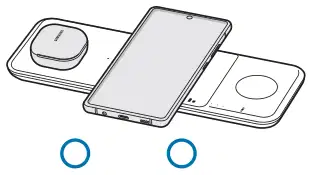
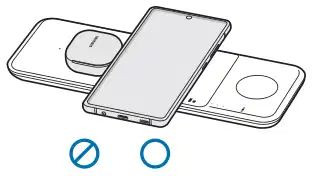
► Charging the Galaxy Watches
► Charging the mobile devices

► Charging the Galaxy Buds
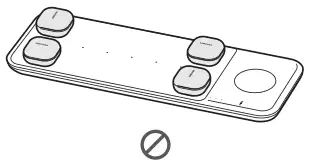
The indicator light alerts you to the wireless charger’s status.
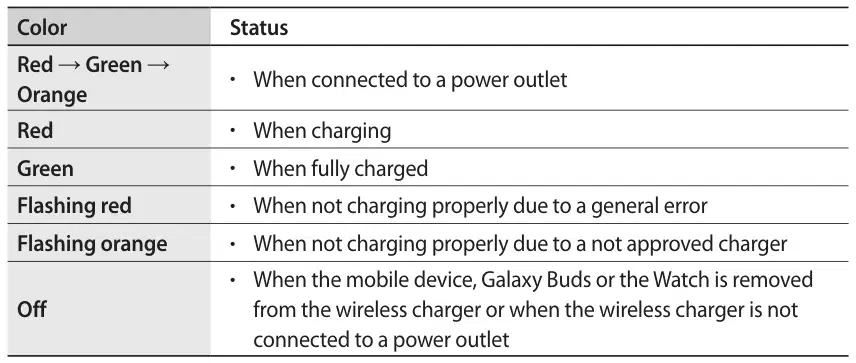
Red → Green → Orange • When connected to a power outlet
Flashing red • When not charging properly due to a general error
Flashing orange • When not charging properly due to a not approved charger

Copyright © 2020 Samsung Electronics Co., Ltd.
This manual is protected under international copyright laws.
No part of this manual may be reproduced, distributed, translated, or transmitted in any form or by any means, electronic or mechanical, including photocopying, recording, or storing in any information storage and retrieval system.
Besitzer und unser Team antworten in der Regel innerhalb eines Tages – und Ihre Frage hilft auch anderen weiter.
Stellen Sie die erste Frage — andere Nutzer oder unser Team antworten Ihnen.