
DE
EDIFIER logo
Offizielle Bedienungsanleitung

EDIFIER Powered Bookshelf Speakers (S1000MKⅡ)

74 Seiten·1.6 MB·Lautsprecher·PDF·ENNLJA
EDIFIER Powered Bookshelf Speakers (S1000MKⅡ)
Inhaltsverzeichnis 12 Abschnitte S1000MK Ⅱ · Powered Bookshelf Speakers · Important safety instruction · Box Contents · … AnzeigenAusblenden
Page 1 of the EDIFIER Powered Bookshelf Speakers (S1000MKⅡ) user manual — S1000MK Ⅱ
Seite 1 · Zum Vergrößern klicken
Seite 1

S1000MK Ⅱ

Powered Bookshelf Speakers

User manual | Manuel d’utilisateur | Manual de usuario | Bedienungsanleitung | Manuale dell’utente | Manual do utilizador


Page 2 of the EDIFIER Powered Bookshelf Speakers (S1000MKⅡ) user manual — Important safety instruction
Seite 2 · Zum Vergrößern klicken
Seite 2
EDIFIER Powered Bookshelf Speakers (S1000MKⅡ) — Important safety instruction diagram (page 2)
Abb. 1 · Important safety instruction

Important safety instruction

1. Please read the instructions carefully. Keep it in safe place for future reference. 2. Use only accessories approved by the manufacturer. 3. Install the instrument properly by following the instructions in the device connection section. 4. Using the product in a 0-35℃ environment is recommended. 5. To reduce the risk of fire and electric shock, do not expose the product to rain or moisture. 6. Do not use this product near water. Do not immerge the product into any liquid or have it exposed to dripping or splashing. 7. Do not install or use this product near any heat source (e.g. radiator, heater, stove, or other devices that generate heat). 8. Do not place any object filled with liquids, such as vases on the product; neither should any open fire, such as lighted candles be placed on the product. 9. Do not block any ventilation openings. Do not insert any object into ventilation openings or slots. It may cause fire or electric shock. 10. Keep sufficient clearance around the product to maintain good ventilation (minimum 5cm is recommended). 11. Do not force a plug into the jack. Before connection, check for blockage in the jack and whether the plug matches the jack and is oriented to the right direction. 12. Keep the provided accessories and parts (such as screws) away from children to prevent from being swallowed by mistake. 13. Do not open or remove the housing yourself. It may expose you to dangerous voltage or other hazardous risks. Regardless the cause of damage (such as damaged wire or plug, exposure to liquid splash or foreign object falling in, exposure to rain or moisture, product not working or being dropped, etc.), the repair has to be performed by an authorized service professional immediately. 14. Before cleaning the product with dry cloth, always turn off the product and disconnect the power plug first. 15. Never use strong acid, alkali, gasoline, alcohol, or other chemical solvents to clean the product surface. Use only neutral solvent or clear water for cleaning.

Excessively loud music may lead to hearing loss. Please keep the volume in a safe range.

Correct Disposal of this product. This marking indicates that this product should not be disposed with other household wastes throughout the EU. To prevent possible harm to the environment or human health from uncontrolled waste disposal, recycle it responsibly to promote the sustainable reuse of material resources. To return your used device, please use the return and collection systems or contact the retailer where the product was purchased. They can take this product for environmental safe recycling.

Use only with the cart, stand, tripod, bracket, or table specified by the manufacturer, or sold with the apparatus. When a cart is used, use caution when moving the cart/apparatus combination to avoid injury from tip-over.


Page 3 of the EDIFIER Powered Bookshelf Speakers (S1000MKⅡ) user manual — Important safety instruction
Seite 3 · Zum Vergrößern klicken
Seite 3
EDIFIER Powered Bookshelf Speakers (S1000MKⅡ) — Important safety instruction diagram (page 3)
Abb. 2 · Important safety instruction

Important safety instruction

Power warning: 1. Place the product near the power outlet for easy use. 2. Before use, make sure that the operating voltage is the same as your local power supply. Correct operating voltage can be found on the product plate. 3. For safety purpose, unplug the product during lightning storms or when unused for extended periods of time. 4. Under normal conditions, the power supply may get hot. Please keep good ventilation in the area and exercise caution. 5. Safety warning labels on the housing or bottom of the product or power adaptor.

This symbol is to alert the user to the presence of un-insulated dangerous voltage within the product's enclosure that may be of sufficient magnitude to constitute a risk of electric shock to persons.

This symbol is to warn the user not to disassemble the enclosure of the product and there is no user-replaceable part inside. Take the product to an authorized service center for repair.

This symbol indicates that the product is for indoor use only.

This symbol indicates that the product is a CLASS II or double insulated electrical device with no earth requirement.

The MAINS plug is used as the disconnect device, the disconnect device shall remain readily operable.

For wireless product: 1. Wireless product may generate shortwave radio frequencies and interfere with the normal use of other electronic devices or medical equipment. 2. Turn off the product when it’s disallowed. Do not use the product in medical facilities, on airplane, at gas stations, near automatic gates, automatic fire alarm system or other automated devices. 3. Do not use the product in the vicinity of a pacemaker within a 20cm range. The radio waves may affect the normal operation of the pacemaker or other medical devices.


Page 4 of the EDIFIER Powered Bookshelf Speakers (S1000MKⅡ) user manual — Box Contents
Seite 4 · Zum Vergrößern klicken
Seite 4
EDIFIER Powered Bookshelf Speakers (S1000MKⅡ) — Box Contents diagram (page 4)
Abb. 3 · Box Contents

Box Contents

EDIFIER Powered Bookshelf Speakers (S1000MKⅡ) — Box Contents diagram (page 4)
Abb. 4 · Box Contents
EDIFIER Powered Bookshelf Speakers (S1000MKⅡ) — Box Contents diagram (page 4)
Abb. 5 · Box Contents

3.5mm - RCA audio cable Speaker connecting cable

RCA - RCA audio cable

Fiber optic audio cable

Remote control User manual

Page 5 of the EDIFIER Powered Bookshelf Speakers (S1000MKⅡ) user manual — Illustration
Seite 5 · Zum Vergrößern klicken
Seite 5
EDIFIER Powered Bookshelf Speakers (S1000MKⅡ) — Illustration diagram (page 5)
Abb. 6 · Illustration

Illustration

EDIFIER Powered Bookshelf Speakers (S1000MKⅡ) — Illustration diagram (page 5)
Abb. 7 · Illustration
EDIFIER Powered Bookshelf Speakers (S1000MKⅡ) — Illustration diagram (page 5)
Abb. 8 · Illustration
EDIFIER Powered Bookshelf Speakers (S1000MKⅡ) — Illustration diagram (page 5)
Abb. 9 · Illustration
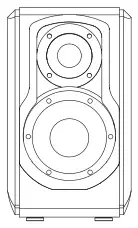
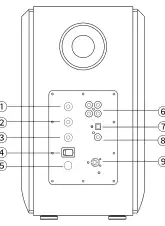
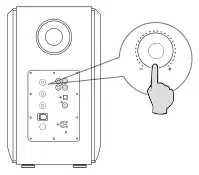
1. Volume dial/Input selection Press to switch amongst Line in 1 → Line in 2 → Optical → Coaxial → Bluetooth input Press and hold to disconnect Bluetooth in Bluetooth input 2. Treble control 3. Bass control 4. Power switch 5. Power cable 6. Line in input
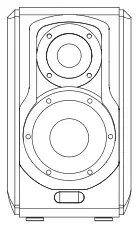
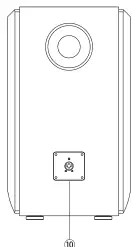
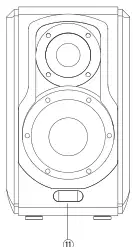
7. Optical input 8. Coaxial input 9. Connect to passive speaker 10. Connect to active speaker 11. Indicator light Red: Optical/coaxial input Green: Line in input Blue: Bluetooth input
Show 6 more labels / short text on this page
② ① · ⑦ ⑥ · ③ ④ ⑤ · ⑧ · ⑨ · ⑩ ⑪
Page 6 of the EDIFIER Powered Bookshelf Speakers (S1000MKⅡ) user manual — ⑩ ⑨ COAX
Seite 6 · Zum Vergrößern klicken
Seite 6
EDIFIER Powered Bookshelf Speakers (S1000MKⅡ) — Remote Control diagram (page 6)
Abb. 10 · Remote Control

Remote Control

Point the remote control to the remote receiving window on the speaker, the optimum operational distance is 7 meters. Displayed value in the display window will alert or blink when the system receives remote control command.

1. Power on/off
2. Mute
3. Bluetooth input

Press and hold to disconnect Bluetooth

4. Previous track/next track
5. Volume up/down
6. Pause/play
7. Line in input 1

⑩ ⑨ COAX

8. Line in input 2
9. Optical input
10. Coaxial input
Show 9 more labels / short text on this page
① · ③ ② · ④ · ⑤ · (Bluetooth input) · ⑥ · ⑦ · ⑧ · (Bluetooth input)
Page 7 of the EDIFIER Powered Bookshelf Speakers (S1000MKⅡ) user manual — Remote Control
Seite 7 · Zum Vergrößern klicken
Seite 7
EDIFIER Powered Bookshelf Speakers (S1000MKⅡ) — Remote Control diagram (page 7)
Abb. 11 · Remote Control

Remote Control

  • The batteries life is normally about 6 months; please replace them when the remote control is not sensitive or the

control distance is shortened.
  • Never use old and new batteries together.
  • Do not place the remote control in places that are hot and humid.
  • Do not charge the batteries.
  • Remove the batteries when unused for a long period of time to avoid batteries leakage.
  • The batteries should not be exposed to excessive heat such as direct sun, fire or similar.
  • Danger of explosion if batteries are incorrectly replaced. Replace only with the same or equivalent type.
Page 8 of the EDIFIER Powered Bookshelf Speakers (S1000MKⅡ) user manual — Connectivity Illustration
Seite 8 · Zum Vergrößern klicken
Seite 8
EDIFIER Powered Bookshelf Speakers (S1000MKⅡ) — Connectivity Illustration diagram (page 8)
Abb. 12 · Connectivity Illustration

Connectivity Illustration

EDIFIER Powered Bookshelf Speakers (S1000MKⅡ) — Connectivity Illustration diagram (page 8)
Abb. 13 · Connectivity Illustration
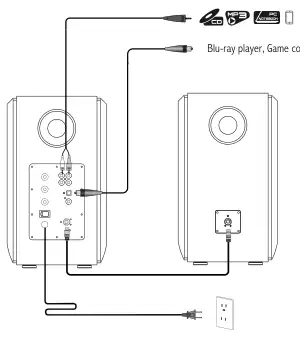
1. As the illustration shows, connect speakers using speaker connecting cable. 2. Connect speakers to power source using power cable and turn power switch on, the speakers should be ready to go, LED light will be lit.
Page 9 of the EDIFIER Powered Bookshelf Speakers (S1000MKⅡ) user manual — Line In Input
Seite 9 · Zum Vergrößern klicken
Seite 9
EDIFIER Powered Bookshelf Speakers (S1000MKⅡ) — Line In Input diagram (page 9)
Abb. 14 · Line In Input

Line In Input

EDIFIER Powered Bookshelf Speakers (S1000MKⅡ) — Line In Input diagram (page 9)
Abb. 15 · Line In Input
EDIFIER Powered Bookshelf Speakers (S1000MKⅡ) — Line In Input diagram (page 9)
Abb. 16 · Line In Input
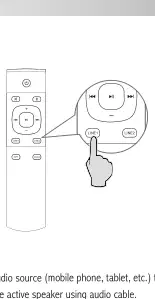
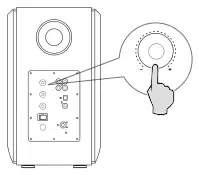
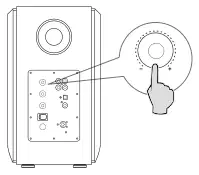
1. Connect audio source (mobile phone, tablet, etc.) to Line In 1/Line In 2 input port (note color matching) on the rear panel of the active speaker using audio cable. 2. Press the “LINE 1”/“LINE 2” button on the remote control, or press the “Volume dial/Input selection” dial on the rear panel of the active speaker, green light will be lit. 3. Play music on the connected device and adjust the settings to a desired level.
Page 10 of the EDIFIER Powered Bookshelf Speakers (S1000MKⅡ) user manual — Line In Input
Seite 10 · Zum Vergrößern klicken
Seite 10
EDIFIER Powered Bookshelf Speakers (S1000MKⅡ) — Line In Input diagram (page 10)
Abb. 17 · Line In Input
EDIFIER Powered Bookshelf Speakers (S1000MKⅡ) — Line In Input diagram (page 10)
Abb. 18 · Line In Input
EDIFIER Powered Bookshelf Speakers (S1000MKⅡ) — Line In Input diagram (page 10)
Abb. 19 · Line In Input
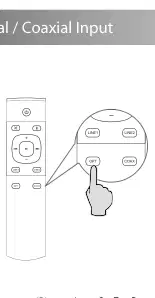
1. Connect audio source (Blu-ray player, Set Top Box, etc.) to Optical/Coaxial input port on the rear panel of the active speaker using fiber optical audio cable or coaxial cable (not included). 2. Press the “OPT”/“COAX” button on the remote control, or press the “Volume dial/Input selection” dial on the rear panel of the active speaker, red light will be lit. 3. Play music on the connected device and adjust the settings to a desired level.
Page 11 of the EDIFIER Powered Bookshelf Speakers (S1000MKⅡ) user manual — Bluetooth Input
Seite 11 · Zum Vergrößern klicken
Seite 11
EDIFIER Powered Bookshelf Speakers (S1000MKⅡ) — Bluetooth Input diagram (page 11)
Abb. 20 · Bluetooth Input

Bluetooth Input

EDIFIER Powered Bookshelf Speakers (S1000MKⅡ) — Bluetooth Input diagram (page 11)
Abb. 21 · Bluetooth Input
EDIFIER Powered Bookshelf Speakers (S1000MKⅡ) — Bluetooth Input diagram (page 11)
Abb. 22 · Bluetooth Input
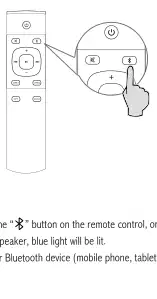
1. Press the “ ” button on the remote control, or press the “Volume dial/Input selection” dial on the rear panel of the active speaker, blue light will be lit. 2. Set your Bluetooth device (mobile phone, tablet, etc.) to search for and connect to “EDIFIER S1000MK Ⅱ ”.
Page 12 of the EDIFIER Powered Bookshelf Speakers (S1000MKⅡ) user manual — Specifications
Seite 12 · Zum Vergrößern klicken
Seite 12
EDIFIER Powered Bookshelf Speakers (S1000MKⅡ) — Specifications diagram (page 12)
Abb. 23 · Specifications

Specifications

Power outputR/L (Treble): 25W+25W
R/L (Mid-range and bass)35W+35W
Frequency Band2.402GHz ~ 2.480GHz
Frequency response45Hz-40KHz
RF Power output≤ 20 dBm (EIRP)
Input sensitivityLine In 1: 750±50mV

There is no restriction of use.

Line In 2900±50mV
OPT/COAX350±50mFFs
Bluetooth450±50mFFs
Audio inputLine In 1/Line In 2/Optical/Coaxial/Bluetooth

The Bluetooth® word mark and logos are registered trademarks owned by Bluetooth SIG, Inc. and any use of such marks by EDIFIER is under license. Other trademarks and trade names are those of their respective owners.

Qualcomm aptX is a product of Qualcomm Technologies, Inc. and/or its subsidiaries. Qualcomm is a trademark of Qualcomm Incorporated, registered in the United States and other countries. aptX is a trademark of Qualcomm Technologies International, Ltd., registered in the United States and other countries.

Declaration for EU

Page 13 of the EDIFIER Powered Bookshelf Speakers (S1000MKⅡ) user manual — Troubleshooting
Seite 13 · Zum Vergrößern klicken
Seite 13
EDIFIER Powered Bookshelf Speakers (S1000MKⅡ) — Troubleshooting diagram (page 13)
Abb. 24 · Troubleshooting

Troubleshooting

  • No sound
  • Check if the speaker is ON.
  • Try to turn up the volume using either the master volume control or remote control.
  • Ensure the audio cables are firmly connected and the input is set correctly on the speakers.
  • Check if there is a signal output from the audio source.
  • Cannot connect via Bluetooth
  • Make sure the speaker is switched to Bluetooth input. If it is in other audio input modes, Bluetooth will not connect. Disconnect from any Bluetooth device by pressing and holding the “ ” button, then try again.
  • Effective Bluetooth transmission range is 10 meters; please ensure that operation is within the range.
  • Try another Bluetooth device for connection.

The S1000MK does not turn on • Check if main power is connected, or if the wall outlet is switched on.

Noise coming from speakers • EDIFIER speakers generate little noise, while the background noise of some audio devices are too high. Please unplug audio cables and turn the volume up, if no sound can be heard at 1 meter away from the speaker, then there is no problem with this product.

To learn more about EDIFIER, please visit www.edifier.com For Edifier warranty queries, please visit the relevant country page on www.edifier.com and review the section titled Warranty Terms. USA and Canada: [email protected] South America: Please visit www.edifier.com (English) or www.edifierla.com (Spanish/Portuguese) for local contact information.

Quellen

Referenzen & Links

In dieser Anleitung genannte Seiten – Hersteller, Support und Downloads.

Frage zu EDIFIER Powered Bookshelf Speakers (S1000MKⅡ) stellen

Besitzer und unser Team antworten in der Regel innerhalb eines Tages – und Ihre Frage hilft auch anderen weiter.

Add your email to get notified when it’s answered — no spam, ever.

0 questions
Noch keine Fragen zu EDIFIER Powered Bookshelf Speakers (S1000MKⅡ)

Stellen Sie die erste Frage — andere Nutzer oder unser Team antworten Ihnen.

Originaldokument

EDIFIER Powered Bookshelf Speakers (S1000MKⅡ) PDF-Anleitung

74 Seiten·1.6 MB·Lautsprecher·PDF
Klicken Sie oben auf eine Seite, um sie hier zu öffnen
Seite 1 / …
100%
Seiten werden geladen…