



USER MANUAL


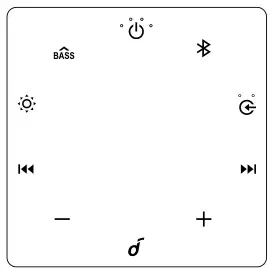
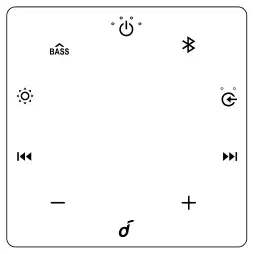
3 (Source input button) 4
Quick Start Guide · Soundcore Trance

5 6 (Multi-function button)
7 (Light effect button) 8
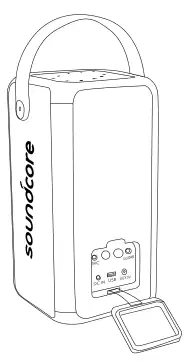
1 DC IN • Connect to the provided power adaptor.
4 Guitar/Mic port • Connect to a guitar/microphone (not provided).
5 Guitar/Mic volume knob • Rotate to adjust guitar/microphone volume.
Connectors

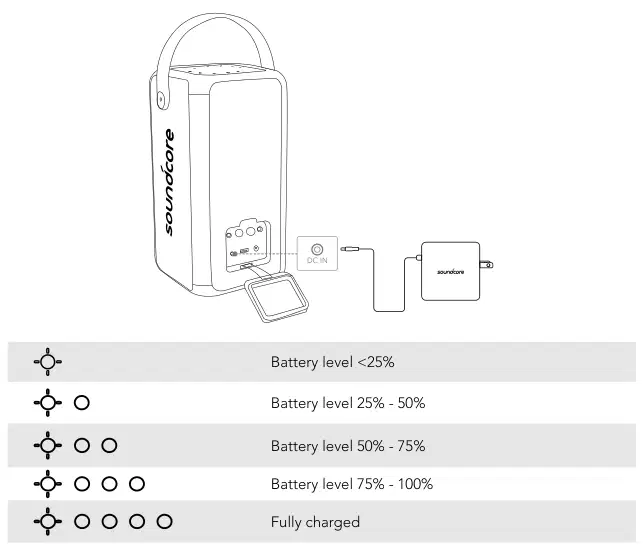
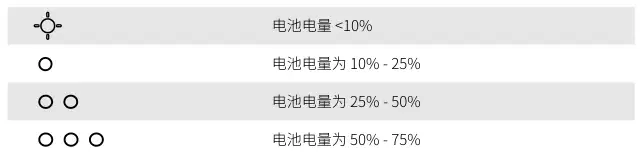
Press any button to check the remaining battery level when it is powered on.
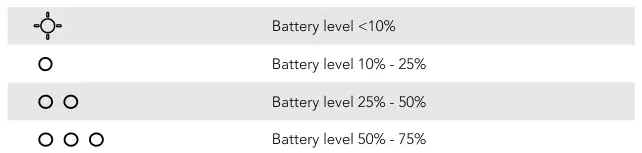
Checking Battery Level

Battery level 75% - 100%
Charging your USB Devices
Use this speaker as an external battery to charge your USB devices. Connect your USB device to the USB port on the back of this speaker.

Connect the provided power adaptor to the DC IN power jack of this speaker, and then to an AC mains outlet.
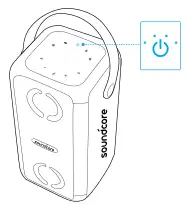
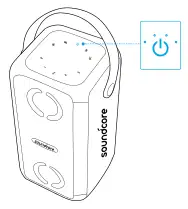
Press and hold for 2 seconds to power on. Press to power off.

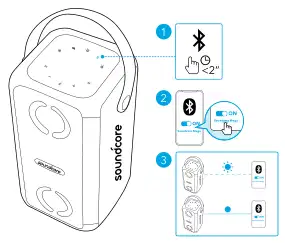
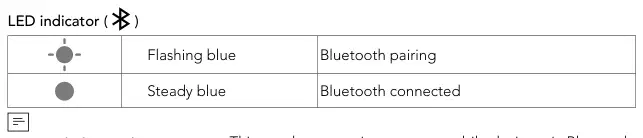
Bluetooth Mode With this speaker, you can enjoy music through your Bluetooth-enabled devices.
True Wireless Stereo (TWS) Mode
Two identical Soundcore speakers (Soundcore Mega) can pair with each other for stereo sound. The two speakers can music as the left channel and right channel.
Press and hold on both Soundcore Mega speakers simultaneously to enter TWS mode.


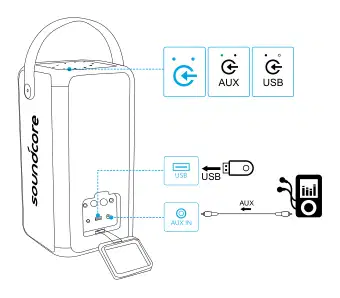
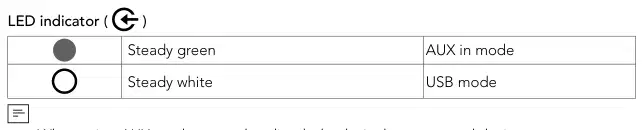
USB/AUX Playback Plug in a 3.5mm audio cable or insert a USB drive, then press to switch between AUX and USB mode.

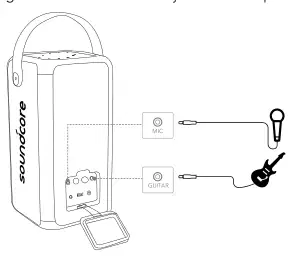
Microphone/Guitar Connection 1. Connect your microphone/guitar (not provided) to the MIC/GUITAR port on the back of this speaker. 2. Rotate the microphone/guitar volume knob to adjust the microphone/guitar volume.
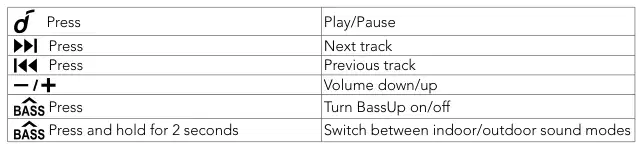
Press to turn on/off or switch light modes.
Check all available light modes in the Soundcore App.
Button controls · Beat-Driven Light Show

Apple and the Apple logo are trademarks of Apple Inc. Google Play and the Google Play logo are trademarks of Google Inc.
Specifications are subject to change without notice

Apple and the Apple logo are trademarks of Apple Inc. Google Play and the Google Play logo are trademarks of Google Inc.
사양은 사전 통지 없이 변경될 수 있습니다.
AC 전원 입력 100~240V, 50/60Hz
배터리 용량 4,900mAh/7.4V
출력 전원 80W( 피크)
충전 시간 4.5 시간
재생 시간( 볼륨 레벨과 음악 콘텐츠에 따라 달라질 수 있음) 18 시간
Bluetooth 버전 V5.0
Bluetooth 범위 20m


Soundcore Trance · Quick Start Guide


打开电源时,按任意按钮检查电池剩余电量。

USB 设备充电
使用本音箱作为外接电池为 USB 设备充电。 将 USB 设备连接到本音箱背面的 USB 端口。

按住 2 秒可开机。按下 可关机。

使用本音箱,您可以通过蓝牙设备欣赏音乐。


True Wireless Stereo (TWS) 模式
使用 True Wireless Stereo 技术将两个 Soundcore Mega 音箱配对,可使左右声道分别连接至两 个音箱,从而实现最佳音响效果。
同时两个 Soundcore Mega 音箱上的 ,进入 TWS 模式。


插入 3.5 毫米音频电缆或插入 USB 驱动器,然后按 在 AUX 输入模式与 USB 模式之间切换。


1. 将麦克风/ 吉他(未提供)连接到本产品背面的 MIC/GUITAR 端口。
2. 旋转麦克风/ 吉他音量旋钮以调整麦克风/ 吉他音量。

按 打开/ 关闭或调整灯光秀效果。
Soundcore App
下载 Soundcore App,获得更好的产品使用体验。 • 设置蓝牙连接
检查 Soundcore 应用中所有可用的灯光模式。

Apple and the Apple logo are trademarks of Apple Inc. Google Play and the Google Play logo are trademarks of Google Inc.
交流电源输入 100 ~ 240 V,50/60Hz
直流电源 inDC 电源输入 15 V 3 A
电池容量 4900 mAh / 7.4 V
输出功率 80 W(峰值)
充电时间 4.5 小时
播放时间(因音量和音乐内容而异) 18 小时
防水等级 IPX7
蓝牙版本 V5.0
蓝牙范围 20 米


Quick Start Guide · Soundcore Trance
Besitzer und unser Team antworten in der Regel innerhalb eines Tages – und Ihre Frage hilft auch anderen weiter.
Stellen Sie die erste Frage — andere Nutzer oder unser Team antworten Ihnen.