



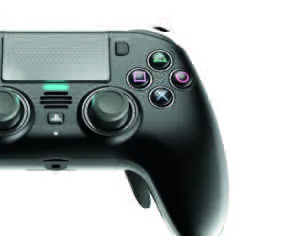

SETUP RECHARGEABLE 1000 MAH INTERNAL BATTERY Controller was charged at the factory, but if Light Bar LED is flashing red, plug in USB cable to charge prior to initial pairing. NOTE: Remember to charge controller at least once every 45-60 days (regardless of use) so battery retains ability to charge. Battery capacity will gradually reduce over time with repeated charging.
1. Upon first use, slide the Mode Switch on the back of the controller to “PS4™ BT” left position. 2. Hold both “PS” button and “SHARE” buttons together for 3 seconds until the LED quickly flashes. 3. On the PlayStation®4 console, use a DUALSHOCK®4 wireless controller to access Setting -> Devices -> Bluetooth Devices. To select the “PS4™ FUSION Pro” use the official controller to Choose “YES” when prompted. 4. Press the PS button on the PS4™ FUSION Pro Controller to confirm.
PS4™ USB WIRED MODE 1. Slide Mode Switch on back of controller to the “PS4™ USB” centre position. 2. Connect USB cable into available port on PlayStation®4 and into USB port on controller. If PS4™ is OFF, press PS button to power PlayStation®4 “ON”. The controller’s LED Connection Indicator will illuminate, and a notification should show up on the home screen indicating the controller is plugged in. 3. For player and controller assignment, refer to the PlayStation®4 user manual. NOTE: To remove cable, squeeze two side buttons near port and pull gently. USB cable also includes inline release plug closer to end of cable that will disconnect when needed.
PC USB WIRED MODE 1. Slide Mode Switch on back of controller to the “PC USB” right position. 2. Connect USB cable into available USB port on PC and into USB port on controller. The controller’s LED Connection Indicator will illuminate, indicating the controller is plugged in. 3. Follow PC software or game service for controller setup or button mapping if needed.
UNDERSTANDING LED INDICATORS Light Bar LED performs similar to Light Bar on DualShock 4. Pro Pack Program LED flashes during paddle programming.

TROUBLESHOOTING For latest FAQs, visit PowerA.com/Support/ Problem: Controller will not connect to game console. Solution: (wired mode) Confirm cable is properly connected to console. Confirm Inline Release Cable is properly connected. Solution: (wireless mode) If using wirelessly confirm the controller is in “BT Mode”. Confirm that the controller is still paired in Settings » Devices » Bluetooth Devices. Problem: Pro Pack paddles are not functioning properly. Solution: Confirm Pro Pack is securely installed to controller. Confirm Pro Pack paddles are securely installed. Review “Mapping Pro Pack Paddles” section above. For additional troubleshooting, refer to your PlayStation®4 user guide.
MOTION WARNING Playing video games can make your muscles, joints, skin or eyes hurt. Follow these instructions to avoid problems such as tendinitis, carpal tunnel

Entertainment LLC. “ ” and “PlayStation” are registered trademarks or trademarks of Sony Interactive Entertainment Inc. All rights reserved. All other trademarks are the property of their respective owners. Made in China.
FCC STATEMENT This device complies with Part 15 of the FCC Rules. Operation is subject to the following two conditions: 1. this device may not cause harmful interference, and 2. this device must accept any interference received, including interference that may cause undesired operation. Warning: Changes or modifications to this unit not expressly approved by the party responsible for compliance could void the user’s authority to operate the equipment. NOTE: This equipment has been tested and found to comply with the limits for Class B digital device, pursuant to Part 15 of the FCC Rules. These limits are designed to provide reasonable protection against harmful interference in a residential installation. This equipment generates, uses and can radiate radio frequency energy and, if not installed and used in accordance with the instructions, may cause harmful interference to radio communications. However, there is no guarantee that interference will not occur in a particular installation. If this equipment does cause
CUSTOMER SERVICE For support with your authentic PowerA accessories, please visit PowerA.com/Support.
MANUFACTURED BY Bensussen Deutsch & Associates, LLC. (BDA, LLC.) 15525 Woodinville-Redmond Rd. NE Woodinville, WA 98072. BDAINC.com | POWERA.com
ADDITIONAL LEGAL PowerA, the PowerA logo, and the FUSION by PowerA logo are trademarks of Bensussen Deutsch and Associates, LLC. TM and © Bensussen Deutsch and Associates, LLC. Manufactured and distributed under license by Sony Interactive

major failure and for compensation for any other reasonably foreseeable loss or damage. You are also entitled to have the goods repaired or replaced if the goods fail to be of acceptable quality and the failure does not amount to a major failure. If purchased within Australia or New Zealand, this product comes with a One-year warranty from date of purchase. Defects in the product must have appeared within One year from date of purchase, in order to claim the warranty. All warranty claims must be facilitated back through the retailer of purchase in accordance with the retailer’s return policies and procedures. Any expenses incurred, as a result of returning the product to the retailer of purchase are the full responsibility of the consumer.
CAN ICES-3(B)/NMB-3(B) This device contains licence-exempt transmitter(s)/receiver(s) that comply with Innovation, Science and Economic Development Canada’s licence-exempt RSS(s). Operation is subject to the following two conditions: 1. This device may not cause interference; 2. This device must accept any interference, including interference that may cause undesired operation of the device
AU WHOLESALE DISTRIBUTOR Level 2, 2 Darling Street South Yarra, Australia VIC 3141 bluemouth.com.au Email: support@bluemouth.com.au +61 (3) 9867 2666
REGIONAL COMPLIANCE SYMBOLS More information available via web-search of each symbol name.
The WEEE (Waste of electrical and electronic equipment) symbol requires battery disposal outside of other household waste per local regulations. Contact your city office, waste disposal service, or retailer for guidance. EU AND TURKEY ONLY
AUSTRALIAN WARRANTY STATEMENT This product comes with guarantees that cannot be excluded under the Australian Consumer Law. You are entitled to a replacement or refund for a
In dieser Anleitung genannte Seiten – Hersteller, Support und Downloads.
Besitzer und unser Team antworten in der Regel innerhalb eines Tages – und Ihre Frage hilft auch anderen weiter.
Stellen Sie die erste Frage — andere Nutzer oder unser Team antworten Ihnen.