
DE
EDIFIER logo
Offizielle Bedienungsanleitung

EDIFIER TWS200 Plus

50 Seiten·1.4 MB·Kopfhörer·PDF·ENNLJA
EDIFIER TWS200 Plus
Inhaltsverzeichnis 3 Abschnitte TWS200 Plus · R L · circuit board. • Do not dismantle the product. Non-professional personnel may AnzeigenAusblenden
Page 1 of the EDIFIER TWS200 Plus user manual — TWS200 Plus
Seite 1 · Zum Vergrößern klicken
Seite 1

TWS200 Plus

True Wireless Stereo Earbuds

www.edif ier.com

Page 2 of the EDIFIER TWS200 Plus user manual — TWS200 Plus
Seite 2 · Zum Vergrößern klicken
Seite 2
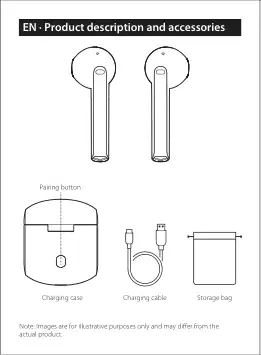
EDIFIER TWS200 Plus — TWS200 Plus diagram (page 2)
Abb. 1 · TWS200 Plus
Page 3 of the EDIFIER TWS200 Plus user manual — R L
Seite 3 · Zum Vergrößern klicken
Seite 3
  • User guide
  • Charge the earbuds
  • You may hear a warning tone when at low battery level, please place the earbuds in the case for charging.

R L

  • Charge the charging case
  • If power indicator flashes six times rapidly when the case is opened, it indicates the case has a low battery capacity, please charge it in time.
  • Power indicator steady lit = charging Power indicator off = fully charged
  • Battery level indicator on the charging case
  • When the charging case is opened/closed, the power indicator will show the case’s battery level; if flashes three times slowly: full battery level; if flashes twice slowly: medium battery level; if flashes once slowly: low battery level; if flashes six times rapidly: battery level is less than 10%
  • Power indicator (next to the charging port)
Input5V 35mA(earbuds) 5V 1A(charging case)
Page 4 of the EDIFIER TWS200 Plus user manual — R L
Seite 4 · Zum Vergrößern klicken
Seite 4
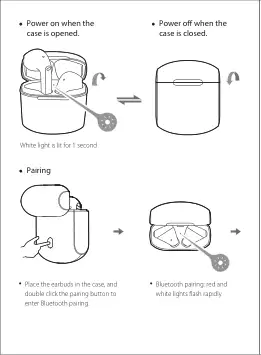
EDIFIER TWS200 Plus — R L diagram (page 4)
Abb. 2
  • Bluetooth pairing: red and white lights flash rapidly
  • Place the earbuds in the case, and double click the pairing button to enter Bluetooth pairing.
Page 5 of the EDIFIER TWS200 Plus user manual — R L
Seite 5 · Zum Vergrößern klicken
Seite 5
  • When not connected with any Bluetooth device, place the earbuds in the case, and press and hold the pairing button for around 10 seconds and release until the white light flashes rapidly, so as to enter TWS pairing mode and clear pairing records.
  • TWS pairing: white light flashes rapidly When successful, white light is lit for 1 second and then the red and whilte lights flash rapidly.

Search for and connect to "EDIFIER TWS200 Plus", after pairing is successful, the white light of the charging case will flash twice per 5 seconds.

  • Functional operation
Accept/end a calldouble click the left or right earbud
Pause/playdouble click the left or right earbud
Previous tracktriple click the left earbud
Next tracktriple click the right earbud

EDIFIER TWS200 Plus

Page 6 of the EDIFIER TWS200 Plus user manual — R L
Seite 6 · Zum Vergrößern klicken
Seite 6
  • FAQs

When charging the charging case, the indicator is off. • Please ensure the charging case is correctly connected with power source.

  • No sound
  • Check if the earbuds are operating.
  • Check if the earbuds volume are at an appropriate level.
  • Check if the earbuds are correctly connected with mobile phone.
  • Check if the earbuds are operating within a normal working range.
  • The call quality of the earbuds are not good.
  • Check if mobile phone is in an area with strong signal.
  • Please ensure the earbuds are within effective distance (10m) and no

obstacle between the earbuds and mobile phone.

When playing music, cannot control pause/play/previous track/next

track via the earbuds. • Please ensure the paired device support AVRCP (Audio Video Remote

Control Profile) profile.

Page 7 of the EDIFIER TWS200 Plus user manual — circuit board. • Do not dismantle the product. Non-professional personnel may
Seite 7 · Zum Vergrößern klicken
Seite 7
  • Maintenance
  • Do not use a fast charger to charge the product to avoid affecting service

live of the battery. • If not used for long periods of time, please charge the product with

lithium battery every three months. • Keep the product away from humid places to avoid affecting internal

circuit. Do not use the product during intense exercise or with much

sweat to prevent sweat from dropping into the product to make

damage. • Do not put the product in places exposed to sun or with high

temperature. High temperature will shorten service life of electronic

components, damage battery and make plastic components deformed. • Do not put the product in cold places to avoid damaging internal

circuit board. • Do not dismantle the product. Non-professional personnel may

damage the product. • Do not drop, strongly vibrate, strike the product with hard object to

  • avoid damaging internal circuit.
  • Do not use drastic chemicals or cleaner to clean the product.
  • Do not use sharp objects to scratch product surface to avoid

damaging shell and affecting facade.

Page 8 of the EDIFIER TWS200 Plus user manual — circuit board. • Do not dismantle the product. Non-professional personnel may
Seite 8 · Zum Vergrößern klicken
Seite 8
ModelEDF200018

Edif ier International Limited P.O. Box 6264 General Post Off ice Hong Kong

www.edif ier.com 2020 Edif ier International Limited. All rights reserved. Printed in China

Page 9 of the EDIFIER TWS200 Plus user manual — circuit board. • Do not dismantle the product. Non-professional personnel may
Seite 9 · Zum Vergrößern klicken
Seite 9
EDIFIER TWS200 Plus — circuit board. • Do not dismantle the product. Non-professional personnel may diagram (page 9)
Abb. 3 · circuit board. • Do not dismantle the product. Non-p…
Quellen

Referenzen & Links

In dieser Anleitung genannte Seiten – Hersteller, Support und Downloads.

Frage zu EDIFIER TWS200 Plus stellen

Besitzer und unser Team antworten in der Regel innerhalb eines Tages – und Ihre Frage hilft auch anderen weiter.

Add your email to get notified when it’s answered — no spam, ever.

0 questions
Noch keine Fragen zu EDIFIER TWS200 Plus

Stellen Sie die erste Frage — andere Nutzer oder unser Team antworten Ihnen.

Originaldokument

EDIFIER TWS200 Plus PDF-Anleitung

50 Seiten·1.4 MB·Kopfhörer·PDF
Klicken Sie oben auf eine Seite, um sie hier zu öffnen
Seite 1 / …
100%
Seiten werden geladen…