



Red 4Pre, Red 8Pre, Red 8Line and Red 16Line

Version 1.01

RedNet Control supports two different MIDI message types:
A compatible controller must be able to send user-programmable CC or
SysEx messages.
Since one of the CC protocol options available is that of the Avid PRE (formerly known as
Digidesign PRE), the devices can be controlled from Pro Tools.
There are five settings to consider:
In RedNet Control, select RedNet Control 2 and choose the Preferences sub menu.

The following options are available:
“RedNet Control” is a software MIDI device that can receive MIDI messages from other software.
All other MIDI input devices will be displayed here. The available devices will vary depending on what MIDI devices you have installed.
Choose the input device you would like to receive MIDI messages from.
“RedNet Control” is a software MIDI device that can send MIDI messages to other software.
All other MIDI output devices will be displayed here. The available devices will vary depending on what MIDI devices you have installed.
Choose the out device you would like to send MIDI messages to.
Choose the input protocol RedNet Control shall receive.
Choose the input protocol RedNet Control shall send.
By clicking on the “spanner” menu of any RedNet 4, RedNet MP8R, RedNet X2P, Red
4Pre, Red 8Pre, Red 8Line or Red 16Line, a MIDI channel can be selected to which the
unit will respond.

RedNet Control must be installed on the same computer as Pro Tools.
The following settings must be set within RedNet Control:
Now set up Pro Tools for PRE control:


Here you can connect up to nine devices.
Choose Type = PRE
“Receive From” and “Send To” must be set to “RedNet Control” and the same channel number set in RedNet Control.


Here, assign the mic pres to the corresponding input channels.


For best operation, it is recommended that RedNet 4 / RedNet MP8R / RedNet X2P and
RedNet Control are running before Pro Tools is launched.
There are two CC protocol options available: Avid PRE (CC) - 3dB steps. See Table A and B. 1dB Step (CC) - 1dB steps. See Table A and C.
CC messages take the format:
Where:
a is the zero-indexed MIDI channel number in hex
cc is the control number in hex
vv is the value in hex
RedNet 4 / RedNet MP8R / RedNet X2P unit on MIDI channel 5 Input gain of mic pre channel 2 to a value of 45dB
Ba cc vv

Table A – Control numbers and values

Table A – Control numbers and values continued
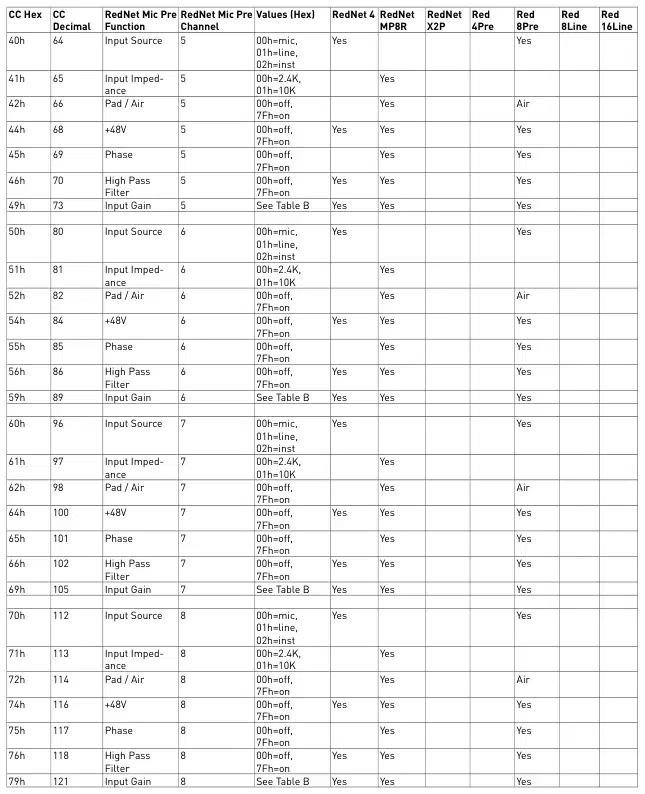

Table B – Avid PRE (CC) Gain Values
When RedNet Control receives a MIDI message from Pro Tools, which is not supported by a device, the same message will be returned with the value set to “Off”

Table C – 1dB Step (CC) Gain Values

Table C – 1dB Step (CC) Gain Values

Many devices can send and receive programmable SysEx messages. Please configure your controller according to the manufacturer’s instructions using the following protocol.
The following tables show the format of each control message.
Table D – SysEx message format

Table E – SysEx channel parameters and parameter values
Parameter Parameter Byte (hex)
Gain 00h RedNet X2P: 00h-44h, RedNet 4: 00h-3Fh, RedNet MP8R: 0Ah- 42h, Red 4Pre: 00h-3Fh, Red 8Pre: 00h-3Fh, Red 8Line: 00h-3Fh Red 16Line: 00h-3Fh,
RedNet X2P: 0-68dB, RedNet 4: 0-63dB, RedNet MP8R: 10- 65dB Red 4Pre: 0-63dB, Red 8Pre: 0-63dB, Red 8Line: 0-63dB Red 16Line: 0-63dB,
Input Source 01h 00h = mic, 01h = line, 02h = inst 0 = mic, 1 = line, 2 = inst
Phantom Power 02h 00h = Off, any other value = On
0 = Off, any other value = On
High Pass Filter 03h 00h = Off, any other value = On
0 = Off, any other value = On
Input Impedance 05h 00h = 2.4K, any other value = 10K
0 = 2.4K, any other value = 10K
Pad 07h 00h = Off, any other value = On
0 = Off, any other value = On
Air 08h 00h = Off, any other value = On
0 = Off, any other value = On
Phase 09h 00h = Off, any other value = On
0 = Off, any other value = On
Gain Compensation 0Eh 00h = Off, any other value = On
0 = Off, any other value = On
Parameter Value (hex) · Parameter Value (dec)

Table F – SysEx unit-wide parameters
Parameter Parameter Byte (hex) Parameter Value
Restore Defaults 00h Any
Identify Unit 01h Any
Clear Overs 02h Any
04h 00h = 0dB, 03h = 3dB, 06h = 6dB
Device Lock 05h 00h = unlock, 01h = lock
For example, to send a message of:
Of RedNet 4 assigned MIDI channel 2
The following message would be sent:
F0h 00h 20h 29h 7Eh 02h 00h 04h 01h 07h 00h 2Dh F7h
Or to Identify RedNet MP8R assigned MIDI channel 6, the following message would be
sent:
F0h 00h 20h 29h 7Eh 02h 00h 08h 05h 7Fh 00h 01h F7h

For a list of FAQs and general troubleshooting tips, our Help Centre is a valuable resource. This can be found here: focusritepro.zendesk.com
If any problem cannot be resolved, or if you have a query, please contact our Customer Support team using the contact details found here.
Focusrite Customer Support:
In dieser Anleitung genannte Seiten – Hersteller, Support und Downloads.
Besitzer und unser Team antworten in der Regel innerhalb eines Tages – und Ihre Frage hilft auch anderen weiter.
Stellen Sie die erste Frage — andere Nutzer oder unser Team antworten Ihnen.