

DE
AGPTEK logo
Offizielle Bedienungsanleitung

AGPTEK Music Player

28 Seiten·399 KB·Mediaplayer·PDF·EN
AGPTEK Music Player
Inhaltsverzeichnis 1 Abschnitte Quick Guide AnzeigenAusblenden
Page 1 of the AGPTEK Music Player user manual — AGPTEK A50 Music Player
Seite 1 · Zum Vergrößern klicken
Seite 1

User Manual

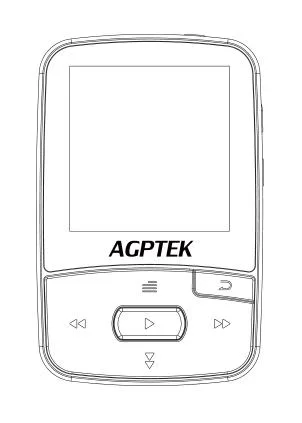
AGPTEK Music Player — User Manual diagram (page 1)
Abb. 1 · User Manual

AGPTEK A50 Music Player

Page 2 of the AGPTEK Music Player user manual — CONTENTS
Seite 2 · Zum Vergrößern klicken
Seite 2

CONTENTS

01/04 05/08 09/13 14/18 19/22 23/26

English Deutsch Italiano Español Francais 日本語

Page 3 of the AGPTEK Music Player user manual — Power On/Off
Seite 3 · Zum Vergrößern klicken
Seite 3

Quick Guide

AGPTEK Music Player — Quick Guide diagram (page 3)
Abb. 2 · Quick Guide
1. Power On/Off 3. Play/Pause/Enter 5. Next/Fast forward 7. Return 8. Volume up 10. Card slot 12. Earphone jack
2. Scroll down 4. Previous/Rewind 6. Menu button/ Scroll up 9. Volume down 11. Micro USB jack 13. Clip

Power On/Off

Hold the power button

for 3 seconds to

Page 4 of the AGPTEK Music Player user manual — Pedometer
Seite 4 · Zum Vergrößern klicken
Seite 4

switch on/off the player.

Charge the Player

1. Plug the attached USB cable into the USB port of a computer to charge the player. When you start charging, it will show two options: “ Charge & Transfer ” and “Charge & Play”. An icon in the top right corner will show the charging status. 2. Use only the 5V/800mAh charger for charging or it may lead to product failure.

Date Transfer

Plug it into your computer and copy over media files with the attached USB cable as if it were a hard drive or use music management software such as Windows Media Player to transfer the files.

Lock Screen

for 3 seconds to lock the screen. Repeat to unlock.

Pedometer

Turn on pedometer, it will display your

Hold button

Page 5 of the AGPTEK Music Player user manual — Play Music by Bluetooth
Seite 5 · Zum Vergrößern klicken
Seite 5

workout information such as daily step counts, distance traveled, calories burned, walking speed and elapsed time.

Screensaver

Find "Screensaver" under "Set">"Display". Choose to set clock screensaver or not.

Play Music by Bluetooth

Find Bluetooth icon, click to enter with the central button. All of the devices(Bluetooth Receiver) connected before and being searched now will be listed here. Choose from the devices(Check the Bluetooth status of the device you want to connect at first) and click the central button to connect. After successfully connected, it will go to the music list for all songs in the player automatically. Click button

to go back.

Page 6 of the AGPTEK Music Player user manual — Quick Guide
Seite 6 · Zum Vergrößern klicken
Seite 6
1.5" TFT screen Weight25g Dimension60*40*11mm Flash memory8G Audio formatMP3/WAV/APE/WMA/F LAC etc. Video format128*128 AMV(converted video) RecordingMP3/WAV/ACT Recording range5-8 meters Bluetooth range5-10 meters Playing time20-25 hours for music playback Battery3.7V/240 mAh Charging time1-1.5 hours SD cardUp to 64G i Lyric FormatLRC

Any problems, please feel free to contact support@agptek.com.

For detailed user manual, please visit: http://www.agptek.com/support/download html.

Quellen

Referenzen & Links

In dieser Anleitung genannte Seiten – Hersteller, Support und Downloads.

Frage zu AGPTEK Music Player stellen

Besitzer und unser Team antworten in der Regel innerhalb eines Tages – und Ihre Frage hilft auch anderen weiter.

Add your email to get notified when it’s answered — no spam, ever.

0 questions
Noch keine Fragen zu AGPTEK Music Player

Stellen Sie die erste Frage — andere Nutzer oder unser Team antworten Ihnen.

Originaldokument

AGPTEK Music Player PDF-Anleitung

28 Seiten·399 KB·Mediaplayer·PDF
Klicken Sie oben auf eine Seite, um sie hier zu öffnen
Seite 1 / …
100%
Seiten werden geladen…