DE
Asus logo
Offizielle Bedienungsanleitung

Asus Rog Phone

208 Seiten·6.3 MB·Smartphone·PDF·ENJA
Asus Rog Phone
Inhaltsverzeichnis 23 Abschnitte Front features · AeroActive Cooler features · To install AeroActive Cooler: · or · … AnzeigenAusblenden
Page 1 of the Asus Rog Phone user manual
Seite 1 · Zum Vergrößern klicken
Seite 1
Asus Rog Phone diagram (page 1)
Abb. 1

U16317-2_ZS661KS_Entry_2SIM_UM_Booklet_WW.indb 1 U16317-2_ZS661KS_Entry_2SIM_UM_Booklet_WW.indb 1 2020/6/16 11:39:13 2020/6/16 11:39:13

Page 2 of the Asus Rog Phone user manual
Seite 2 · Zum Vergrößern klicken
Seite 2
Page 2 of the Asus Rog Phone user manual
Page 3 of the Asus Rog Phone user manual — Front features
Seite 3 · Zum Vergrößern klicken
Seite 3

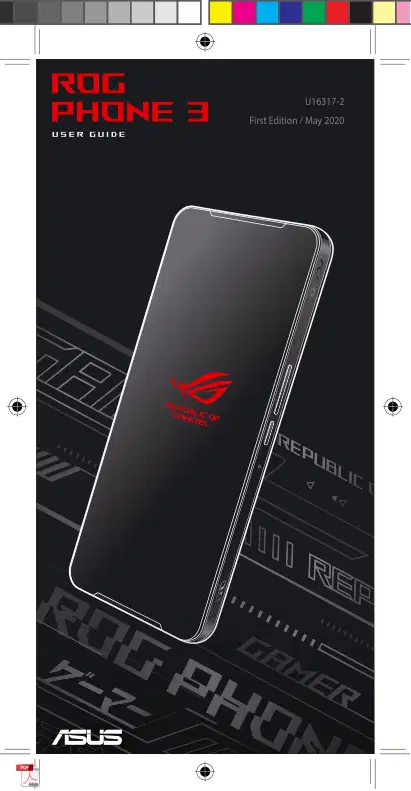
First Edition/ May 2020

ASUS Phone (Mobile Phone) ModelASUS_I003DD (ZS661KS)

Before you start, ensure that you have read all the safety information and operating instructions in this User Guide to prevent injury or damage to your device.

Front features

Asus Rog Phone — Front features diagram (page 3)
Abb. 2 · Front features

Proximity sensor and light sensor

U16317-2_ZS661KS_Entry_2SIM_UM_Booklet_WW.indb 3 U16317-2_ZS661KS_Entry_2SIM_UM_Booklet_WW.indb 3 2020/6/16 11:39:13 2020/6/16 11:39:13

Show 7 more labels / short text on this page
English · Receiver & Speaker · LED indicator · Front camera · Touch screen display · Fingerprint sensor · Speaker
Page 4 of the Asus Rog Phone user manual — Front features
Seite 4 · Zum Vergrößern klicken
Seite 4
Asus Rog Phone — Front features diagram (page 4)
Abb. 3 · Front features
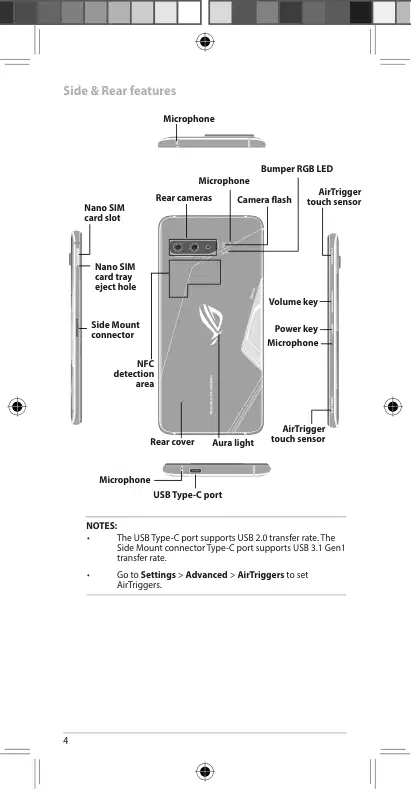
  • Go to Settings > Advanced > AirTriggers to set AirTriggers.

U16317-2_ZS661KS_Entry_2SIM_UM_Booklet_WW.indb 4 U16317-2_ZS661KS_Entry_2SIM_UM_Booklet_WW.indb 4 2020/6/16 11:39:14 2020/6/16 11:39:14

Page 5 of the Asus Rog Phone user manual — To install AeroActive Cooler:
Seite 5 · Zum Vergrößern klicken
Seite 5

AeroActive Cooler features

Use the AeroActive Cooler to keep your ROG Phone working at a high frequency during heavy workloads by providing a better thermal solution, and offering the ultimate user experience.

Side mount connector cover storage

  • We recommend that you put your side mount connector cover into the side mount connector cover storage to avoid missing while connecting the side mount connector.
  • You can use your AeroActive Cooler while using the bundled ROG Phone 3 Case.

To install AeroActive Cooler:

1. Place your smartphone in a horizontal position.
2. Place the AeroActive Cooler on the back side of your phone with the ROG logo facing outwards.
3. Insert the USB plug of the AeroActive Cooler into the Side Mount connector of your Phone.
4. Push the top part of the AeroActive Cooler and snap the clip on the top side.

U16317-2_ZS661KS_Entry_2SIM_UM_Booklet_WW.indb 5 U16317-2_ZS661KS_Entry_2SIM_UM_Booklet_WW.indb 5 2020/6/16 11:39:14 2020/6/16 11:39:14

Show 4 more labels / short text on this page
Fan · USB Type-C port · Aura light · Audio jack
Page 6 of the Asus Rog Phone user manual — AeroActive Cooler features
Seite 6 · Zum Vergrößern klicken
Seite 6
Asus Rog Phone — AeroActive Cooler features diagram (page 6)
Abb. 4 · AeroActive Cooler features
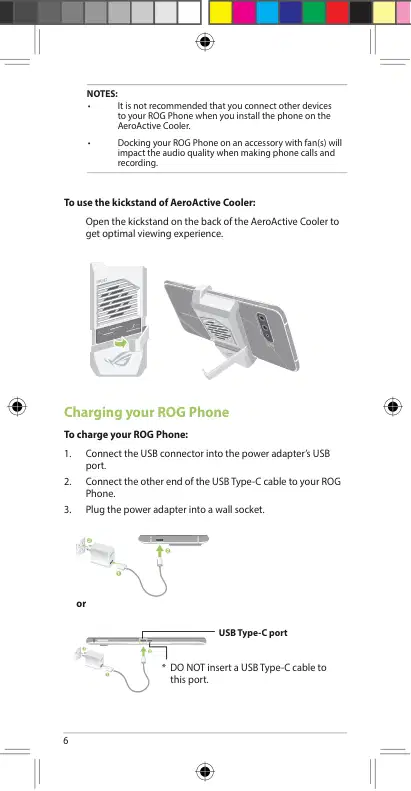
  • Docking your ROG Phone on an accessory with fan(s) will impact the audio quality when making phone calls and recording.

Open the kickstand on the back of the AeroActive Cooler to get optimal viewing experience.

1. Connect the USB connector into the power adapter’s USB port.
2. Connect the other end of the USB Type-C cable to your ROG Phone.
3. Plug the power adapter into a wall socket.

* DO NOT insert a USB Type-C cable to this port.

U16317-2_ZS661KS_Entry_2SIM_UM_Booklet_WW.indb 6 U16317-2_ZS661KS_Entry_2SIM_UM_Booklet_WW.indb 6 2020/6/16 11:39:15 2020/6/16 11:39:15

Page 7 of the Asus Rog Phone user manual — or
Seite 7 · Zum Vergrößern klicken
Seite 7

or

  • Only the Side Mount connector has Display Port functionality.
  • If you connect USB Type-C OTG or charging devices to both of the USB Type-C ports on your ROG phone, the Side Mount connector will become the master and the charging current or OTG device on the bottom port will be limited.
  • When charging your ROG Phone through your computer, ensure that you plug the USB Type-C cable to your computer’s USB port.
  • DO NOT charge your ROG phone underwater or when the USB connector is wet.
  • Avoid charging your ROG Phone in an environment with ambient temperature of above 35

°C (95 °F).

  • For safety purposes, use ONLY the bundled power adapter and cable to charge your ROG Phone.
  • The input voltage range between the wall outlet and this adapter is AC 100V - 240V. The output voltage of the USB Type-C cable is +5V-10V 3A, 30W.

U16317-2_ZS661KS_Entry_2SIM_UM_Booklet_WW.indb 7 U16317-2_ZS661KS_Entry_2SIM_UM_Booklet_WW.indb 7 2020/6/16 11:39:15 2020/6/16 11:39:15

Page 8 of the Asus Rog Phone user manual — To install a Nano SIM card:
Seite 8 · Zum Vergrößern klicken
Seite 8

Installing a Nano SIM card

To install a Nano SIM card:

1. Push a pin into the hole on the Nano SIM card tray to eject it. Insert the Nano SIM card(s) into the card slot(s).
2. Push the tray to close it.
  • Actual network and frequency band usage depends on network deployment in your area. Contact your telecom carrier if 5G NR Sub-6 support and VoLTE 4G calling service are available in your area.
  • Use only a standard Nano SIM card on your ROG Phone.

U16317-2_ZS661KS_Entry_2SIM_UM_Booklet_WW.indb 8 U16317-2_ZS661KS_Entry_2SIM_UM_Booklet_WW.indb 8 2020/6/16 11:39:16 2020/6/16 11:39:16

Nano-SIM1 · Nano-SIM2

Page 9 of the Asus Rog Phone user manual — Installing a Nano SIM card
Seite 9 · Zum Vergrößern klicken
Seite 9
Asus Rog Phone — Installing a Nano SIM card diagram (page 9)
Abb. 5 · Installing a Nano SIM card

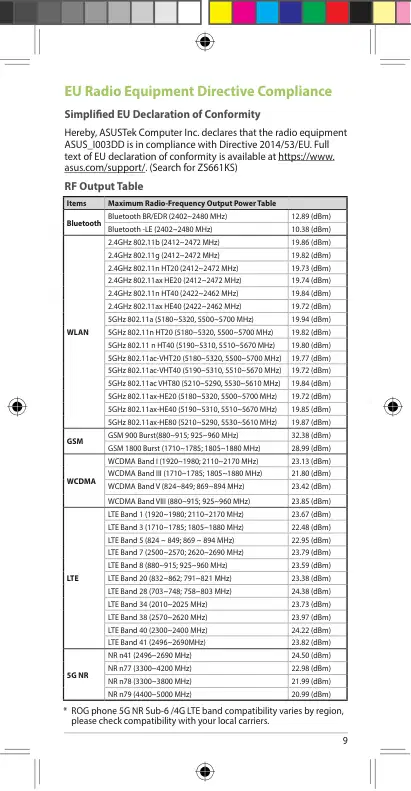
Hereby, ASUSTek Computer Inc. declares that the radio equipment ASUS_I003DD is in compliance with Directive 2014/53/EU. Full text of EU declaration of conformity is available at https://www asus.com/support/ (Search for ZS661KS)

ItemsMaximum Radio-Frequency Output Power Table BluetoothBluetooth BR/EDR (2402~2480 MHz)12.89 (dBm) Bluetooth -LE (2402~2480 MHz)10.38 (dBm) WLAN2.4GHz 802.11b (2412~2472 MHz)19.86 (dBm) 2.4GHz 802.11g (2412~2472 MHz)19.82 (dBm) 2.4GHz 802.11n HT20 (2412~2472 MHz)19.73 (dBm) 2.4GHz 802.11ax HE20 (2412~2472 MHz)19.74 (dBm) 2.4GHz 802.11n HT40 (2422~2462 MHz)19.84 (dBm) 2.4GHz 802.11ax HE40 (2422~2462 MHz)19.72 (dBm) 5GHz 802.11a (5180~5320, 5500~5700 MHz)19.94 (dBm) 5GHz 802.11n HT20 (5180~5320, 5500~5700 MHz)19.82 (dBm) 5GHz 802.11 n HT40 (5190~5310, 5510~5670 MHz)19.80 (dBm) 5GHz 802.11ac-VHT20 (5180~5320, 5500~5700 MHz)19.77 (dBm) 5GHz 802.11ac-VHT40 (5190~5310, 5510~5670 MHz)19.72 (dBm) 5GHz 802.11ac VHT80 (5210~5290, 5530~5610 MHz)19.84 (dBm) 5GHz 802.11ax-HE20 (5180~5320, 5500~5700 MHz)19.72 (dBm) 5GHz 802.11ax-HE40 (5190~5310, 5510~5670 MHz)19.85 (dBm) 5GHz 802.11ax-HE80 (5210~5290, 5530~5610 MHz)19.87 (dBm) GSMGSM 900 Burst(880~915; 925~960 MHz)32.38 (dBm) GSM 1800 Burst (1710~1785; 1805~1880 MHz)28.99 (dBm) WCDMAWCDMA Band I (1920~1980; 2110~2170 MHz)23.13 (dBm) WCDMA Band III (1710~1785; 1805~1880 MHz)21.80 (dBm) WCDMA Band V (824~849; 869~894 MHz)23.42 (dBm) WCDMA Band VIII (880~915; 925~960 MHz)23.85 (dBm) LTELTE Band 1 (1920~1980; 2110~2170 MHz)23.67 (dBm) LTE Band 3 (1710~1785; 1805~1880 MHz)22.48 (dBm) LTE Band 5 (824 ~ 849; 869 ~ 894 MHz)22.95 (dBm) LTE Band 7 (2500~2570; 2620~2690 MHz)23.79 (dBm) LTE Band 8 (880~915; 925~960 MHz)23.59 (dBm) LTE Band 20 (832~862; 791~821 MHz)23.38 (dBm) LTE Band 28 (703~748; 758~803 MHz)24.38 (dBm) LTE Band 34 (2010~2025 MHz)23.73 (dBm) LTE Band 38 (2570~2620 MHz)23.97 (dBm) LTE Band 40 (2300~2400 MHz)24.22 (dBm) LTE Band 41 (2496~2690MHz)23.82 (dBm) 5G NRNR n41 (2496~2690 MHz)24.50 (dBm) NR n77 (3300~4200 MHz)22.98 (dBm) NR n78 (3300~3800 MHz)21.99 (dBm) NR n79 (4400~5000 MHz)20.99 (dBm)

* ROG phone 5G NR Sub-6 /4G LTE band compatibility varies by region, please check compatibility with your local carriers.

U16317-2_ZS661KS_Entry_2SIM_UM_Booklet_WW.indb 9 U16317-2_ZS661KS_Entry_2SIM_UM_Booklet_WW.indb 9 2020/6/16 11:39:16 2020/6/16 11:39:16

Page 10 of the Asus Rog Phone user manual — CE Marking
Seite 10 · Zum Vergrößern klicken
Seite 10

The Wi-Fi operating in the band 5150-5350MHz shall be restricted to indoor use for countries listed in the table below:

ATBEBGCZDKEEFR DEISIEITELESCY LVLILTLUHUMTNL NOPLPTROSISKTR FISECHUKHR

RF Exposure Information

This ASUS product has been tested and meets applicable European SAR limits. The SAR limit is 2.0 W/kg in countries that set the limit averaged over 10 grams of tissue. The specific maximum SAR values for this device are as follows:

  • Head: 0.736 W/Kg
  • Body: 1.497 W/Kg When carrying this device or using it while worn on the body, either use an approved accessory such as a holster or otherwise maintain a distance of 0.5 cm from the body to ensure compliance with RF exposure requirements.

CE Marking

Using GPS (Global Positioning System) on your ROG Phone

To use the GPS positioning feature on your ROG Phone:

  • Ensure that your device is connected to the Internet before using Google Map or any GPS-enabled apps.
  • For first-time use of a GPS-enabled app on your device, ensure that you are outdoors to get the best positioning data.
  • When using a GPS-enabled app on your device inside a vehicle, the metallic component of the car window and other electronic devices might affect the GPS performance.

U16317-2_ZS661KS_Entry_2SIM_UM_Booklet_WW.indb 10 U16317-2_ZS661KS_Entry_2SIM_UM_Booklet_WW.indb 10 2020/6/16 11:39:16 2020/6/16 11:39:16

Page 11 of the Asus Rog Phone user manual — ROG Phone care
Seite 11 · Zum Vergrößern klicken
Seite 11

Prevention of Hearing Loss

To prevent possible hearing damage, do not listen at high volume levels for long periods.

Safety information

ROG Phone care

  • Use your ROG Phone in an environment with ambient temperatures between 0 °C (32 °F) and 35 °C (95 °F). The battery

Your ROG Phone is equipped with a high performance non- detachable Li-polymer battery. Observe the maintenance guidelines for a longer battery life.

  • Do not remove the non-detachable Li-polymer battery as this will void the warranty.
  • Avoid charging in extremely high or low temperature. The battery performs optimally in an ambient temperature of +5 °C to +35 °C.
  • Do not remove and replace the battery with a non-approved battery.
  • Use only ASUS battery. Using a different battery may cause physical harm/injury and may damage your device.
  • Do not remove and soak the battery in water or any other liquid.
  • Never try to open the battery as it contains substances that might be harmful if swallowed or allowed to come into contact with unprotected skin.

U16317-2_ZS661KS_Entry_2SIM_UM_Booklet_WW.indb 11 U16317-2_ZS661KS_Entry_2SIM_UM_Booklet_WW.indb 11 2020/6/16 11:39:16 2020/6/16 11:39:16

Page 12 of the Asus Rog Phone user manual — Operator access with a tool
Seite 12 · Zum Vergrößern klicken
Seite 12
  • Do not remove and short-circuit the battery, as it may overheat and cause a fire. Keep it away from jewelry or metal objects.
  • Do not remove and dispose of the battery in fire. It could explode and release harmful substances into the environment.
  • Do not remove and dispose of the battery with your regular household waste. Take it to a hazardous material collection point.
  • Do not touch the battery terminals.
  • To avoid fire or burns, do not disassemble, bend, crush, or puncture the battery.
  • Dispose of used battery according to the instructions.

The charger

  • Use only the charger supplied with your ROG Phone.
  • Never pull the charger cord to disconnect it from the power socket. Pull the charger itself. Caution

Your ROG Phone is a high quality piece of equipment. Before operating, read all instructions and cautionary markings on the (1) AC Adapter.

  • Do not use the ROG Phone in an extreme environment where high temperature or high humidity exists. The ROG Phone performs optimally in an ambient temperature between 0 °C (32 °F) and 35 °C (95 °F).
  • Do not disassemble the ROG Phone or its accessories. If service or repair is required, return the unit to an authorized service center. If the unit is disassembled, a risk of electric shock or fire may result.
  • Do not short-circuit the battery terminals with metal items.

Operator access with a tool

If a TOOL is necessary to gain access to an OPERATOR ACCESS AREA, either all other compartments within that area containing a hazard shall be inaccessible to the OPERATOR by the use of the same TOOL, or such compartments shall be marked to discourage OPERATOR access.

U16317-2_ZS661KS_Entry_2SIM_UM_Booklet_WW.indb 12 U16317-2_ZS661KS_Entry_2SIM_UM_Booklet_WW.indb 12 2020/6/16 11:39:16 2020/6/16 11:39:16

Page 13 of the Asus Rog Phone user manual — India BIS - IS 16333 Notice
Seite 13 · Zum Vergrößern klicken
Seite 13

Regional notice for Singapore

This ROG Phone complies with IMDA Standards.

India E-waste (Management) Rules 2016

This product complies with the “India E-Waste (Management) Rules, 2016” and prohibits use of lead, mercury, hexavalent chromium, polybrominated biphenyls (PBBs) and polybrominated diphenyl ethers (PBDEs) in concentrations exceeding 0.1% by weight in homogenous materials and 0.01 % by weight in homogenous materials for cadmium, except for the exemptions listed in Schedule II of the Rule.

ASUS Recycling/Takeback Services

ASUS recycling and takeback programs come from our commitment to the highest standards for protecting our environment. We believe in providing solutions for you to be able to responsibly recycle our products, batteries, other components as well as the packaging materials. Please go to http://csr.asus com/english/Takeback.htm for detailed recycling information in different regions.

India BIS - IS 16333 Notice

Language InputHindi, English, Tamil
ReadabilityAssamese, Bangla, Bodo(Boro), Dogri, Gujarati, Hindi, Kannada, Kashmiri, Konkani,

Maithili, Malayalam, Manipuri(Bangla), Manipuri(Meetei Mayek),

Marathi, Nepali, Oriya, Panjabi, Santhali, Sanskrit, Sindhi (Devanagari) ,Tamil, Telugu, Urdu and English

U16317-2_ZS661KS_Entry_2SIM_UM_Booklet_WW.indb 13 U16317-2_ZS661KS_Entry_2SIM_UM_Booklet_WW.indb 13 2020/6/16 11:39:16 2020/6/16 11:39:16

Page 14 of the Asus Rog Phone user manual — WARNING
Seite 14 · Zum Vergrößern klicken
Seite 14

Proper disposal

Risk of explosion if battery is replaced by an incorrect type. Dispose of used batteries according to the instructions.

DO NOT throw the battery in municipal waste. The symbol of the crossed out wheeled bin indicates that the battery should not be placed in municipal waste.

DO NOT throw this product in municipal waste. This product has been designed to enable proper reuse of parts and recycling. The symbol of the crossed out wheeled bin indicates that the product (electrical, electronic equipment and mercury-containing button cell battery) should not be placed in municipal waste. Check local regulations for disposal of electronic products.

DO NOT throw this product in fire. DO NOT short circuit the contacts. DO NOT disassemble this product.

WARNING

Cancer and Reproductive Harm-

www.P65Warnings.ca.gov

TouchSense® Technology licensed from Immersion Corporation and protected under one or more of the U.S. Patents found at the following address www.immersion.com/patent-marking.html and other patents pending.

U16317-2_ZS661KS_Entry_2SIM_UM_Booklet_WW.indb 14 U16317-2_ZS661KS_Entry_2SIM_UM_Booklet_WW.indb 14 2020/6/16 11:39:17 2020/6/16 11:39:17

Page 15 of the Asus Rog Phone user manual — ASUS Address: 1F., No.15, Lide Rd., Beitou Dist., Taipei City 112,
Seite 15 · Zum Vergrößern klicken
Seite 15

ASUS Address: 1F., No.15, Lide Rd., Beitou Dist., Taipei City 112,

Taiwan Tel: 886228943447 Fax: 886228907698

Declaration

We declare that the IMEI codes for this product, ROG Phone, are unique to each unit and only assigned to this model. The IMEI of each unit is factory set and cannot be altered by the user and that it complies with the relevant IMEI integrity related requirements expressed in the GSM standards.

Should you have any questions or comments regarding this matter, please contact us.

ASUSTeK COMPUTER INC.

Tel886228943447
Fax886228907698
Supporthttps://www.asus.com/support/

Copyright © 2020 ASUSTeK COMPUTER INC.

All Rights Reserved.

You acknowledge that all rights of this Manual remain with ASUS. Any and all rights, including without limitation, in the Manual or website, and shall remain the exclusive property of ASUS and/or its licensors. Nothing in this Manual intends to transfer any such rights, or to vest any such rights to you.

ASUS PROVIDES THIS MANUAL “AS IS” WITHOUT WARRANTY OF ANY KIND. SPECIFICATIONS AND INFORMATION CONTAINED IN THIS MANUAL ARE FURNISHED FOR INFORMATIONAL USE ONLY, AND ARE SUBJECT TO CHANGE AT ANY TIME WITHOUT NOTICE, AND SHOULD NOT BE CONSTRUED AS A COMMITMENT BY ASUS.

ZenTalk Fans Forum (http://www.asus.com/zentalk/global_forward.php)

U16317-2_ZS661KS_Entry_2SIM_UM_Booklet_WW.indb 15 U16317-2_ZS661KS_Entry_2SIM_UM_Booklet_WW.indb 15 2020/6/16 11:39:17 2020/6/16 11:39:17

Sincerely yours,

Quellen

Referenzen & Links

In dieser Anleitung genannte Seiten – Hersteller, Support und Downloads.

Frage zu Asus Rog Phone stellen

Besitzer und unser Team antworten in der Regel innerhalb eines Tages – und Ihre Frage hilft auch anderen weiter.

Add your email to get notified when it’s answered — no spam, ever.

0 questions
Noch keine Fragen zu Asus Rog Phone

Stellen Sie die erste Frage — andere Nutzer oder unser Team antworten Ihnen.

Originaldokument

Asus Rog Phone PDF-Anleitung

208 Seiten·6.3 MB·Smartphone·PDF
Klicken Sie oben auf eine Seite, um sie hier zu öffnen
Seite 1 / …
100%
Seiten werden geladen…