



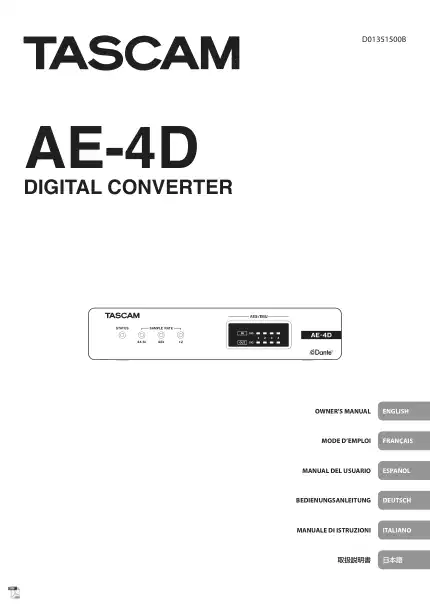

AE-4D DIGITAL CONVERTER
OWNER'S MANUAL
ENGLISH
MODE D’EMPLOI
FRANÇAIS
MANUAL DEL USUARIO
ESPAÑOL
BEDIENUNGSANLEITUNG
DEUTSCH
MANUALE DI ISTRUZIONI
ITALIANO
取扱説明書
日本語

TEAC CORPORATION https://tascam.jp/jp/ Phone: +81-42-356-9143 1-47 Ochiai, Tama-shi, Tokyo 206-8530 Japan
TEAC AMERICA, INC. https://tascam.com/us/ Phone: +1-323-726-0303 10410 Pioneer Blvd. Suite #1 and #4, Santa Fe Springs, California 90670, U.S.A.
TEAC UK Ltd. https://www.tascam.eu/en/ Phone: +44-1923-797205 Meridien House, 69-71 Clarendon Road, Watford, Herts, WD17 1DS, United Kingdom
TEAC EUROPE GmbH https://www.tascam.eu/en/ Phone: +49-611-71580 Bahnstrasse 12, 65205 Wiesbaden-Erbenheim, Germany
TEAC SALES & TRADING(SHENZHEN) CO., LTD Phone: +86-755-88311561~2 Room 817, Block A, Hailrun Complex, 6021 Shennan Blvd., Futian District, Shenzhen 518040, China

IMPORTANT SAFETY INSTRUCTIONS
For Canada THIS CLASS B DIGITAL APPARATUS COMPLIES WITH CANADIAN ICES-003. CET APPAREIL NUMERIQUE DE LA CLASSE B EST CONFORME A LA NORME NMB-003 DU CANADA.
For U.S.A.
Declaration of Conformity Model Number: AE-4D Trade Name: TASCAM Responsible party: TEAC AMERICA, INC. Address: 10410 Pioneer Blvd. Suite #1 and #4, Santa Fe
This product complies with the European Directives request and the other Commission Regulations.
Springs, California 90670, U.S.A. Telephone number: 1-323-726-0303
This device complies with Part 15 of the FCC Rules. Operation is subject to the following two conditions: (1) this device may not cause harmful interference, and (2) this device must accept any interference received, including interference that may cause undesired operation.
a) Applicable electromagnetic environment: E1, E2, E3,
INFORMATION TO THE USER This equipment has been tested and found to comply with the limits for a Class B digital device, pursuant to Part 15 of the FCC Rules. These limits are designed to provide reasonable protection against harmful inter- ference in a residential installation. This equipment generates, uses, and can radiate radio frequency energy and, if not installed and used in accordance with the instruction manual, may cause harmful interference to radio communications. However, there is no guarantee that interference will not occur in a particular instal- lation. If this equipment does cause harmful interference to radio or television reception, which can be deter- mined by turning the equipment off and on, the user is encouraged to try to correct the interference by one or more of the following measures.
a) Reorient or relocate the receiving antenna.
b) Increase the separation between the equipment and
receiver.
c) Connect the equipment into an outlet on a
circuit different from that to which the receiver is connected.
d) Consult the dealer or an experienced radio/TV
technician for help.

(a) All electrical/electronic equipment and waste
batteries/ accumulators should be disposed of separately from the municipal waste stream via collection facilities designated by the government or local authorities.
(b) By disposing of electrical/electronic equipment
and waste batteries/accumulators correctly, you will help save valuable resources and prevent any potential negative effects on human health and the environment.
(c) Improper disposal of waste electrical/electronic
equipment and batteries/accumulators can have serious effects on the environment and human health because of the presence of hazardous substances in the equipment.
(d) The Waste Electrical and Electronic
Equipment (WEEE) symbols, which show wheeled bins that have been crossed out, indicate that electrical/electronic equipment and batteries/accumulators must be collected and disposed of separately from household waste.
If a battery or accumulator contains more than the specified values of lead (Pb), mercury (Hg), and/or cadmium (Cd) as defined in the Battery Directive (2006/66/EC), then the chemical symbols for those elements will be indicated beneath the WEEE symbol.
(e) Return and collection systems are available to end
users. For more detailed information about the disposal of old electrical/electronic equipment and waste batteries/ accumulators, please contact your city office, waste disposal service or the shop where you purchased the equipment.
Pb, Hg, Cd

The nameplate is located on the bottom of the unit as shown below.
Front side · Nameplate

Introduction
Thank you very much for purchasing a TASCAM AE-4D Dig- ital Converter. Before using this unit, read this Owner’s Manual carefully so that you will be able to use it correctly and enjoy working with it for many years. After you have finished reading this manual, please keep it in a safe place for future reference. You can also download this Owner’s Manual from the TEAC Global Site (http://teac-global.com/).
Introduction 6
Features 6
Included items 6
Conventions used in this manual 7
Precautions for placement and use 7
Beware of condensation 7
Cleaning the unit 7
Using the TEAC Global Site 7
Product registration 7
0Supports 4 channels of digital AES/EBU (XLR) input and output at 44.1/48 kHz
About TASCAM customer support service 7
0Supports 2 channels of digital AES/EBU (XLR) input and output at 88.2/96 kHz
Names of parts 8
Front panel 8 Rear panel 8
0Internal sampling rate converter for inputs
Installing the attachment brackets 9
0Dante interface included as standard feature
0AES67 (Dante AES67 mode) is also supported, so con- nection is possible with Ravenna and other network au- dio technologies compatible with AES67
Installing on or under a desk 9
DSP overview 10
Input channels 10 Output channels 10
0Supports daisy-chain connection in Dante switch mode
0Flexible routing is possible using Dante Controller
Application overview 10
0Supports PoE (Power over Ethernet)
0Supports power daisy-chaining
Connecting to a Dante network 10
0Support for sampling frequencies and bit lengths up to 96kHz and 24-bit
Switched (daisy chain) connection 10
Using Dante Controller 11
Dante Controller overview 11 Audio routing settings 11 Changing sampling frequencies and bit depths with Dante Controller 12
0LEDs for input signal and output signal
0Reference level can be set
0Dedicated remote control application for Windows, Mac, iOS and Android (TASCAM DCP CONTROL)
Specifications 13
0Half rack size
General 13 Input/output ratings 13 Other 13
This product includes the following items. Take care when opening the package to avoid damaging the items. Keep the box and packing materials for transpor- tation in the future. Please contact the store where you purchased this unit if any of these items are missing or have been damaged during transportation.
0Main unit × 1
0Installation brackets × 2
0Owner’s Manual (this document) including warranty × 1

Cleaning the unit
In this manual, we use the following conventions:
Use a dry soft cloth to wipe the unit clean. Do not wipe with chemical cleaning cloths, thinner, alcohol or other chemical agents. Doing so could damage the surface or cause discol- oration.
0When we refer to buttons, connectors and other parts of this unit and other equipment, we use a bold font like this: STATUS indicator.
0As necessary, additional information is provided under TIP, NOTE and CAUTION headings.
These are tips about how to use the unit.
You can download updates for this unit from the TEAC Glob- al Site:
http://teac-global.com/ In the TASCAM Downloads section, select the desired lan- guage to open the Downloads website page for that lan- guage.
These provide additional explanations and describe spe- cial cases.
Failure to follow these instructions could result in dam- age to equipment or lost data, for example.
Failure to follow these instructions could result in injury.
Customers in the USA, please visit the following TASCAM website to register your TASCAM product online.
About TASCAM customer support service
0The operating temperature range of this unit is 0–40 °C.
0Do not install this unit in the following types of locations. Doing so could make the sound quality worse or cause malfunction.
TASCAM products are supported and warrantied only in their country/region of purchase. To receive support after purchase, on the TASCAM Distrib- utors list page of the TEAC Global Site (http:// teac-global. com/), search for the local company or representative for the region where you purchased the product and contact that organization. When making inquiries, the address (URL) of the shop or web shop where it was purchased and the purchase date are required. Moreover, the warranty card and proof of purchase might also be necessary.
Places with significant vibrations Next to a window or in another location exposed to direct sunlight Near heaters or other extremely hot places Extremely cold places Very humid or poorly ventilated places Very dusty places
0To enable good heat dissipation, do not place anything on top of the unit.
0Do not place this unit on top of a power amplifier or oth- er device that generates heat.
0When installing this unit on or under a desk, use the in- cluded attachment brackets.
0To mount this unit in a rack, use a TASCAM AKRS1 (sold separately).
Condensation could occur if the unit is moved from a cold place to a warm place, it is used immediately after a cold room has been heated or it is otherwise exposed to a sud- den temperature change. To prevent this, or if this occurs, let the unit sit for one or two hours at the new room temperature before using it.

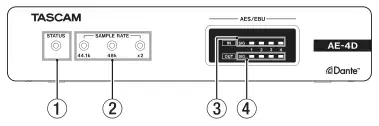
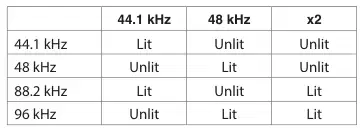
2 SAMPLE RATE indicator The lit/unlit state of the three SAMPLE RATE indicators (44.1k, 48k and ×2) show the sampling frequency status of the unit.
1 STATUS indicator The STATUS indicator blinks blue under the following conditions.
o When no LAN cable is connected
3 IN SIG indicators These light when sound is being input through the dig- ital inputs. Input is judged to have occurred when the signal level exceeds −60 dBFS.
o When the Dante module is not operating properly
4 OUT SIG indicators These light when sound is being output through the dig- ital outputs. Output is judged to have occurred when the signal level exceeds −60 dBFS.
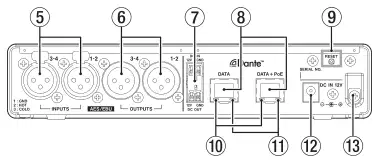
7 DC IN/DC OUT connectors The DC-IN connector is above, and the DC-OUT connec- tor is below. (Left is 12V, and right is GND.) These connectors are specifically for power daisy-chain- ing.
Disconnect the AC adapter before connecting the DC IN and DC OUT connectors.
5 AES/EBU IN connectors These are balanced XLR AES3-2003/IEC60958-4 (AES/ EBU) format digital audio input connectors.
i Power daisy-chaining can be enabled by connecting the
DC OUT and DC IN connectors. Power daisy-chaining of up to two units is possible i When powering by PoE, the first unit in the powerdai-
When the sampling frequency is 88.2 or 96 kHz, use the AES/EBU IN 1-2 connector. The AES/EBU IN 3-4 connec- tor cannot be used.
sy-chain will not be powered. In this case, use a dedicat- ed PS-P1220E AC adapter (sold separately) to power the first unit in the daisy chain.
6 AES/EBU OUT connectors These are balanced XLR AES3-2003/IEC60958-4 (AES/ EBU) format digital audio output connectors.
8 DATA/DATA+PoE connectors These are Dante transmission connectors. Use to connect the unit to a Dante network. Use the DATA+PoE connector when connecting to a switching hub that supports PoE power supply. In this case, use of an AC adapter is not necessary. Either connector can be used when using a switching hub that does not support PoE power supply.
When the sampling frequency is 88.2 or 96 kHz, use the AES/EBU OUT 1-2 connector. The AES/EBU OUT 3-4 connector cannot be used.
9 RESET button This resets the settings. Press and hold for 5 seconds to reset all Dante settings. Press and hold for 10 seconds to reset all unit settings.

0 Gigabit link status indicator Orange indicates that a gigabit Ethernet link has been established.
q Link status/activity indicator
Green indicates that a link is established between the devices. Blinking indicates that signals are being transmitted be- tween the devices.
w DC IN 12V connector
Connect a PS-P1220E AC adapter (sold separately) here.
When using a PS-P1220E AC adapter (sold separately), hook its cord here to prevent accidental disconnection.
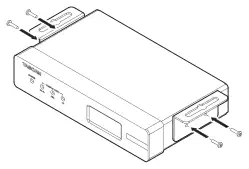
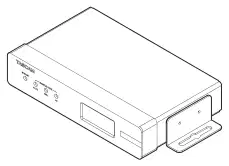
Installing the attachment brackets
To install this unit on or under a desk, use 4 commercial- ly-available screws that are suitable for the material and thickness of the desk.
By installing the included attachment brackets on this unit, you can fix it in place on top of or underneath a desk, for example.
The width of the attachment bracket openings is 7.1 mm. See the dimensional diagrams at the end of this manual for details about the attachment brackets.
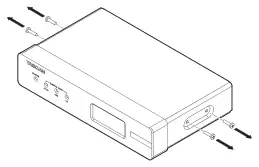
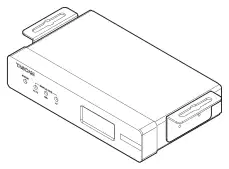
When installing this unit on a desk, align the brackets as shown in the illustration below.
e Cord holder

Application overview
This unit has a built-in DSP. All of the following settings can be made using the dedi- cated remote control application (TASCAM DCP CONTROL). See the back of this manual for DSP block diagrams.
Using the TASCAM DCP CONNECT remote control applica- tion, you can operate the unit from a distance. For details about the application, please see its Owner’s Manual. You can download the application Owner’s Manual from the TEAC Global Site (http://teac-global.com/).
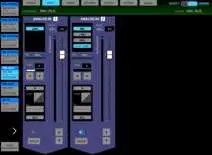
Input channel fader Use to adjust the input channel signals. Input mute Mute the input channel signal.
Output channel fader Use to adjust the level sent to the output jack. Output mute Mute the output channel signal.
Dante is a transmission protocol developed by Audinate. Using networks based on gigabit Ethernet standards, it en- ables multichannel (512 IN/512 OUT) transmission and high precision, for example. Check the Audinate website for details about Dante.
INPUT screen

Using Dante Controller
In order to set up and use this card, you must also set up the Ethernet network that it is connected to, a computer that runs Dante Controller and other devices that support Dante. Requirements for LAN cables used for con- nections with the connectors on this unit Use STP cables that are at least category 5e. Both crossover and straight cables can be used.
This unit uses the Dante Controller application, which is available at the Audinate website, to connect with other de- vices that support Dante. Download the latest version of the Dante Controller appli- cation and an operation manual from the Audinate website. Audinate download page https://www.audinate.com/products/software/dan- te-controller
This unit is not compatible with 100Mbps Ethernet switching hubs. Always use switching hubs that support Layer 2 and Gigabit Ethernet.
Make at least the following settings using a computer that has Dante Controller installed.
i Set the computer to set the IP address automatically.
0Adjust the sampling frequency and bit depth of each Dante device.
i Restarting the computer might be necessary if a previ-
ous network setting is still active on the computer.
0Set the audio routing.
Settings made using Dante Controller are stored in the built-in memory of each Dante device. Unless settings are modified, connections will not change even if Dante Controller is quit or the computer is discon- nected from the Dante network.
Dante devices can be daisy-chained when there are few connected devices and when not using a switching hub. Connect them as shown below. Switched (daisy chain) connection example
i When using a switched (daisy chain) connection, either
DATA or DATA+PoE connectors can be used. i If the number of connected devices increases, raising the
latency setting will be necessary.
Mixer AE-4D AE-4D

Changing sampling frequencies and bit depths with Dante Controller
When Dante Controller is launched, the Network View screen shown below will open. On this screen, you can set and monitor conditions related to the Dante network.
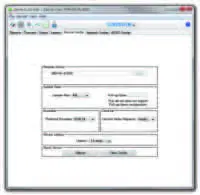
Double-click a device name on the Network View screen to open the Device View screen. On this screen, you can set and monitor conditions related to devices on the Dante network. Click the Device Config tab to open the page where you can change the sampling frequency, bit rate and other settings of the device selected in 1 shown in the illustration below.
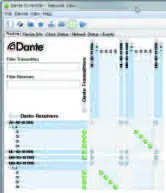
1 Receiving device name This is the name of a receiving device on the Dante net- work.
2 Receiving device channels These are the names of the channels of the receiving de- vice on the Dante network.
1 Identify Device If the unit is selected by device name (1), clicking this icon will cause all 3 SAMPLE RATE indicators to start blinking. Clicking it again will return them to their ordinary status. This allows the quick identification of the device being operated when multiple units are being used at the same time, for example.
3 Transmitting device name This is the name of a transmitting device on the Dante network.
4 Transmitting device channels These are the names of the channels of the transmitting device on the Dante network.
5 Audio routing Route the audio channels of the transmitting and receiv- ing devices that you want to connect here. Left-click the intersection of the channels you want to connect on the matrix to connect them.
2 Device name This is the name of the device that can have its settings changed in the current Device View.
3 Change device name Edit the device name.
4 Sampling frequency Set the sampling frequency.
While pressing the computer keyboard Ctrl key, left-click the “-” at the intersection of device names to connect all connectable channels at once.
5 Bit depth Set the bit depth.

6 Latency setting Set the latency. Use the following guidelines to change the latency set- ting.
Connected network setup guide- line
The transmission route from the transmitting device to the receiving device passes through 10 gigabit switching hub.
44.1/48 kHz,16/24-bit, 4 channels 88.2/96 kHz,16/24-bit, 2 channels (double speed)
2 msec The transmission speed of the transmitting device is 100 Mbps.
DATA/DATA+PoE connectors
5 msec Use this maximum selectable la- tency value when creating a large- scale network.
Connector: RJ-45 Transmission protocol: Dante Gigabit Ethernet standard: 1000BASE-T (IEEE 802.3ab) Cables: category 5e or faster STP cables DIGITAL INPUT (AES/EBU) connectors
i Changing the name of a device will clear audio routing
settings. For this reason, we recommend changing de- vice names to names that are easy to identify before set- ting audio routings. i Depending on network connection conditions, setting
Connector: XLR-3-31 Input impedance: 110 Ω Format: AES3-2003/IEC60958-4 (AES/EBU) Supported sampling frequencies: 32 kHz – 192 kHz
the latency to a value higher than the guideline might be necessary.
When using a switched (daisy chain) connection, which does not use a switching hub, set the latency accord- ing to the number of Dante devices that signals pass- through as shown below.
Connector: XLR-3-32 Input impedance: 110 Ω Format: AES3-2003/IEC60958-4 (AES/EBU) Supported sampling frequencies: 44.1, 48, 88.2 and
Other
Passes through 2 devices
PoE class 0 TASCAM PS-P1220E AC adapter (sold separately) Power consumption
Passes through 1 devices
214 × 44.45 × 136.1 mm (W x H x D, including protrusions) Weight
0See the back of this manual for dimensional drawings and DSP block diagrams.
0Illustrations in this manual might differ in part from the actual product.
0 Specifications and external appearance might be changed without notification to improve the product.



http://teac-global.com/support/opensource/form/
Important Notice Regarding Software
To request the source codes, please access the following URL and fill in the registration form.
http://teac-global.com/support/opensource/form/
Please note that we are unable to answer any inquiries or questions about the contents of the source codes.
Precision Time Protocol daemon (v1b2) http://sourceforge.net/projects/ptpd/files/
ORY OF LIABILITY, WHETHER IN CONTRACT, STRICT LIABILITY, OR TORT (INCLUDING NEGLIGENCE OR OTHERWISE) ARISING IN ANY WAY OUT OF THE USE OF THIS SOFTWARE, EVEN IF ADVISED OF THE POSSIBILITY OF SUCH DAMAGE.
Copyright (c) 2009-2012 George V. Neville-Neil, Steven Kreuzer, Martin Burnicki, Jan Breuer, Gael Mace, Alexandre Van Kempen
lwIP (v2.0.3) http://savannah.nongnu.org/projects/lwip/ lwIP is licenced under the BSD licence: Copyright (c) 2001-2004 Swedish Institute of Computer Science. All rights reserved. Redistribution and use in source and binary forms, with or with- out modification, are permitted provided that the following con- ditions are met: 1. Redistributions of source code must retain the above copyright notice, this list of conditions and the following disclaimer. 2. Redistributions in binary form must reproduce the above copy- right notice, this list of conditions and the following disclaimer in the documentation and/or other materials provided with the distribution. 3. The name of the author may not be used to endorse or pro- mote products derived from this software without specific prior written permission. THIS SOFTWARE IS PROVIDED BY THE AUTHOR `AS IS’ AND ANY EXPRESS OR IMPLIED WARRANTIES, INCLUDING, BUT NOT LIM- ITED TO, THE IMPLIED WARRANTIES OF MERCHANTABILITY AND FITNESS FOR A PARTICULAR PURPOSE ARE DISCLAIMED. IN NO EVENT SHALL THE AUTHOR BE LIABLE FOR ANY DIRECT, INDIRECT, INCIDENTAL, SPECIAL, EXEMPLARY, OR CONSEQUENTIAL DAM- AGES (INCLUDING, BUT NOT LIMITED TO, PROCUREMENT OF SUB- STITUTE GOODS OR SERVICES; LOSS OF USE, DATA, OR PROFITS; OR BUSINESS INTERRUPTION) HOWEVER CAUSED AND ON ANY THEORY OF LIABILITY, WHETHER IN CONTRACT, STRICT LIABILITY, OR TORT (INCLUDING NEGLIGENCE OR OTHERWISE) ARISING IN ANY WAY OUT OF THE USE OF THIS SOFTWARE, EVEN IF ADVISED OF THE POSSIBILITY OF SUCH DAMAGE. FreeRTOS (v6.0.4)
Copyright (c) 2005-2008 Kendall Correll, Aidan Williams All Rights Reserved
Redistribution and use in source and binary forms, with or with- out modification, are permitted provided that the following con- ditions are met: 1. Redistributions of source code must retain the above copyright notice, this list of conditions and the following disclaimer. 2. Redistributions in binary form must reproduce the above copy- right notice, this list of conditions and the following disclaimer in the documentation and/or other materials provided with the distribution.
THIS SOFTWARE IS PROVIDED BY THE AUTHORS ``AS IS’’ AND ANY EXPRESS OR IMPLIED WARRANTIES, INCLUDING, BUT NOT LIM- ITED TO, THE IMPLIED WARRANTIES OF MERCHANTABILITY AND FITNESS FOR A PARTICULAR PURPOSE ARE DISCLAIMED. IN NO EVENT SHALL THE AUTHORS OR CONTRIBUTORS BE LIABLE FOR ANY DIRECT, INDIRECT, INCIDENTAL, SPECIAL, EXEMPLARY, OR CONSEQUENTIAL DAMAGES (INCLUDING, BUT NOT LIMITED TO, PROCUREMENT OF SUBSTITUTE GOODS OR SERVICES; LOSS OF USE, DATA, OR PROFITS; OR BUSINESS INTERRUPTION) HOWEVER CAUSED AND ON ANY THEORY OF LIABILITY, WHETHER IN CON- TRACT, STRICT LIABILITY, OR TORT (INCLUDING NEGLIGENCE OR OTHERWISE) ARISING IN ANY WAY OUT OF THE USE OF THIS SOFT- WARE, EVEN IF ADVISED OF THE POSSIBILITY OF SUCH DAMAGE.
mdnsd - embeddable Multicast DNS Daemon https://github.com/cooljeanius/mdnsd The mdnsd source code is licensed by the BSD License - text pro- vided below. Copyright (c) 2007, Jer - jer@jabber.org All rights reserved. THIS SOFTWARE IS PROVIDED BY THE COPYRIGHT HOLDERS AND CONTRIBUTORS “AS IS” AND ANY EXPRESS OR IMPLIED WARRAN- TIES, INCLUDING, BUT NOT LIMITED TO, THE IMPLIED WARRANTIES OF MERCHANTABILITY AND FITNESS FOR A PARTICULAR PURPOSE ARE DISCLAIMED. IN NO EVENT SHALL THE COPYRIGHT HOLDER OR CONTRIBUTORS BE LIABLE FOR ANY DIRECT, INDIRECT, INCI- DENTAL, SPECIAL, EXEMPLARY, OR CONSEQUENTIAL DAMAGES (INCLUDING, BUT NOT LIMITED TO, PROCUREMENT OF SUBSTI- TUTE GOODS OR SERVICES; LOSS OF USE, DATA, OR PROFITS; OR BUSINESS INTERRUPTION) HOWEVER CAUSED AND ON ANY THE-

tropicssl (v6a6997f) http://gitorious.org/tropicssl/
Copyright (c) 2009, StackFoundry LLC < support@stackfoundry. com >. Based on XySSL: Copyright (c) 2006-2008, Christophe Devine. Based on PolarSSL: Copyright (c) 2009, Paul Bakker All rights reserved.
Redistribution and use in source and binary forms, with or with- out modification, are permitted provided that the following con- ditions are met:
* Redistributions of source code must retain the above copyright notice, this list of conditions and the following disclaimer. * Redistributions in binary form must reproduce the above copy- right notice, this list of conditions and the following disclaimer in the documentation and/or other materials provided with the distribution. * Neither the names of PolarSSL or XySSL nor the names of its contributors may be used to endorse or promote products de- rived from this software without specific prior written permission.
THIS SOFTWARE IS PROVIDED BY THE COPYRIGHT HOLDERS AND CONTRIBUTORS “AS IS” AND ANY EXPRESS OR IMPLIED WARRAN- TIES, INCLUDING, BUT NOT LIMITED TO, THE IMPLIED WARRANTIES OF MERCHANTABILITY AND FITNESS FOR A PARTICULAR PURPOSE ARE DISCLAIMED. IN NO EVENT SHALL THE COPYRIGHT OWNER OR CONTRIBUTORS BE LIABLE FOR ANY DIRECT, INDIRECT, INCI- DENTAL, SPECIAL, EXEMPLARY, OR CONSEQUENTIAL DAMAGES (INCLUDING, BUT NOT LIMITED TO, PROCUREMENT OF SUBSTI- TUTE GOODS OR SERVICES; LOSS OF USE, DATA, OR PROFITS; OR BUSINESS INTERRUPTION) HOWEVER CAUSED AND ON ANY THE- ORY OF LIABILITY, WHETHER IN CONTRACT, STRICT LIABILITY, OR TORT (INCLUDING NEGLIGENCE OR OTHERWISE) ARISING IN ANY WAY OUT OF THE USE OF THIS SOFTWARE, EVEN IF ADVISED OF THE POSSIBILITY OF SUCH DAMAGE.




✂
<日本> 無料修理規定(持ち込み修理)
< In the United States > This warranty gives you specific legal rights and you may also have other rights which vary from state to state. This warranty is only valid within the country the unit was originally purchased. WHAT IS AND IS NOT COVERED Except as specified below, this warranty covers all defects in materials and workmanship in this product. The following are not covered by the warranty: 1. Damage to or deterioration of the external cabinet. 2. Damages resulting from accident, misuse, abuse or neglect. 3. Damage resulting from failure to perform basic daily maintenance and/or calibration or otherwise resulting from failure to follow instructions contained in your owner’s manual. 4. Damage occurring during shipment of the product. (Claims must be presented to the carrier) 5. Damage resulting from repair or attempted repair by anyone other than TEAC or an authorized TASCAM service station. 6. Damage resulting from causes other than product defects, including lack of technical skill, competence, or experience of the user. 7. Damage to any unit which has been altered or on which the serial number has been defaced, modified or is missing. WHO IS COVERED UNDER THE WARRANTY This warranty may be enforced only by the original purchaser. This warranty is not valid if the product was purchased through an unauthorized dealer. LENGTH OF WARRANTY All parts except heads and disk drives are warranted for one (1) year from the date of original purchase. Heads and disk drives are warranted to ninety (90) days from date of original purchase. Labor is warranted for ninety (90) days from date of original purchase. WHAT WE WILL PAY FOR We will pay all labor and material expenses for items covered by the warranty. Payment of shipping charges is discussed in the next section of this warranty. HOW YOU CAN GET WARRANTY SERVICE Your unit must be serviced by an authorized TASCAM service station in the United States. (This warranty is not enforceable outside the U.S.) If you are unable to locate an authorized TASCAM service station in your area, please contact us. We either will refer you to an authorized service station or instruct you to return the unit to the factory. Whenever warranty service is required, you must present a copy of the original dated sales receipt from an Authorized TASCAM Dealer. You must pay any shipping charges if it is necessary to ship the product to service. However, if the necessary repairs are covered by the warranty, we will pay return surface shipping charges to any destination within the United States.
合の故障および損傷 (6)メンテナンス (7)本書の提示がない場合 (8) 本書にお買い上げ年月日、お客様名、販売店名(印)の記入のない場合、あ
るいは字句を書き換えられた場合 6. 本書(日本語記載部)は日本国内においてのみ有効です。 These warranty provisions in Japanese are valid only in Japan. 7. 本書は再発行致しませんので、紛失しないよう大切に保管してください。
約束するものです。この保証書によって保証書を発行しているもの(保 証責任者)、およびそれ以外の事業者に対するお客様の法律上の権利を 制限するものではありません。保証期間経過後の修理などについてご不 明の場合は、ティアック修理センターにお問い合わせください。
< In other countries/areas > This warranty gives you specific legal rights, and you may also have other rights that vary by country, state or province. If you have a warranty claim or request, please contact the dealer where you bought the product.
LIMITATION OF IMPLIED WARRANTIES Any implied warranties, INCLUDING WARRANTIES OF MERCHANTABILITY AND FITNESS FOR A PARTICULAR PURPOSE, are limited in duration to the length of this warranty. EXCLUSION OF DAMAGES TEAC’s liability for any defective product is limited to repair or replacement of the product, at TEAC’s option. TEAC shall not be liable for: 1. Damages based upon inconvenience, loss of use of the product, loss of time interrupted operation or commercial loss; or 2. Any other damages, whether incidental, consequential or otherwise. Some states do not allow limitations on how long an implied warranty lasts and/or do not allow the exclusion or limitation of incidental or consequential damages, so the above limitations and exclusions may not apply to you. To locate an Authorized Service Center in Your Area CALL 1-800-447-8322
If you require repair services for your TASCAM equipment, please contact the dealer where the product was purchased from or the TASCAM Distributor in your country. A list of TASCAM Distributors can be found on our website at: http://teac-global.com/
< Europe > This product is subject to the legal warranty regulations of the country of purchase. In case of a defect or a problem, please contact the dealer where you bought the product. Ce produit est sujet aux réglementations concernant la garantie légale dans le pays d’achat. En cas de défaut ou de problème, veuillez contacter le revendeur chez qui vous avez acheté le produit. Dieses Gerät unterliegt den gesetzlichen Gewährleistungsbestimmungen des Landes, in dem es erworben wurde. Bitte wenden Sie sich im Gewährleistungsfall an den Händler, bei dem sie das Gerät erworben haben. Questo apparecchio è conforme alle norme sulla garanzia vigenti nel rispettivo Paese in cui esso è stato acquistato. Si prega di rivolgersi al proprio commerciante, presso il quale è stato acquistato l’apparecchio, nel caso in cui si voglia richiedere una prestazione in garanzia. Las condiciones de garantía de este aparato están sujetas a las disposiciones legales sobre garantía del país en el que ha sido adquirido. En caso de garantía, debe dirigirse al establecimiento donde adquirió el aparato.

✂
Model / Modèle / Modell Modello / Modelo / 型名
Owner’s name / Nom du possesseur / Name des Eigentümers Nome del proprietario / Nombre del propietario / お名前
Address / Adresse / Adresse Indirizzo / Dirección / ご住所
Serial No. / No de Série / Seriennummer Numero di serie / Número de serie / 機番
Date of purchase / Date de l’achat / Datum des Kaufs Data dell’acquisto / Fecha de compra / お買い上げ日
Dealer’s name / Nom du détaillant / Name des Händlers Nome del commerciante / Nombre del establecimiento / 販売店
Dealer’s address / Adresse du détaillant / Adresse des Händlers Indirizzo del commerciante / Dirección del establecimiento / 住所
〒206-8530 東京都多摩市落合1-47
ティアック修理センター 〒358-0026 埼玉県入間市小谷田858 電話:0570-000-501 /04-2901-1033
0219.MA-2760B Printed in China
Memo / 修理メモ
In dieser Anleitung genannte Seiten – Hersteller, Support und Downloads.
Besitzer und unser Team antworten in der Regel innerhalb eines Tages – und Ihre Frage hilft auch anderen weiter.
Stellen Sie die erste Frage — andere Nutzer oder unser Team antworten Ihnen.