DE
Logitech logo
Offizielle Bedienungsanleitung

Logitech Z533

148 Seiten·17.6 MB·Lautsprecher·PDF·EN
Logitech Z533
Inhaltsverzeichnis 10 Abschnitte Getting started with · What’s in the box · 1. Left Satellite 2. Right satellite 3. Subwoofer (including wired control pod) · 4. 3.5 mm to 3.5mm cable 5. User documentation · … AnzeigenAusblenden
Page 1 of the Logitech Z533 user manual — Getting started with
Seite 1 · Zum Vergrößern klicken
Seite 1

Getting started with

Getting started with

Logitech Z533 — Getting started with diagram (page 1)
Abb. 1 · Getting started with
Page 2 of the Logitech Z533 user manual — Getting started with
Seite 2 · Zum Vergrößern klicken
Seite 2
Page 2 of the Logitech Z533 user manual — Getting started with
Page 3 of the Logitech Z533 user manual — 1. Left Satellite 2. Right satellite 3. Subwoofer (including wired control pod)
Seite 3 · Zum Vergrößern klicken
Seite 3

What’s in the box

English Read Manual Before Product Use.

Deutsch Lesen Sie das Handbuch vor der Nutzung des Produkts.

  • Safe Usage Guidelines for Products Install in accordance with the manufacturer’s instructions.
  • Maintain a minimum distance of at least 6 inches (15 cm) around apparatus for sufficient ventilation.
  • Do not block any ventilation openings.
  • Ventilation should not be impeded by covering the ventilation openings with items, such as newspapers, table clothes, curtains, etc.
  • Do not push objects into apparatus vents or slots.
  • Place apparatus in a stable location so it will not fall.
  • No naked (open) flame sources, such as lighted candles, should be placed on or near the apparatus.
  • Do not install near any heat sources such as radiators, heat registers, stoves, or other apparatus (including amplifiers) that produce heat.
  • Do not defeat the safety purpose of the polarized plug. A polarized plug has two blades with one wider than the other. The wide blade is provided for your safety. If the provided plug does not fit into your outlet, consult an electrician for replacement of the obsolete outlet.
  • Protect the power cord from being walked on or pinched particularly at plugs, convenience receptacles, and the point where they exit from the apparatus.
  • Only use attachments/accessories specified by the manufacturer.
  • Unplug this apparatus during lightning storms or when unused for long periods of time.
  • Refer all servicing to qualified service personnel. Servicing is required when the apparatus has been damaged in any way, such as power supply cord or plug is damaged, liquid has been spilled or objects have fallen into the apparatus, the apparatus has been exposed to rain or moisture, does not operate normally, or has been dropped.
  • Sicherheitsund Einsatzrichtlinien für Produkte Installieren Sie das Gerät gemäß den Anweisungen des Herstellers.
  • Achten Sie auf einen Abstand von mindestens 15 cm rund um das Gerät, damit eine ausreichende Lüftung gewährleistet ist.
  • Achten Sie darauf, die Lüftungsschlitze nicht zu blockieren.
  • Die Lüftung darf nicht erschwert werden, etwa durch Verdecken der Öffnungen durch Gegenstände wie Zeitungen, Tischtücher, Vorhänge oder Ähnliches.
  • Führen Sie keine Gegenstände in die Lüftungsöffnungen des Geräts ein.
  • Stellen Sie das Gerät auf eine stabile Unterlage, um zu verhindern, dass es herunterfällt.
  • Stellen Sie niemals offene Flammen in Form von brennenden Gegenständen (z. B. Kerzen) auf oder neben das Gerät.
  • Stellen Sie das Gerät nicht in der Nähe von Wärmequellen (Heizkörpern, Öfen, Herden oder anderen Wärme abgebenden Geräten wie Verstärkern) auf.
  • (Nicht für den europäischen Markt) Beachten Sie die Sicherheitsvorkehrungen und verwenden Sie den gepolten Stecker ordnungsgemäß. Bei den in den USA üblichen polarisierten Steckern ist ein Leiter breiter als der andere. Dieser breite Leiter ist eine Sicherheitsvorkehrung. Wenn das Gerät mit einem Netzstecker ausgestattet ist, der nicht in Ihre Steckdose passt, wenden Sie sich an Ihren Fachhändler.
  • Treten Sie nicht auf das Netzkabel und verhindern Sie ein Knicken oder Dehnen. Achten Sie besonders auf Kabelenden an Steckern, Mehrfachsteckdosen und Gerätebuchsen.
  • Verwenden Sie nur vom Hersteller genehmigtes Zubehör. Zi h Si d N t t k äh d i G itt d b i lä

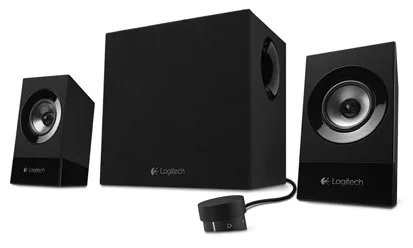
1. Left Satellite 2. Right satellite 3. Subwoofer (including wired control pod)

4. 3.5 mm to 3.5mm cable 5. User documentation

Page 4 of the Logitech Z533 user manual — Set-up
Seite 4 · Zum Vergrößern klicken
Seite 4

Set-up

Logitech Z533 — Set-up diagram (page 4)
Abb. 2 · Set-up
1. Plug the right satellite cable into the black subwoofer jack.
2. Plug the left satellite cable into the blue subwoofer jack.
3. Plug the power cord into an electrical outlet.
Page 5 of the Logitech Z533 user manual — Set-up
Seite 5 · Zum Vergrößern klicken
Seite 5
Logitech Z533 — Set-up diagram (page 5)
Abb. 3 · Set-up
4. A. If you have a 3.5mm outlet on your device: - Insert the 3.5mm to 3.5mm cable plug from the subwoofer into the audio jack on your device

B. If you have a RCA outlet on your device: - Insert the RCA cable on the subwoofer (the RCA cable is not included in the box and must be purchased separately) - Insert the other end of the RCA cable into the RCA outlet on your device (TV, Gaming Console, etc)

Page 6 of the Logitech Z533 user manual — Set-up
Seite 6 · Zum Vergrößern klicken
Seite 6
Logitech Z533 — Set-up diagram (page 6)
Abb. 4 · Set-up
Logitech Z533 — Set-up diagram (page 6)
Abb. 5 · Set-up

C. If you have a 3.5mm outlet on your device: - Insert the 3.5mm to 3.5mm cable plug from the wired remote into the 3.5mm outlet on your device

Logitech Z533 — Set-up diagram (page 6)
Abb. 6 · Set-up
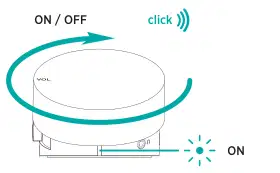
5. Switch ON your Multimedia Speaker System z533 by turning clockwise the volume knob located on top of the wired remote. You will notice a “click” sound once the system is ON (the LED in front of the wired remote will also turn on)
Page 7 of the Logitech Z533 user manual — BASS ADJUSTING BASS VOLUME
Seite 7 · Zum Vergrößern klicken
Seite 7

Features

Logitech Z533 — Features diagram (page 7)
Abb. 7 · Features

ADJUSTING SPEAKER VOLUME

Adjust your Multimedia Speaker System z533 volume with the wheel located on top of the wired remote (VOLUME UP - turn the wheel clockwise for volume up. VOLUME DOWN - turn wheel counter-clockwise for volume down).

USING HEADPHONES

Most types of analog headphones with a 3.5mm connector can be plugged into the headphone jack on the right of the wired remote.

BASS ADJUSTING BASS VOLUME

To adjust the bass level of your Multimedia Speaker System z533, move the bass slider located on the left of the wired remote - Move the slider clockwise to increase bass - Move the slider counter-clockwise to reduce the bass

Page 9 of the Logitech Z533 user manual — Deutsch 9
Seite 9 · Zum Vergrößern klicken
Seite 9
Logitech Z533 — Deutsch 9 diagram (page 9)
Abb. 8 · Deutsch 9
1. Stecken Sie das vom rechten Satellitenlautsprecher kommende Kabel in die schwarze Buchse am Subwoofer.
2. Stecken Sie das vom linken Satellitenlautsprecher kommende Kabel in die blaue Buchse am Subwoofer.
3. Stecken Sie das Netzkabel in eine Steckdose.

Deutsch 9

Frage zu Logitech Z533 stellen

Besitzer und unser Team antworten in der Regel innerhalb eines Tages – und Ihre Frage hilft auch anderen weiter.

Add your email to get notified when it’s answered — no spam, ever.

0 questions
Noch keine Fragen zu Logitech Z533

Stellen Sie die erste Frage — andere Nutzer oder unser Team antworten Ihnen.

Originaldokument

Logitech Z533 PDF-Anleitung

148 Seiten·17.6 MB·Lautsprecher·PDF
Klicken Sie oben auf eine Seite, um sie hier zu öffnen
Seite 1 / …
100%
Seiten werden geladen…