


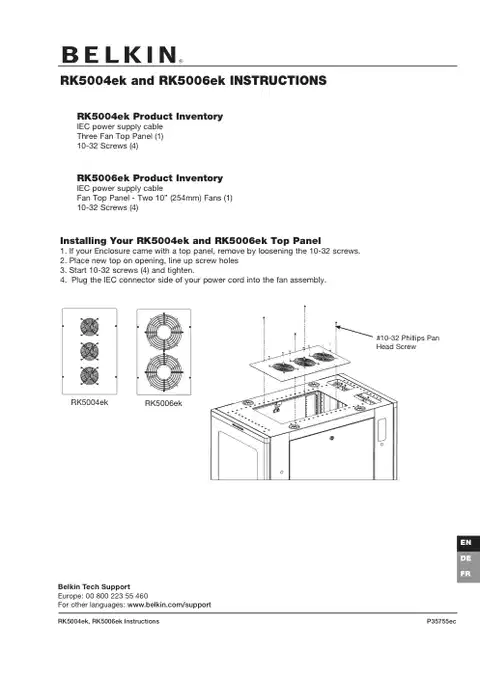

RK5004ek Product Inventory IEC power supply cable Three Fan Top Panel (1) 10-32 Screws (4)
RK5006ek Product Inventory IEC power supply cable Fan Top Panel - Two 10” (254mm) Fans (1) 10-32 Screws (4)
Installing Your RK5004ek and RK5006ek Top Panel 1. If your Enclosure came with a top panel, remove by loosening the 10-32 screws. 2. Place new top on opening, line up screw holes 3. Start 10-32 screws (4) and tighten. 4. Plug the IEC connector side of your power cord into the fan assembly.
#10-32 Phillips Pan Head Screw
DE
FR
RK5004ek, RK5006ek Instructions P35755ec
RK5004ek RK5006ek

Belkin Ltd. Express Business Park Shipton Way, Rushden NN10 6GL, United Kingdom +44 (0) 1933 35 2000 +44 (0) 1933 31 2000 fax
Belkin B.V. Boeing Avenue 333 1119 PH Schiphol-Rijk, The Netherlands +31 (0) 20 654 7300 +31 (0) 20 654 7349 fax
Belkin GmbH Hanebergstrasse 2 80637 Munich, Germany +49 (0) 89 143405 0 +49 (0) 89 143405 100 fax
Belkin SAS 130 rue de Silly 92100 Boulogne Billancourt, France +33 (0) 1 41 03 14 40 +33 (0) 1 41 31 01 72 fax
© 2005 Belkin Corporation. All rights reserved. All trade names are registered trademarks of respective manufacturers listed.
RK5004ek, RK5006ek Instructions P35755ec
In dieser Anleitung genannte Seiten – Hersteller, Support und Downloads.
Besitzer und unser Team antworten in der Regel innerhalb eines Tages – und Ihre Frage hilft auch anderen weiter.
Stellen Sie die erste Frage — andere Nutzer oder unser Team antworten Ihnen.