



Experience the freedom of wireless communication La communication sans fil en toute liberté Entdecken Sie die Bewegungsfreiheit von kabelloser Kommunikation Ervaar de vrijheid die draadloze communicatie u biedt Experimente la libertad de la comunicación inalámbrica Tutta la libertà della comunicazione wireless
F8T064ea P75048ea



Experience the freedom of wireless communication
F8T064ea P75048ea




Users are advised not to make changes or modify the device in any way. Changes or modifications not expressly approved by Belkin will void the warranty.
This device complies with part 15 of the FCC rules. Operation is subject to the following two conditions:
(1)This device may not cause harmful interference, and
(2) This device must accept any interference received, including interference that may cause
undesired operation.
FCC RF Exposure requirements: This device and its antenna(s) must not be co-located or operation in conjunction with any other antenna or transmitter.

The Bluetooth trademarks are owned by Bluetooth SIG, Inc., U.S.A. and licensed to Belkin.

Congratulations on your purchase of a Belkin Bluetooth Headset. The Bluetooth Headset is quite light, weighing just about 10g. It has both Headset and Hands-Free profiles for more functions, and is compatible with more Bluetooth wireless technology mobile phones.
Read this user’s guide carefully before you start using Belkin Bluetooth Headset.
In this package, you will find:
One Belkin Bluetooth Headset
Three front covers for replacement

The Bluetooth wireless technology is set to revolutionize the personal connectivity market by providing freedom from wired connections. It is a specification for a small form-factor, low-cost radio solution providing links between mobile computers, mobile phones and other portable and handheld devices, and connectivity to the Internet. The Bluetooth Special Interest Group (SIG), comprised of leaders in the telecommunications, computing, and network industries, is driving development of the technology and bringing it to market. The Bluetooth SIG includes promoter companies 3Com, Ericsson, IBM, Intel, Lucent, Microsoft, Motorola, Nokia and Toshiba, and more than 2000 adopter companies.


The headset has a rechargeable battery. Before using the headset for the first time, you have to charge the headset battery for approximate 2 hours to get a full charge. A fully charged battery provides up to 7 hours of talk time and over 1 week of standby time.
When the battery is low, the LED indicator flashes red. The low battery warning indication will begin three minutes of talk time before the headset runs out of power.
You can recharge the headset at any time without waiting for the battery to be completely discharged. To keep the battery in good condition, please always recharge the headset within a month once the headset is fully discharged.
Before charging, make sure that the headset is at room temperature. The battery will not charge in very cold and very hot conditions.

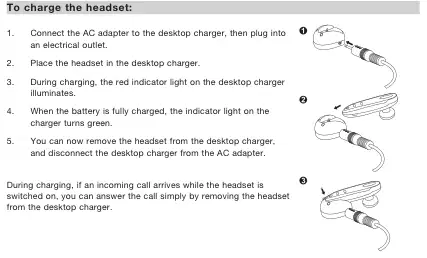
During charging, if an incoming call arrives while the headset is switched on, you can answer the call simply by removing the headset from the desktop charger.

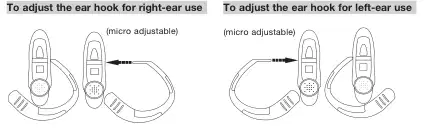
The Belkin Bluetooth Headset can be worn either on the right or left ear. The earpiece is adjustable, and the 90-degree, rotatable design ensures a snug yet comfortable fit in your ear. To put on the headset, please follow the instructions as below:
The ear cushion supplied with the Belkin Bluetooth Headset provides additional comfort and Better fitting. To attach the ear cushion,

Easy to carring via Clip or carring strap.

To adjust the ear hook for right-ear use To adjust the ear hook for left-ear use
Suite your style and match your mood with Belkin cut-out-covers.
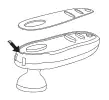
Pull out the current cover as shown, then push your favorite cover in.

Before using the headset, you must first pair it with a Bluetooth wireless technology enabled device, such as a Bluetooth mobile phone.
Pairing is necessary for two Bluetooth devices to connect each other wirelessly. After creating a paired link, you do not need to repeat the pairing process and the headset automatically links to the mobile phone when both devices are switched on. Paring must be performed every time you want to use the headset with a different Bluetooth mobile phone or other Bluetooth wireless technology enabled devices. The headset can be paired simultaneously with up to 8 mobile phones.

To initiate pairing between the headset and a Bluetooth mobile phone in close proximity:

Before using the headset, make sure that (1) the headset is switched on and connected to a paired. Bluetooth mobile phone; (2) the headset is within 10 meters of the phone; and (3) the phone’s Bluetooth feature is on (see your phone’s user’s guide).
When an incoming call comes, the headset rings and the LED indicator flashes blue at a 3-second interval. To receive the call from the headset, press the Talk button once. You can also answer the call by using your phone in the normal way. Please note that if the mobile phone rings first, wait until you hear a ring tone from the headset, and then press the Talk button to answer the call.
To end a call, press the Talk button once on the headset or press the phone’s END key. The headset returns to standby mode.

When a call comes and you do not want to answer it, you can press the Talk button for 2 seconds to reject the call.
You can make a call through:
To use voice activation, the mobile phone must support voice dialing. For details on voice dialing, please see your phone’s user’s guide. 1. Press the Talk button once on your headset. 2. After a short tone sounds, speak the name of the person you wish to connect (if he or she has a voice tag in your phone). 3. The phone automatically dials the number. You can see the details of the call from the phone’s screen.

To redial the last phone number, press either the Volume Down button for 3 seconds.
During a call, you can adjust the headset speaker volume. An audio tone is played for each volume up and volume down step.
To increase the volume, press the Volume Up button repeatedly until you reach the desired level. To decrease the volume, press the Volume Down button repeatedly until you reach the desired level.
To transfer a call from the headset to the mobile phone, initiate it from the mobile phone. (Refer to your phone’s user’s guide)
To transfer a call from the mobile phone to the headset, simply press the Volume up button once even If the headset is then switched on after a call has been initiated.

To mute the headset sound during a call, press the Volume Up button and the Volume Down button for 2 seconds, and you hear 1 tones repeated every 20 seconds. Upon activating the mute function, the person on the other side won’t hear you, but you can hear all sound generated from the other side. To un-Mute, press the Volume Up button or the Volume Down button once.

Status Blue LED Red LED Interval Remarks
Turning on 4 times
Turning off 4 times
Pairing mode Flashes blue and red alternatively until the pairing is complete or time out.
Standby mode 3 times 3 times 3 seconds Flashes red when low
Incoming call 3 times 3 seconds
Talk mode 4 times 4 times 3 seconds Flashes red when low
Status Red LED Green LED
Charging in process On
battery · battery · Charging complete On

Switching on Quick series of 2 tones, low to high Switching off Quick series of 2 tones, high to low
Pairing mode 1 tones Incoming call A ring tone at a 2-second interval
Mute 1 tones repeated every 20 seconds Un-mute Single tone
Low battery 5 rapid tones every 20 seconds in standby mode
Particularly, for Nokia mobile phones
All sounds generated from the mobile phone automatically transfer to the headset.
When a call comes in, the headset uses the same ring tone as the mobile phone. If the mobile
phone is set in vibration mode, you won’t hear any ring tone from the headset.Standard

Standard Compliant with Bluetooth specification v1.1 / v1.2
Chipset BlueCore2-Audio single chipset
Profile Supported Bluetooth Headset & Hands-free profiles Radio Frequency 2402 MHz ~2480 MHz Transmitter Power Class 2 (max 4dBm) Transmission Range Up to 10 meters Receiver Sensitivity -78 dBm Charger Power Supply 5VDC / 200 mA Temperature Operating: -20ºC to 60ºC; Storage: -20ºC to 60ºC; Charging: 0ºC to 45ºC Operation Voltage 3.7V Battery Rechargeable 120mAh Lithium Polymer battery
Charging Time 1.5 ~2 hours Talk Time HV1: Over 4 hours; HV3: Over 7 hours Standby Time More than 1 week Dimension 60(L)x18(W)x11(H) mm Weight 10.6g (not including desktop charger)

Belkin One-year Product Warranty
Belkin warrants this product against defects in materials and workmanship for its warranty period. If a defect is discovered, Belkin will, at its option, repair or replace the product at no charge provided it is returned during the warranty period with transportation charges prepaid to the authorized Belkin dealer from whom you purchased the product. Repaired or replaced product will be returned to you at the same revision level as received or higher at Belkin’s option. Belkin reserves the right to replace discounted product with an equivalent generation product. Proof of purchase may be required.
This warranty does not apply if the product has been damaged by accident, abuse, misuse or misapplication; if the product has been modified or dismantled without the written permission of Belkin;or if any Belkin serial number has been removed or defaced.
The warranty and remedies set forth above are exclusive and in lieu of all others, whether oral or written, expressed or implied. Belkin specifically disclaims any and all other warranties, including implied warranties of merchantability, fitness for a particular purpose, and non-infringement of third party rights are expressly excluded.
Belkin is not responsible for special, incidental or consequential damages resulting from any breach of warranty or under any other legal theory, including, without limitation, damages resulting from use of or reliance on this information presented, loss of profits or revenues or costs of replacement goods, even if informed in advance of the possibility of such damages.

™ HeadSet
Belkin Ltd. Express Business Park, Shipton Way Rushden NN10 6GL, United Kingdom +44 (0) 1933 35 2000 +44 (0) 1933 31 2000 fax
Belkin GmbH Hanebergstrasse 2 80637 Munich, Germany +49 (0) 89 143405 0 +49 (0) 89 143405 100 fax
Belkin B.V. Starparc Building, Boeing Avenue 333 1119 PH Schiphol-Rijk, The Netherlands +31 (0) 20 654 7300 +31 (0) 20 654 7349 fax
Belkin SAS 5 Rue du Petit Robinson, 3ème étage 78350 Jouy en Josas, France +33 (0) 1 34 58 14 00 +33 (0) 1 39 46 62 89 fax
© 2005 Belkin Corporation. All rights reserved. All trade names are registered trademarks of respective manufacturers listed. The Bluetooth
name and the Bluetooth trademarks are owned by Bluetooth SIG, Inc. and are used by Belkin Corporation under license. Mac, Mac OS, and
Apple are trademarks of Apple Computer, Inc., registered in the U.S. and other countries.
P75048ea

La communication sans fil en toute liberté
Manuel de l’utilisateur
F8T064ea P75048ea



Besitzer und unser Team antworten in der Regel innerhalb eines Tages – und Ihre Frage hilft auch anderen weiter.
Stellen Sie die erste Frage — andere Nutzer oder unser Team antworten Ihnen.