







1. Lire avec attention toutes les recommandations et précautions d'emploi avant d'utiliser ce produit. 2. Toutes les recommandations et précautions d'emploi doivent être conservées afin de pouvoir s'y reporter si nécessaire. 3. Lire et comprendre tous les avertissements énumérés dans les précautions d'emploi. 4. Suivre toutes les précautions d'emploi pour utiliser ce produit. 5. Ce produit ne doit pas être utilisé près d'eau, comme par exemple baignoires, éviers, piscine, sous-sol humides ... Etc. 6. Utiliser exclusivement un chiffon sec pour nettoyer ce produit. 7. Ne bloquér aucune ouverture de ventilation. Ne pas placer le produit tout contre un mur ou dans une enceinte fernée, cela gênerait le flux d'air nécessaire au refroidissement. 8. Ne pas placer le produit près de toute source de chaeur telle que radiateurs, arrivées d'air chaud, fourneaux ou autres appareils générant de la chaleur (incluant les amplificateurs producteurs de chaleur) . 9. Ne pas négliger la sécurité que procure un branchement polarisé ou avec raccordement à la terre, Un branchement polarisé comprend deux fiches dont l'une est plus large que l'autre. Un branchement à la terre comprend deux fiches plus une troisième reliée à la terre. Si la fiche secteur fournie ne s'insert pas dans votre prise de courant. consulter un 'électricien afin de remplacer votre prise obsolète. 10. Protéger le cordon d'alimentation de tout écrasement ou pincement, particulièrement au niveau des fiches, des réceptacles utilisés et à l'endroit de sortie de l'appareil. Ne pas casser la fiche de terre du cordon d'alimentation. 11. Utiliser uniquement les accessoires spécifiés par le constructeur. 12. Utiliser uniquement avec le chariot de transport, le support, le trépied, la console ou la table spécifiés par le constructeur ou vendus avec l'appareil. Lors de l'utilisation d'un chariot, bouger avec précaution l'ensemble chariotlappareil afin d'éviter les dommages d'un renversement. 13 Débrancher cet appareil lors d'orages ou s'il n'est pas utilisé pendant une longue période. 14. Des précautions doivent être prises afin qu'aucun objet ne tombe et qu'aucun liquide ne se répande à l'intérieur de l'appareil par les orifics de ventilation ou n'importe quelle autre ouverture. 15. Pour toutes interventions techniques s'adresser à un technicien qualifié.L'intervention technique est nécessaire lorsque l'appareil a été endommagé de n'importe quelle façon, comme par exemple si le cordon secteur ou sa fiche sont détériorés,si du liquide a coulé ou si des objets sont tombés à l'intérieur de l'apparei1,si l'appareil a été exposé à la pluie ou à l'humidité, s'il ne fonctionne pas normalement ou s'il est tombé. 16. ATTENTI0N:Pour réduire le risque d'incendie ou de choc electrique ne pas exposer l'appareil à la pluie ou à l'humidité.
Danger L‘exposition a des niveaux eleves de bruit peut provoquer une perte permanente de l’audition, Chaque organisme humain reagit differemment quant a la perte de l’audition, mais quasiment tout le monde subit une diminution de I’acuite auditive lors d’une exposition suffisamment longue au bruit intense. Les autorites competentes en reglementation de bruit ont defini les expositions tolerees aux niveaux de bruits:
DURE EN HEURES PAR JOUR 8 6 4 3 2 1
INIVEAU SONORE CONTINU EN dB 90 93 95 97 100 103
Selon les autorites, toute exposition dans les limites citees ci-dessus, peuvent provoquer certaines pertes d’audition. Des bouchons ou protections dans l’appareil auditif ou sur l’oreille doivent etre portes lors de l’utilisation de ce systeme d’amplification afin de prevenir le risque de perte permanente de l’audition, Dans le cas d’expositions superieures aux limites precitees il est recommande, afin de se premunir contre les expositions aux pressions acoustiquese I evees potentielIement dangeure u ses, aux personnes exposees aux equipements capables de delivrer de telles puissances, tels ce systeme d’amplification en fonctionnement, de proteger l’appareil auditif.
NE PAS OUVRIR.
PAS ENLEVER LE CHASSIS. NE CONTIENT PAS DE PIECES POUVANT ETRE REPAREE PAR L’UTILISATEUR. CONFER LE SERVICE APRES-VENTE AUX REPARATEURS
CE SYMBOLE A POUR BUT D'AVERTIR L'UTILISATEUR DE LA PRESENCE DE VOLTAGE DANGEREUX NON-ISOLE A L'INTERIEUR DE CE PRODUIT QUI PEUT ETRE DE PUISSANCE SUFFISAMMENT IMPORTANTE POUR PROVOQUER UN CHOC ELECTRIQUE AUX PERSONNES.
CE SYMBOLE A POUR BUT D'AVERTIR L'UTILISATEUR DE LA PRESENCE D'INSTRUCTIONS D'UTILISATION ET DE MAINTENANCE DANS LES DOCUMENTS FOURNIS AVEC CE PRODUIT.
AFIN DE REDUIRE LES RISQUÉ D'INCENDIE ET DE DECHARGE ELECTRIQUE, NE PAS EXPOSER CET APPAREIL A LA PLUIE OU A L'HUMIDITE.


POWER SERVICE GROUPING ELECTRODE SYSTEM NEC ART 250 PART H NEC NATIONAL ELECTRICAL CODE

C o n g r a t u l a t i o n s o n y o u r p u r c h a s e o f t h e N u V o T 2 S I R D u a l S I R I U S R e a d y / A M / F M T u n e r . E n j o y i n g b r o a d c a s t m u s i c t h r o u g h o u t t h e s t h o m e h a s m o v e d i n t o t h e 2 1 c e n t u r y w i t h N u V o ’ s T 2 D u a l T u n e r s o l u t i o n s . W h e t h e r y o u r p r e f e r e n c e i s t r a d i t i o n a l A M / F M l i s t e n i n g , o r S I R I U S S a t e l l i t e R a d i o , t h e T 2 S I R o f f e r s a n a f f o r d a b l e , s p e c i a l l y d e s i g n e d c o m p o n e n t f o r w h o l e - h o m e d i s t r i b u t i o n .
T h e T 2 S I R ’ s i n t e r n a l N u V o N e t c o m m u n i c a t i o n a l l o w s f o r v e r y u n i q u e a n d c o m p l e t e f e e d b a c k t o a l l o f t h e N u V o C o n t r o l P a d s .
Table of Contents:
T2SIR Quick Setup Guide for Use with NuVoNet p a g e 2
IV. NuVoNet Control of the T2SIR
T u n i n g U p a n d D o w n p a g e 1 5 S e l e c t i n g a L o c k e d C h a n n e l p a g e 1 5 C h a n g i n g B a n d s p a g e 1 5 T u n i n g M o d e s p a g e 1 5 S e l e c t i n g T u n e r A a n d B p a g e 1 5 C o n t r o l P a d M a i n M e n u p a g e 1 6 T 2 S I R O p t i o n s p a g e 1 6
F r o n t P a n e l p a g e 4 B a c k P a n e l p a g e 5 N V - T 2 R C 4 R e m o t e C o n t r o l p a g e 6
I. Installing the T2SIR in the Home
C o n n e c t i n g t h e A u d i o O u t p u t s p a g e 7
S e t t i n g t h e A u d i o O u t p u t s f o r N u V o N e t o r
S t a n d a l o n e u s e p a g e 7 A M / F M A n t e n n a I n s t a l l a t i o n p a g e 7 C o n n e c t i n g f o r N u V o N e t U s e p a g e 8 I R C o n t r o l o f t h e T 2 S I R p a g e 8 R S 2 3 2 S e r i a l C o n t r o l p a g e 9
V. Using the Tuner Configurator Software
II. T2SIR Use with SIRIUS Radio
T h e S I R I U S 8 - p i n C o n n e c t o r p a g e 9 S I R I U S M o d u l e s a n d S u b s c r i p t i o n p a g e 9 I n s t a l l i n g t h e S I R I U S A n t e n n a p a g e 1 0
III. T2SIR Front Panel Menu
NV-T2SIR Specifications p a g e 2 4
B a n d s p a g e 1 0 C h a n n e l s p a g e 1 1 S I R I U S I n f o p a g e 1 1 T 2 S I R O p t i o n s p a g e 1 1 E d i t P r e s e t s p a g e 1 1 T u n i n g M o d e p a g e 1 2 S k i p p e d C h a n n e l s p a g e 1 2 T 2 S I R S e t t i n g s p a g e 1 3 O p e r a t i n g M o d e p a g e 1 3 E n a b l e d B a n d s p a g e 1 3 T u n i n g p a g e 1 3 D i a g n o s t i c s p a g e 1 4 A u d i o T e s t p a g e 1 4 R e s e t M e m o r y p a g e 1 4
Basic Features · Advanced Settings


Diagram shown using an optional NV-SCH-ANT SIRIUS Outdoor Antenna and two SIRIUS NV-SCH1 Home Tuners.
www.nuvote chnolog ies .co m NuVo Technolog ies LLC Hebron, Kentu cky USA
ZONE 3 ZONE 4 ZONE 5 ZONE 2 PROGRAM
MODEL NV-I8DM SIX SOURCE EIGHT ZONE AUDIO DISTRIBUTION SYSTEM
Diagram shown using the Grand Concerto System
T h e T 2 S I R D u a l T u n e r i s t h e p e r f e c t b r o a d c a s t m u s i c s o l u t i o n f o r w h o l e - h o m e a u d i o . T h e i n t e r n a l N u V o N e t c a p a b i l i t y o f t h e T 2 S I R a l l o w s i t t o e a s i l y c o m m u n i c a t e i n r e a l t i m e w i t h t h e N u V o G r a n d C o n c e r t o a n d E s s e n t i a E 6 G C o n t r o l P a d s . T h e f o l l o w i n g i s a s t e p - b y - s t e p g u i d e f o r s e t t i n g u p a n d i n s t a l l i n g t h e T 2 S I R f o r u s e w i t h t h e G r a n d C o n c e r t o a n d E s s e n t i a N u V o N e t S u i t e s .
Step 1: U p o n u n p a c k i n g y o u r T 2 S I R T u n e r , e s t a b l i s h w h i c h a u d i o i n p u t s , 1 - 6 , t h e T 2 ’ s A a n d B a u d i o o u t p u t s w i l l r e p r e s e n t . P l u g t h e T 2 i n t o a n A C p o w e r s o u r c e .
Step 2: A t t a c h t h e a u d i o o u t p u t s A a n d B o f t h e T u n e r t o t h e a p p r o p r i a t e n u m b e r e d i n p u t s o n t h e G r a n d C o n c e r t o o r E s s e n t i a S y s t e m .
Step 3: C o n n e c t t h e C A T 5 f r o m t h e N u V o N e t o u t p u t o n t h e r e a r p a n e l o f t h e T u n e r t o o n e o f t h e D e v i c e i n p u t s o n t h e G r a n d C o n c e r t o E Z P o r t o r t h e E s s e n t i a A l l p o r t . T h i s w i l l e n a b l e c o m m u n i c a t i o n t o t h e S y s t e m ’ s C o n t r o l P a d s . N o t e t h a t a s i n g l e C A T 5 c o n n e c t i o n p r o v i d e s i n f o r m a t i o n f r o m b o t h T u n e r s A a n d B . A f i n a l C A T 5 C o n n e c t i o n s h o u l d t h e n b e m a d e t o t h e N u V o N e t C A T 5 i n p u t o n t h e b a c k p a n e l o f t h e G r a n d C o n c e r t o o r E s s e n i t a m a i n a m p l i f i e r f o r t h e N u V o N e t R J 4 5 o n t h e G r a n d C o n c e r t o E Z P o r t o r t h e E s s e n t i a A l l p o r t . T h i s c o m p l e t e s t h e n e c e s s a r y c o n n e c t i o n f o r t h e N u V o N e t c o m m u n i c a t i o n .

Step 4: C o m p l e t e t h e a n t e n n a c o n n e c t i o n s o n t h e b a c k p a n e l o f t h e T u n e r u s i n g s t a n d a r d R G 6 c o a x i a l c a b l e . Q u a d s h i e l d e d c a b l e i s r e c o m m e n d e d . W h e n t h e a n t e n n a s a r e c o n n e c t e d , t h e T u n e r w i l l b e g i n r e c e i v i n g a s i g n a l f o r b o t h T u n e r s A a n d B .
Step 5: W h e n t h e T u n e r i s p l u g g e d i n t o a n A C p o w e r s o u r c e , t h e f r o n t p a n e l d i s p l a y w i l l m o v e t h r o u g h a b o o t p r o c e d u r e . W h e n t h i s p r o c e d u r e i s c o m p l e t e d , a m e s s a g e , U n i n i t i a l i z e d S t a t e D e t e c t e d w i l l a p p e a r .
Step 6: F o l l o w i n g t h e p r o m p t f r o m t h e d i s p l a y , t o u c h t h e O K b u t t o n o n t h e T u n e r ’ s f r o n t p a n e l c o n t r o l . T h i s w i l l d i s p l a y a r e g i o n a l t u n i n g s e l e c t i o n : U S A a n d C a n a d a , W e s t e r n E u r o p e , A u s t r a l i a , a n d N e w Z e a l a n d . M a k e t h e a p p r o p r i a t e s e l e c t i o n t o m a t c h t h e T u n e r s g e o g r a p h i c l o c a t i o n .
Step 7: T o u c h i n g O K o n t h e f r o n t p a n e l c o n t r o l s w i l l p r o m p t a s e c o n d s c r e e n o n t h e d i s p l a y . T h i s w i l l r e a d , Set Tuner A Mode, Standalone, Source 1, Source 2, Source 3, Source 4, Source 5, and Source 6. T h e t o p s e l e c t i o n , Standalone, w i l l b e h i g h l i g h t e d . T h i s c h o i c e i s u s e d f o r a n y p u r p o s e t h a t i s n o t N u V o N e t c o m m u n i c a t i o n . U s i n g t h e d o w n a r r o w o n t h e f a r r i g h t o f t h e f r o n t p a n e l c o n t r o l s , s c r o l l t o t h e d e s i r e d s o u r c e i n p u t n u m b e r a n d t o u c h O K t o s e l e c t . T h e d i s p l a y w i l l a u t o m a t i c a l l y g o t o T u n e r B s e t u p . R e p e a t t h e a b o v e s t e p s f o r s e t t i n g T u n e r B . I f N u V o N e t i s n o t c o n n e c t e d o r a l l a v a i l a b l e s o u r c e s h a v e b e e n a s s i g n e d , t h a n t h e s o u r c e s e l e c t i o n s w i l l b e g r a y e d o u t .
Step 8: W h e n t h e d e s i r e d s o u r c e n u m b e r i s s e l e c t e d , t h e d i s p l a y w i l l r e t u r n t o t h e f i r s t s c r e e n . B o t h o u t p u t s A a n d B w i l l d i s p l a y t h e l o w e s t F M b a n d f r e q u e n c y b y d e f a u l t . A t t h i s p o i n t , f u l l t u n i n g c a p a b i l i t y c a n b e d o n e f r o m t h e T u n e r ’ s f r o n t p a n e l o r a n a d d r e s s e d N u V o C o n t r o l P a d .
Step 9: W h e n b o t h T u n e r o u t p u t s a r e s e t , m a k e s u r e t h e N u V o N e t C A T 5 c o n n e c t i o n b e t w e e n t h e T u n e r s b a c k p a n e l a n d t h e s y s t e m E Z P o r t i s c o m p l e t e d .
T h e T 2 S I R T u n e r i s n o w r e a d y f o r N u V o N e t c o m m u n i c a t i o n w i t h e i t h e r t h e G r a n d C o n c e r t o o r E s s e n t i a E 6 G d i s t r i b u t e d a u d i o s y s t e m s .
P l e a s e s e e t h e c o m p l e t e i n s t a l l a t i o n g u i d e f o r u n d e r s t a n d i n g t h e f u l l u s e o f y o u r T 2 S I R T u n e r .

NV-T2SIR Dual SIRIUS Ready AM/FM Tuner
Sr6 Give Me The Night
MENU
A/B DISP
STANDBY
FM 103.5 Ticket To Ride
ST
BAND OK
RADIO DATA SYSTEM
1 45678 9 1 0 1 11 2 1 4 2 3
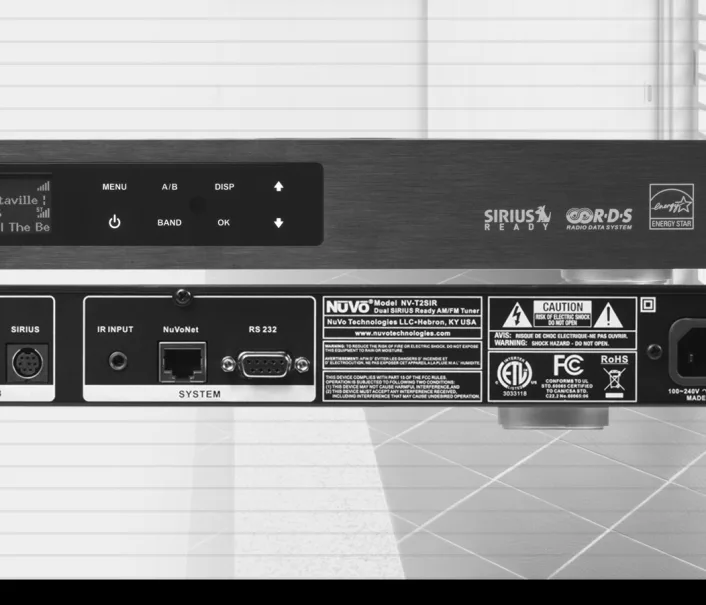
2. Tuner Highlight: T h i s h i g h l i g h t b a r s h i f t s b e t w e e n t h e T u n e r A a n d B d i s p l a y t o i n d i c a t e w h i c h T u n e r i s b e i n g c o n t r o l l e d .
3. Broadcast Band Display: T h i s l i n e o f t h e f r o n t p a n e l d i s p l a y s h o w s t h e s e l e c t e d b r o a d c a s t b a n d a n d f r e q u e n c y o r c h a n n e l . T h e b a n d s a v a i l a b l e a r e A M , F M a n d o p t i o n a l S I R I U S .
4. Metadata Display: T h i s l i n e o f t h e d i s p l a y s c r o l l s R D S , R a d i o D a t a S e r v i c e , i n f o r m a t i o n f o r F M a n d S I R I U S R a d i o b r o a d c a s t i n f o r m a t i o n w h e n a S I R I U S - R e a d y r e c e i v e r i s c o n n e c t e d .
5. Preset Number: T h e T 2 S I R f e a t u r e s u p t o 5 b a n k s o f 2 0 p r e s e t s e a c h . T h i s i n d i c a t e s t h e n u m b e r o f t h e p r e s e t b a n k o f t h e s e l e c t e d p r e s e t .
6. Antenna Signal: T h e l e v e l o f s i g n a l l e v e l i s i n d i c a t e d w i t h u p t o f i v e b a r s , f i v e b e i n g t h e b e s t . W h e n l i s t e n i n g t o F M , f u l l s t e r e o r e c e p t i o n i s i n d i c a t e d w i t h a n a b b r e v i a t e d S T .
7. Menu: T h i s c a p a c i t i v e t o u c h p a n e l a l l o w s f r o n t a c c e s s t o t h e T 2 S I R ’ s c o n t r o l s a s w e l l a s p r e s e t l i s t e n i n g s e l e c t i o n s a n d t u n i n g p a r a m e t e r s .
8. Power: T h i s b u t t o n t u r n s t h e p o w e r f o r t h e f r o n t p a n e l o f f w h e n t a p p e d , a n d c a u s e s a s o f t r e b o o t o f t h e o p e r a t i n g s y s t e m w h e n i t i s h e l d f o r 3 s e c o n d s .
10. Band: T h e B a n d b u t t o n t o g g l e s b e t w e e n A M , F M a n d S I R I U S w h e n i t i s a c t i v a t e d f o r t h e h i g h l i g h t e d T u n e r A o r B .
12. OK: O k i n i t i a t e s a h i g h l i g h t e d M e n u c h o i c e . 13. Disp: T h i s b u t t o n t o g g l e s t h r o u g h t h e t u n i n g c h o i c e s f o r S I R I U S . T h i s i s o n l y f u n c t i o n a l w h e n S I R I U S r e c e p t i o n i s a c t i v a t e d .
14. Up and Down Arrows: T h e s e a r r o w b u t t o n s p r o v i d e m u l t i p l e f u n c t i o n s d e p e n d i n g o n t h e m o d e o f t h e T u n e r . I n n o r m a l o p e r a t i o n , t h e y i n i t i a t e t u n i n g u p a n d d o w n t h r o u g h t h e s e l e c t e d b a n d . W h e n i n m e n u m o d e , t h e y s c r o l l u p a n d d o w n t h r o u g h t h e m e n u c h o i c e s .
Front Panel Features


1 . Antenna Input: T h i s s i n g l e F c o n n e c t o r i s t h e c o a x i a l c a b l e c o n n e c t i o n b e t w e e n t h e T 2 S I R a n d t h e i n c l u d e d N V - T 2 F A A A M / F M a n t e n n a .
2 . Audio Output: T h e a u d i o b r o a d c a s t f o r A M , F M , o r S I R I U S S a t e l l i t e R a d i o r e c e i v e d b y t h e T u n e r m o d u l e i s a v a i l a b l e t h r o u g h t h i s s t e r e o R C A o u t p u t . T u n e r A a n d B o f f e r i n d e p e n d e n t a u d i o o u t p u t s f o r u s e w i t h t h e N u V o a u d i o s y s t e m s o r t h i r d p a r t y r e c e i v e r s a n d a m p l i f i e r s .
3 . SIRIUS: T h i s e i g h t - p i n c o n n e c t i o n i s a u n i v e r s a l S I R I U S c o m m u n i c a t i o n p o r t . I t a l l o w s a t h i r d p a r t y S I R I U S T u n e r m o d u l e t o f u l l y c o m m u n i c a t e w i t h t h e G r a n d C o n c e r t o o r E s s e n t i a E 6 G N u V o N e t S y s t e m s .
4 . IR Input: T h e T 2 S I R o f f e r s a s i n g l e s t e r e o m i n i , 3 . 5 m m c o n n e c t i o n f o r i n d e p e n d e n t I R c o n t r o l o f b o t h T u n e r A a n d B .
5 . NuVoNet: T h i s s i n g l e C A T 5 c o n n e c t i o n p r o v i d e s f u l l N u V o N e t c o m m u n i c a t i o n f o r b o t h T u n e r s A a n d B t o t h e N u V o G r a n d C o n c e r t o a n d E s s e n t i a E 6 G a u d i o d i s t r i b u t i o n s y s t e m s . T h i s c o n n e c t i o n i s m a d e a t t h e G r a n d C o n c e r t o E Z P o r t o r t h e E s s e n t i a E 6 G A l l p o r t .
6 . RS232: T h i s D B 9 9 - p i n c o n n e c t o r i s u s e d f o r c o n f i g u r a t i o n p r o g r a m m i n g ( s e e p a g e 1 7 , V. Using the Tuner Configurator Software) a n d b i d i r e c t i o n a l s e r i a l c o n t r o l f r o m a t h i r d p a r t y h o m e a u t o m a t i o n c o n t r o l l e r .
Back Panel Features


1 .Power: T h e p o w e r b u t t o n t u r n s t h e T u n e r o n a n d o f f . 2 .Tune Buttons: T h e s e b u t t o n s a r e t h e e q u i v a l e n t o f u s i n g t h e U p a n d D o w n a r r o w s o n t h e f r o n t p a n e l o f t h e T 2 S I R t o t u n e . 3 .Band: T h i s b u t t o n t o g g l e s t h r o u g h t h e T u n e r s a v a i l a b l e b r o a d c a s t b a n d s . 4 .Seek Up and Down: T h e s e e k b u t t o n s w i l l t u n e t o t h e n e x t a v a i l a b l e s t a t i o n w i t h t h e r e q u i r e d s i g n a l s t r e n g t h f o r A M a n d F M u s e . T h e s i g n a l t h r e s h o l d c a n b e a d j u s t e d h i g h e r o r l o w e r u s i n g t h e T u n e r C o n f i g u r a t o r s o f t w a r e ( s e e p g . 1 8 ) , o r t h r o u g h t h e T 2 S I R O p t i o n s m e n u o n t h e f r o n t p a n e l ( s e e p g . 1 0 ) . 5 .Preset Tune: T h e s e b u t t o n s s t e p t h r o u g h t h e a s s i g n e d p r e s e t s . T h e T 2 S I R i s c a p a b l e o f 5 b a n k s o f 2 0 p r e s e t s . 6 .Category Tune: C a t e g o r y T u n e i s n o t i m p l e m e n t e d o n t h i s m o d e l . 7 . Pre: T h i s b u t t o n i s u s e d t o e s t a b l i s h a p r e s e t b a n k a n d p r e s e t n u m b e r f o r t h e f r e q u e n c y b e i n g d i s p l a y e d o n t h e s e l e c t e d T u n e r . T o t u n e t o a s p e c i f i c p r e s e t , p u s h P r e f o l l o w e d b y t h e b a n k n u m b e r ( 1 - 5 ) t h e n t h e 2 - d i g i t p r e s e t n u m b e r ( 0 1 - 2 0 ) . 8 .Tuner A & B LED: T h i s L E D g l o w s r e d w h e n T u n e r A i s s e l e c t e d a n d g r e e n w h e n T u n e r B i s s e l e c t e d . T h i s L E D g l o w s o n l y m o m e n t a r i l y w h e n a b u t t o n i s p u s h e d . 9 .A/B: T h i s b u t t o n t o g g l e s b e t w e e n T u n e r A a n d T u n e r B o p e r a t i o n . 1 0 .Disp: T h i s b u t t o n f u n c t i o n s o n l y f o r N o r t h A m e r i c a n s a t e l l i t e r a d i o u s e . 1 1 .Numeric Buttons: T h e s e b u t t o n s ( 0 - 9 ) a r e u s e d t o a c c e s s a s p e c i f i c s t a t i o n f r e q u e n c y o r p r e s e t . 1 2 . OK: T h i s i s a s e l e c t b u t t o n u s e d f o r s a v i n g p r e s e t s o r e n t e r i n g a n A M o r F M f r e q u e n c y . 1 3 . Band Buttons: T h e s e f o u r b u t t o n s a r e a d i r e c t s e l e c t f o r t h e t u n i n g b a n d s a v a i l a b l e t h r o u g h t h e T 2 T u n e r s . A c t u a l f u n c t i o n a l i t y d e p e n d s o n t h e m o d e l T u n e r b e i n g c o n t r o l l e d .
NV-T2RC4 Remote Control

Connecting the Audio Outputs (Fig. 1) T h e T 2 S I R h a s t w o i n d e p e n d e n t a u d i o o u t p u t s l a b e l e d A a n d B . T h e s e a r e s t a n d a r d s t e r e o R C A c o n n e c t i o n s a n d c a n b e c o n n e c t e d t o a n y d e v i c e d e s i g n e d t o r e c e i v e a n a n a l o g s t e r e o a u d i o s i g n a l .

Setting the Audio Outputs for NuVoNet or Standalone use (Fig. 2) T h e o u t p u t s A a n d B a r e i n d i v i d u a l l y s e t f r o m t h e f r o n t p a n e l d i s p l a y o f t h e T 2 S I R . W h e n t h e T u n e r i s i n i t i a l l y p l u g g e d i n t o a n A C p o w e r s o u r c e , a s h o r t s e t u p w i z a r d w i l l a p p e a r o n t h e d i s p l a y . A m e s s a g e , U n i n i t i a l i z e d S t a t e D e t e c t e d ( P r e s s O K ) w i l l a p p e a r . W h e n O K i s p r e s s e d , t h e p r o m p t i s t o s e l e c t a r e g i o n a l t u n i n g s t a n d a r d . T h e c h o i c e s a r e U S A / C a n a d a , W e s t e r n E u r o p e , A u s t r a l i a , a n d N e w Z e a l a n d . U s e t h e U p a n d D o w n a r r o w s t o h i g h l i g h t t h e a p p r o p r i a t e c h o i c e a n d t o u c h t h e O K b u t t o n t o s e l e c t t h i s . O n c e r e g i o n a l t u n i n g h a s b e e n s e l e c t e d , t h e d i s p l a y w i l l p r o m p t f o r t h e u s e o f e a c h o u t p u t A a n d B . U s i n g t h e U p a n d D o w n a r r o w s o n t h e f r o n t p a n e l , m o v e t h e h i g h l i g h t t o t h e a p p r o p r i a t e u s e o f t h e T u n e r o u t p u t a n d t o u c h O K . T h e c h o i c e s a r e Stand Alone, Source 1, Source 2, Source 3, Source 4, Source 5, and Source 6. F o r a n y u s e o t h e r t h a n w i t h t h e E s s e n t i a E 6 G o r G r a n d C o n c e r t o S y s t e m s , s e l e c t S t a n d a l o n e . T h i s w i l l r e q u i r e I R o r s e r i a l c o n t r o l o f t h e T 2 S I R ’ s f u n c t i o n s . H i g h l i g h t i n g t h e a p p r o p r i a t e S o u r c e n u m b e r i n p u t f o r t h e N u V o s y s t e m a n d t o u c h i n g t h e O K b u t t o n s e t s N u V o N e t c o m m u n i c a t i o n . O n c e O u t p u t A i s s e t , t h e h i g h l i g h t w i l l m o v e t o O u t p u t B . F o r o p e r a t i o n , b o t h o u t p u t s A a n d B m u s t b e s e t a s S t a n d a l o n e o r a s a N u V o N e t S o u r c e .

A/B DISP Regional Setup US and Canada Western Europe Australia
A/B DISP Set TunerA Mode Standalone Source 1 Source 2
W h e n t h e T u n e r ’ s o u t p u t s a r e s e t , t h e y w i l l r e t u r n t o F M 8 7 . 9 , o r t h e m i n i m u m F M b a n d s e t t i n g f o r t h e s e l e c t e d r e g i o n a l t u n i n g p a r a m e t e r s . A t t h i s p o i n t t h e T 2 S I R i s r e a d y f o r e i t h e r N u V o N e t c o m m u n i c a t i o n o r s t a n d a l o n e u s e , d e p e n d i n g o n t h e s e t t i n g m a d e f o r b o t h o u t p u t s .


AM/FM Antenna Installation (Fig. 3)
T h e T 2 S I R i s s h i p p e d w i t h t h e N V - T 2 F A A a c t i v e A M / F M a n t e n n a . T h e a n t e n n a i s d e s i g n e d t o w o r k a c t i v e l y w i t h t h e T u n e r u s i n g s t a n d a r d 7 5 - o h m c o a x i a l c a b l e . Q u a d - s h i e l d e d c a b l e i s r e c o m m e n d e d f o r t h i s p u r p o s e . T h e a d v a n t a g e o f t h e a c t i v e a n t e n n a t e c h n o l o g y i s t h e r e m o t e l o c a t i o n c a p a b i l i t y , u p t o 2 0 0 f e e t f r o m t h e T 2 S I R l o c a t i o n , w i t h o u t t h e n e e d f o r a n e x t e r n a l p o w e r s u p p l y . T h e t e r m i n a t i o n a t t h e a n t e n n a a n d T u n e r i s a s t a n d a r d F s t y l e c o n n e c t o r . N o s o f t w a r e a p p l i c a t i o n o r c o n f i g u r a t i o n i s n e c e s s a r y b e y o n d m a k i n g t h e c a b l e c o n n e c t i o n a t e a c h e n d .
The NuVo active antenna can be located up to 200 feet from the T2SIR Tuner.
Note, for best results, the T2FAA antenna should be located as high as possible, either in an attic or outside. If you choose to use a third party antenna, other than the T2FAA, you must use the forced off setting from the menu to allow the signal to pass through to the T2SIR, (s e e s e c t i o n I I I . T2SIR Front Panel Menu, Antenna Power, p g . 1 4 ).

Connecting for NuVoNet Use (Fig. 4)
O n c e a u d i o o u t p u t s A a n d B a r e s e t f o r N u V o N e t , t h e T 2 S I R i s r e a d y t o c o m m u n i c a t e i n r e a l t i m e w i t h t h e G r a n d C o n c e r t o o r E s s e n t i a E 6 G a u d i o d i s t r i b u t i o n s y s t e m s . T o c o m p l e t e t h e c o n n e c t i o n , a l l t h a t i s n e c e s s a r y i s a s i n g l e C A T 5 c a b l e f r o m t h e N u V o N e t o u t p u t o n t h e T 2 S I R ’ s b a c k p a n e l t o o n e o f t h e D e v i c e i n p u t s o n e i t h e r t h e G r a n d C o n c e r t o E Z P o r t o r t h e E s s e n t i a E 6 G A l l p o r t . S i n c e t h e o u t p u t s o f t h e T u n e r m u s t b e s e t a s a s p e c i f i c s o u r c e n u m b e r i n p u t f o r N u V o N e t c o m m u n i c a t i o n , t h e n u m b e r o f t h e D e v i c e c o n n e c t i o n u s e d i s i r r e l e v a n t t o t h e s y s t e m ’ s o p e r a t i o n . O n c e t h e c o n n e c t i o n i s c o m p l e t e , t h e T u n e r i s r e a d y t o f u l l y c o m m u n i c a t e w i t h N u V o N e t .
IR Control of the T2SIR (Fig. 5)
SIR SR 86 (P101) SIRIUS Pops
T h e T 2 S I R c a n b e u s e d w i t h o u t N u V o N e t a s a s t a n d a l o n e A M / F M / S I R I U S - R e a d y T u n e r . T h e I R r e c e i v e r i s a l w a y s a c t i v e , h o w e v e r c o n t r o l t h r o u g h I R i s t y p i c a l l y d o n e i n S t a n d a l o n e m o d e , ( s e e s e c t i o n I . Setting the Audio Outputs for NuVoNet or Standalone use, p g . 7 ) .
OK

Jozef Kossovit · Hungaria

O n c e t h e a u d i o o u t p u t s a r e s e t a t S t a n d a l o n e , t h e T 2 S I R o f f e r s t h r e e m e t h o d s f o r I R c o n t r o l . O n e i s t o t a k e t h e I R o u t p u t o f y o u r c o n t r o l d e v i c e u s i n g a m o n o 3 . 5 m m p a t c h c a b l e p l u g g e d i n t o t h e D i r e c t I R i n p u t o n t h e b a c k p a n e l o f t h e T 2 S I R . T u n e r s A a n d B f e a t u r e d i s c r e t e c o m m a n d s , a l l o w i n g b o t h T u n e r s t o b e c o n t r o l l e d i n d e p e n d e n t l y f r o m o n e i n p u t . T h e s e c o n d m e t h o d f o r I R c o n t r o l i s t o a t t a c h a n I R e m i t t e r o v e r t h e I R r e c e i v e r o n t h e f r o n t p a n e l , a n d t h e t h i r d m e t h o d i s t o a i m t h e r e m o t e c o n t r o l a t t h e I R r e c e i v e r l o c a t e d o n t h e f r o n t p a n e l .

Model NV -T2 SIR Dual SIRI US Ready AM/FM Tuner
NuVo Techno log ies LLC Hebr on, KY USA •
T h e T 2 S I R f e a t u r e s a b i d i r e c t i o n a l D B 9 p o r t f o r s e r i a l c o n t r o l . T h i s e n a b l e s t h e T u n e r t o b e c o n t r o l l e d v i a a t h i r d p a r t y h o m e a u t o m a t i o n s y s t e m a n d w i l l i n t u r n i s s u e p r e s e n t s t a t e c o m m a n d s b a c k t o t h e c o n t r o l l e r . P o t e n t i a l l y , a l l a s p e c t s o f N u V o N e t c o m m u n i c a t i o n c a n b e e m u l a t e d u s i n g t h e s e r i a l c o n t r o l c a p a b i l i t y . T h e n e c e s s a r y p r o t o c o l f o r s e r i a l u s e c a n b e d o w n l o a d e d f r o m t h e N u V o w e b s i t e P r o Z o n e a t

The SIRIUS 8-Pin Connector (Fig. 6)
E a c h T u n e r , A a n d B , h a s a S I R I U S - R e a d y c o n n e c t o r o n i t s b a c k p a n e l . T h i s c o n n e c t o r i s r e a d y t o r e c e i v e t h e T u n e r s i g n a l a n d r e l a t e d m e t a d a t a f r o m a S I R I U S r e c e i v e r . A n y S I R I U S r e c e i v e r e q u i p p e d w i t h t h e S I R I U S c o n n e c t o r w i l l c o m m u n i c a t e w i t h t h e T 2 S I R ’ s i n p u t . T h e c a b l e n e c e s s a r y f o r t h i s c o n n e c t i o n i s t y p i c a l l y s u p p l i e d w i t h t h e S I R I U S r e c e i v e r . O n c e t h e 8 - p i n c o n n e c t i o n i s m a d e f r o m t h e S I R I U S r e c e i v e r t o t h e T 2 S I R , S I R I U S w i l l b e r e c o g n i z e d a s a r a d i o b a n d f o r e i t h e r T u n e r A o r B .
Diagram shown using a NV-SCH1 SIRIUS Home Tuner
SIRIUS Modules and Subscription (Fig. 7)

T h e r e i s n o t a s p e c i f i c S I R I U S r e c e i v e r t h a t m u s t b e u s e d i n c o n j u n c t i o n w i t h t h e T 2 S I R . S e v e r a l a r e o n t h e m a r k e t , a n d t h e o n l y p r e - r e q u i s i t e i s t h a t t h e r e c e i v e r u s e d h a s t h e 8 - p i n S I R I U S - R e a d y c o n n e c t o r . N u V o d o e s h a v e t h e N V - S C H 1 h o m e r e c e i v e r m o d u l e a s a c o n v e n i e n t , i n e x p e n s i v e s o l u t i o n f o r t h e T 2 S I R . E a c h S I R I U S T u n e r h a s a n I D a s s o c i a t e d w i t h i t . T h i s n u m b e r i s t y p i c a l l y f o u n d p r i n t e d o n t h e S I R I U S T u n e r o r b y g o i n g t o t h e T 2 S I R S I R I U S I n f o m e n u . E a c h a t t a c h e d S I R I U S r e c e i v e r m u s t b e a c t i v a t e d u s i n g i t s I D n u m b e r .
NuVo Technologies Cincinnati Ohio USA
FUSE:T5 A 120V 60Hz 500W
MODEL NV-I8M SIX SOURCE EIGHT ZONE AUDIO DISTRIBUTION SYSTEM
SPEAKER 40W/6 OHMS X 2 LEFT RIGHT
ZONE 5 ZONE 6 ZONE 7 ZONE 8
VARIABLE OUTPUT
FIXED OUTPUT
TIP=L RING=R
SPEAKER 40W/6 OHMS X 2 LEFT RIGHT
VARIABLE OUTPUT
FIXED OUTPUT
TIP=L RING=R
SPEAKER 40W/6 OHMS X 2 LEFT RIGHT
VAR. OUT
FIX. OUT
PROGRAM
SYSTEM ZONE TRIGGER OUTPUTS NETWORK
1 2 3 4 1 2 3 CONNECT TO NV-I8X
EMITTER OUTPUTS
SUM1
SYS ON
EXT. MUTE
CONNECT TO NV-I8EZP1
USE NV-NC1 CABLE
DIGITAL LINK
USE NV-SLC1 CABLE
C US
R
RS232 Serial Control · SIRIUS-Ready 8-pin connectors · 3033118

Your SIRIUS Tuners must be activated through SIRIUS. This can be done online at www.SIRIUS.com
Installing the SIRIUS Antenna (Fig. 8)

T h e r e a r e s e v e r a l v e r s i o n s o f S I R I U S a n t e n n a s o n t h e m a r k e t . T h e a n t e n n a s b e s t s u i t e d f o r u s e w i t h t h e T 2 S I R a r e d e s i g n e d f o r o u t s i d e p l a c e m e n t , s u c h a s t h e N V - S C H - A N T a l s o a v a i l a b l e f r o m D i r e c t e d E l e c t r o n i c s a s m o d e l 1 4 2 4 5 . A n a n t e n n a w i t h a n F c o n n e c t o r d e s i g n e d f o r u s e w i t h c o a x i a l c a b l e i s r e c o m m e n d e d . O f t e n i t i s n e c e s s a r y f o r t h e a n t e n n a t o h a v e a n u n i m p e d e d v i e w o f t h e s k y t o r e c e i v e a s i g n a l . F i g u r e 8 s h o w s t h i s t y p e o f a p p l i c a t i o n w i t h t h e N V - S C H - A N T a n t e n n a w i t h i t s i n c l u d e d s i g n a l s p l i t t e r f o r u s e w i t h t w o S I R I U S r e c e i v e r s . T h e T 2 S I R i s s h i p p e d w i t h t w o N V - T 2 F S D A M / F M / S a t e l l i t e D i p l e x e r s . T h i s a l l o w s t h e A M / F M a n d S I R I U S s i g n a l s t o b e c o m b i n e d a n d b r o u g h t t o t h e b a c k o f t h e T u n e r . T h e r e , t h e s e c o n d N V - T 2 F S D c a n b e u s e d t o s p l i t t h e s i g n a l a s e c o n d t i m e . T h i s a l l o w s t h e A M / F M s i g n a l t o c o m e i n t o t h e a n t e n n a i n p u t o n t h e T 2 S I R b a c k p a n e l a n d t h e S I R I U S s i g n a l i s t h e n r o u t e d t o t h e S I R I U S r e c e i v e r o r r e c e i v e r s , d e p e n d i n g o n t h e a p p l i c a t i o n . I t i s n o t n e c e s s a r y t o p l a c e t h e A M / F M a n d S I R I U S a n t e n n a s i n t h e s a m e l o c a t i o n .
A/B DISP Main Menu Bands Channels My Presets 1
BAND OK
It is important to note that Directed Electronics has an outdoor antenna, model 14240, that has a 50 ohm connection intended for RG58 cable. This model is not recommended for use with the NV-T2SIR Tuner.
III. T2SIR Front Panel Menu (Fig. 9) T h e M e n u b u t t o n o n t h e f r o n t p a n e l o f t h e T 2 S I R a l l o w s a c c e s s t o t h e t u n i n g a n d f u n c t i o n a l i t y o f b o t h T u n e r s A a n d B . T h e m e n u s e l e c t i o n s a r e t h e s a m e f o r b o t h , a n d t o u c h i n g t h e A / B b u t t o n m o v e s t h e h i g h l i g h t b e t w e e n t h e t w o T u n e r o u t p u t s .
Main Menu FM AM SIRIUS
Bands (Fig. 10)
T h e B a n d s m e n u i s a s i m p l e t o g g l e t h r o u g h t h e a v a i l a b l e b r o a d c a s t b a n d s o f e a c h T u n e r . S I R I U S i s o n l y p r e s e n t i f a S I R I U S r e c e i v e r h a s b e e n p l u g g e d i n t o e i t h e r T u n e r A o r B . T h e c u r r e n t l y s e l e c t e d b a n d w i l l b e d i s p l a y e d w i t h a c h e c k m a r k .

Channels (Fig. 11)
Channels All SIRIUS Cha Pop Rock
T h e C h a n n e l m e n u i s a S I R I U S f u n c t i o n . I t i s a q u i c k a c c e s s t o t h e c a t e g o r i e s a s s o c i a t e d w i t h S I R I U S . W h e n s e l e c t e d , e a c h c a t e g o r y w i l l e x p a n d t o d i s p l a y t h e a s s o c i a t e d c h a n n e l s . W h e n t h e S I R I U S i n p u t i s n o t i n u s e , t h i s w i l l a p p e a r g r a y e d o u t .
SIRIUS Info (Fig. 12)
T h e r e a r e t w o s u b - m e n u s w i t h i n t h i s c h o i c e . I t i s o n l y a c t i v e i f t h e S I R I U S i n p u t f o r t h e s e l e c t e d T u n e r i s b e i n g u s e d .
SIRIUS Info SIRIUS ID Now Playing I..
SIRIUS ID: T h i s d i s p l a y s t h e I D n u m b e r a s s o c i a t e d w i t h t h e c o n n e c t e d S I R I U S T u n e r . T h i s n u m b e r i s r e f e r e n c e d w h e n a c t i v a t i n g t h e T u n e r t h r o u g h S I R I U S , o r f o r c u s t o m e r s e r v i c e i s s u e s .
Now Playing Info: T h i s s c r o l l s t h e m e t a d a t a f o r a s e l e c t e d S I R I U S C h a n n e l .
T2SIR Options Edit Presets Seek Tune Tuning Mode
T2SIR Options (Fig. 13)
T h e o p t i o n s m e n u h a s t h r e e m a i n t u n i n g s u b - m e n u s . T h e s e a r e t u n i n g d e f a u l t s t h a t c a n b e s e t :
Edit Presets (Fig. 14): T h i s i s a g r e a t t o o l f o r a l l o w i n g a c u r r e n t l y s e l e c t e d c h a n n e l t o b e s a v e d a s a p r e s e t . A s a n u m b e r p r e s e t i s s e l e c t e d , t h e d i s p l a y w i l l p r o m p t t o A s s i g n t o c u r r e n t c h a n n e l . W h e n s e l e c t e d , t h e T 2 S I R w i l l s a v e t h e f r e q u e n c y a n d a s s o c i a t e d s h o r t n a m e o f t h e c h a n n e l . T h e r e a r e 5 b a n k s o f 2 0 p r e s e t s e a c h a v a i l a b l e . T o a d d a p r e s e t t o f a v o r i t e s , h i g h l i g h t a n d s e l e c t a n e x i s t i n g p r e s e t . T h i s w i l l b r i n g u p a s e c o n d m e n u w i t h s e v e r a l c h o i c e s : Delete Preset, w h i c h w i l l e r a s e t h e h i g h l i g h t e d p r e s e t f r o m t h e l i s t ; Add to Favorites p l a c e s t h e h i g h l i g h t e d p r e s e t i n t o t h e F a v o r i t e s m e n u a v a i l a b l e a t e a c h C o n t r o l P a d ; Move Up a n d Move Down m o v e s t h e h i g h l i g h t e d p r e s e t u p o r d o w n w i t h i n t h e l i s t o f p r e s e t s ; Move to Top a n d Move to Bottom p l a c e s t h e h i g h l i g h t e d p r e s e t i n t h e n u m b e r 1 p o s i t i o n o r t o t h e l a s t a v a i l a b l e p o s i t i o n .
Edit Presets Delete Preset Add to Favori... Move Up

Tuning Mode (Fig. 15): T u n i n g M o d e h a s f o u r c h o i c e s t h a t s e t d e f a u l t s f o r t h e w a y i n w h i c h t h e T 2 S I R w i l l t u n e t h r o u g h c h a n n e l s o r f r e q u e n c i e s . T h e S I R I U S o n l y f u n c t i o n s w i l l b e g r a y e d o u t w h e n a S I R I U S r e c e i v e r i s n o t p r e s e n t . Seek Tune (Am/FM only): S e e k T u n e s e a r c h e s f o r s t r o n g f r e q u e n c i e s i n A M / F M b a n d s a n d w i l l s t o p a t t h e n e x t f r e q u e n c y t h a t m e e t s t h e s e t t u n i n g p a r a m e t e r s . T h i s m e n u o p t i o n t u r n s s e e k o n o r o f f . W h e n S e e k T u n e i s t u r n e d o f f , S t e p T u n e i s t h e d e f a u l t . Preset Tune: W h e n t u r n e d o n , t h e P r e s e t T u n e m o d e w i l l o n l y s t o p a t c h a n n e l s o r f r e q u e n c i e s t h a t h a v e b e e n s a v e d a s p r e s e t s i n t h e c u r r e n t b a n d . Parental Lock (SIRIUS only) (Fig. 16): T h i s r e q u i r e s a 4 - d i g i t s e c u r i t y c o d e . T h e d e f a u l t p a r e n t a l l o c k c o d e i s 5 . T o a c c e s s t h e s u b - m e n u s , y o u m u s t e n t e r t h e d e f a u l t 5 . T h i s i s d o n e b y u s i n g t h e U p a r r o w t o s c r o l l t o t h e f i r s t 5 , t h e n t o u c h i n g O K o n t h e f r o n t p a n e l m o v e s t h e h i g h l i g h t t o t h e s e c o n d n u m b e r . W h e n 5 i s s e t , y o u w i l l t h e n h a v e a c c e s s t o t h e P a r e n t a l L o c k s e t u p . Set Security Code (Fig. 17): T h i s l e t s y o u s e t a n e w c o d e f o r P a r e n t a l L o c k p u r p o s e s . T h e n e w c o d e i s s e t i n t h e s a m e w a y a s t h e d e f a u l t 5 d e s c r i b e d a b o v e . O n c e t h e n e w c o d e i s s e t , i t w i l l r e p l a c e t h e d e f a u l t . Locked Channels: T h i s i s a c o m p l e t e l i s t o f t h e a v a i l a b l e S I R I U S c h a n n e l s . W h e n s p e c i f i c c h a n n e l s a r e h i g h l i g h t e d a n d s e l e c t e d , t h e y a r e a d d e d t o t h e P a r e n t a l L o c k f e a t u r e a n d w i l l r e q u i r e t h e 4 - d i g i t s e c u r i t y c o d e b e f o r e a u d i o i s e n a b l e d . Skipped Channels (SIRIUS only): T h i s a l l o w s y o u t o h i g h l i g h t a n d s e l e c t u n w a n t e d c h a n n e l s f r o m t h e S I R I U S c h a n n e l l i n e u p . T h e s e s e l e c t e d c h a n n e l s a r e r e m o v e d f r o m S I R I U S t u n i n g . T h e y c a n b e a d d e d b a c k i n a t a l a t e r d a t e b y h i g h l i g h t i n g t h e c h a n n e l a n d t o u c h i n g O K , r e m o v i n g t h e a s s o c i a t e d c h e c k m a r k .
Tuning Mode Seek Tune Preset Tune
Parental Lock Set Security.. Lock Channel...
Lock Code? [9] · Set Lock [9]

T2SIR Settings (Fig. 18) T h e r e a r e s e v e r a l o p e r a t i o n a l d e f a u l t s t h a t a r e s e t i n t h i s m e n u c h o i c e :
T2SIR Settings Operating Mod Enabled Bands Tuning
Operating Mode (Fig. 19): T h i s w i l l d i s p l a y t h e s e t c h o i c e f o r e a c h T u n e r o u t p u t A a n d B w i t h a c h e c k m a r k . T h e c h o i c e s a r e Standalone, Source 1, Source 2, Source 3, Source 4, Source 5, a n d Source 6. H e r e , t h e s o u r c e n u m b e r o r s t a n d a l o n e c a n b e c h a n g e d f r o m t h e i n i t i a l p o w e r o n s e t t i n g . U n a v a i l a b l e N u V o N e t s o u r c e s w i l l b e g r a y e d o u t .
Operating Mode Tuner A Tuner B
Enabled Bands: B r o a d c a s t b a n d s a s s o c i a t e d w i t h e a c h T u n e r c a n b e t u r n e d o f f h e r e . T h i s i s u s e f u l e s p e c i a l l y f o r A M w h e r e a n a c c e p t a b l e A M s i g n a l i s n o t p o s s i b l e . I f S I R I U S i s d i s a b l e d , a l l S I R I U S r e l a t e d m e n u i t e m s w i l l b e r e m o v e d a s o p p o s e d j u s t b e i n g g r a y e d o u t .
Set Tuner A Mo Standalone Source 1 Source 2
Tuning: T h e r e a r e f o u r s u b - m e n u s t h a t s e t d e f a u l t t u n i n g p a r a m e t e r s f o r t h e T 2 S I R : Fine Tuning: T h i s r e d u c e s t h e f r e q u e n c y s t e p t o 5 0 k H z i n F M a n d 1 k H z i n A M . W i t h t o d a y ’ s d i g i t a l T u n e r s , t h i s f e a t u r e i s r a r e l y u s e d . Regional Setup: R e g i o n a l S e t u p s e t s t h e d e f a u l t t u n i n g s t a n d a r d f o r f o u r r e g i o n s o f t h e w o r l d . T h e c h o i c e s a r e U S / C a n a d a , W e s t e r n E u r o p e , A u s t r a l i a , a n d N e w Z e a l a n d . C u s t o m i s g r a y e d o u t . T h i s m u s t b e s e t u s i n g t h e C o n f i g u r a t o r S o f t w a r e d i s c u s s e d l a t e r i n t h i s m a n u a l . Seek Thresholds (Fig. 20): T h e r e c o g n i z e d s i g n a l l e v e l f o r A M a n d F M c a n b e s e t i n t h i s m e n u . T h e r e a r e t h r e e d e f a u l t l e v e l s w i t h 1 b e i n g t h e l o w e s t , r e q u i r i n g a s t r o n g e r s i g n a l t o b e r e c o g n i z e d a n d 3 b e i n g t h e h i g h e s t , r e q u i r i n g a w e a k t o m o d e r a t e s i g n a l t o b e r e c o g n i z e d . T h e d e f a u l t i s 2 , t h e m i d d l e l e v e l . Brightness: B r i g h t n e s s s e t s t h e o v e r a l l l e v e l o f t h e d i s p l a y . T h e r e a r e s e v e n d e g r e e s o f b r i g h t n e s s t o c h o o s e f r o m .
Seek Thresholds AM Threshold FM Threshold
AM Threshold Level 1 Level 2 Level 3

Antenna Power: T h e c h o i c e s h e r e a r e Automatic, Forced ON a n d Forced OFF. A u t o m a t i c i s t h e d e f a u l t a n d a l l o w s t h e T 2 S I R t o r e c o g n i z e a p r e s e n t S I R I U S r e c e i v e r . I n A u t o m a t i c t h e T 2 S I R l e t s t h e a t t a c h e d S I R I U S r e c e i v e r s u p p l y t h e 5 v o l t s t o b o t h t h e S I R I U S a n d T 2 F A A a n t e n n a s . I n i n s t a n c e s w h e r e y o u i n t e n d o n u s i n g a t h i r d p a r t y F M a n t e n n a , t h e F o r c e d O F F c h o i c e i s n e c e s s a r y t o b l o c k D C v o l t a g e n e e d e d f o r A M r e c e p t i o n . F o r c e d O N s u p p l i e s D C v o l t a g e f o r A M r e c e p t i o n i n t h e p r e s e n c e o f a S I R I U S r e c e i v e r w h i c h i s n o t s h a r i n g a n a n t e n n a c a b l e w i t h t h e N V - T 2 F A A a n t e n n a .
Diagnostics Version Signal Streng.. Audio Test
Diagnostics (Fig. 21): S i g n a l s t r e n g t h f o r A M , F M a n d S I R I U S r e c e p t i o n a n d t h e c u r r e n t f i r m w a r e v e r s i o n n u m b e r a r e p r o v i d e d i n t h e D i a g n o s t i c s m e n u . Version: T h i s d i s p l a y s t h e T 2 S I R ’ s c u r r e n t f i r m w a r e v e r s i o n . U p g r a d e d v e r s i o n s a r e p o s t e d o n t h e N u V o w e b s i t e P r o Z o n e a n d a r e l o a d e d o n t o t h e T u n e r b y d o w n l o a d i n g a n e w c o n f i g u r a t i o n f r o m t h e T u n e r C o n f i g u r a t o r s o f t w a r e t h r o u g h t h e R S 2 3 2 p o r t . AM/FM Signal Strength (Fig. 22): T h i s d i s p l a y s t w o l e v e l s f o r T u n e r s A a n d B . R S S I , r e c e i v e d s i g n a l s t r e n g t h i n d i c a t o r , i s a m e a s u r e m e n t i n d B u V , a n d S N R , s i g n a l t o n o i s e i s m e a s u r e d i n d B . SIRIUS Signal Strength (Fig. 23): T h r e e s e p a r a t e m e a s u r e m e n t s a r e p r o v i d e d i n l e v e l s 1 - 4 , N o n e , W e a k , G o o d , o r S t r o n g . T h e m e a s u r e m e n t s a r e S A T ( s a t e l l i t e ) , T E R R ( t e r r e s t r i a l ) , a n d C O M B I N E D .
Are You Sure? No Yes
Audio Test: T h e t e s t t o n e i s i n t e n d e d t o v e r i f y a n a u d i o s i g n a l f r o m a n a t t a c h e d S I R I U S r e c e i v e r . T h e t o n e w i l l c o n t i n u e u n t i l y o u t u n e u p o r d o w n , o r c h a n g e b r o a d c a s t b a n d s . Reset Memory (Fig. 24): T h i s s h o u l d b e u s e d o n l y w h e n i t i s a d v a n t a g e o u s t o r e m o v e a l l s e t t i n g s f r o m t h e T u n e r . C h o o s i n g y e s t o r e s e t m e m o r y r e t u r n s t h e T 2 S I R t o i t s f a c t o r y d e f a u l t .
AM/FM Strength

IV. NuVoNet Control of the T2SIR N u V o N e t a l l o w s t h e G r a n d C o n c e r t o a n d E s s e n t i a E 6 G C o n t r o l P a d t o c o m p l e t e l y c o n t r o l t h e T 2 S I R f u n c t i o n a l i t y . T h e i m p o r t a n t f e a t u r e o f t h e C o n t r o l P a d i s i t s m u l t i - l i n e O L E D , o r g a n i c l i g h t e m i t t i n g d i o d e , d i s p l a y w h i c h g i v e c o m p l e t e T u n e r f u n c t i o n f e e d b a c k .
SIR SR 86 (P101) SIRIUS Pops
Tuning Up and Down (Fig. 25) T u n i n g a t t h e N u V o C o n t r o l P a d i s a c c o m p l i s h e d b y t o u c h i n g a r r o w f o r w a r d >> o r a r r o w b a c k <<. A s i n g l e t o u c h a d v a n c e s o n e c h a n n e l o r s t a t i o n f r e q u e n c y b a s e d o n t h e t u n i n g m e t h o d s e l e c t e d , a n d a t o u c h a n d h o l d w i l l r a p i d l y c h a n g e t h e c h a n n e l o r f r e q u e n c y .
OK
Tuning Up and Down
Selecting a Locked Channel (SIRIUS only) (Fig. 26) I f a l o c k e d c h a n n e l i s s e l e c t e d , a f o u r - d i g i t s e c u r i t y c o d e m u s t b e e n t e r e d t o l i s t e n t o t h e a u d i o . T h e c o d e w i l l a p p e a r a s 0 o n t h e d i s p l a y w i t h t h e f i r s t 0 h i g h l i g h t e d . T h e u p a n d d o w n a r r o w b u t t o n s a r e u s e d t o s c r o l l t o t h e d e s i r e d n u m b e r a n d t o u c h i n g t h e O K b u t t o n a d v a n c e s t h e h i g h l i g h t t o t h e n e x t 0 . R e p e a t t h e s t e p s t o e n t e r t h e r e m a i n i n g n u m b e r s u n t i l a l l f o u r a r e e n t e r e d . T o u c h i n g t h e O K b u t t o n w i l l t h e n a l l o w a c c e s s t o t h e s e l e c t e d c h a n n e l .
Changing Bands (Fig. 27) I n n o r m a l p l a y m o d e , t o u c h i n g t h e P l a y / P a u s e b u t t o n c h a n g e s t h e b r o a d c a s t b a n d . T h i s c a n a l s o b e d o n e i n t h e B a n d s m e n u s e l e c t i o n . I f n o S I R I U S r e c e i v e r i s p r e s e n t o r a b a n d h a s b e e n t u r n e d o f f , ( s e e III. T2SIR Front Panel Menu, T2SIR Settings, Enabled Bands, p g . 1 3 ) , o n l y t h e e n a b l e d b a n d s w i l l b e p r e s e n t .
OK
Tuning Modes T h e a v a i l a b l e t u n i n g m o d e s a r e S e e k a n d P r e s e t t u n e . S e e k i s a n A M / F M f u n c t i o n t h a t s e a r c h e s f o r f r e q u e n c i e s s t r o n g e n o u g h t o l a t c h o n t o . P r e s e t t u n e m o v e s t o t h e n e x t p r e s e t i n t h e l i s t . T o u c h i n g a n d h o l d i n g t h e P l a y / P a u s e b u t t o n a d v a n c e s t o t h e n e x t t u n i n g m o d e , s e e k o r p r e s e t .
Fly 92.9
Selecting Tuner A or B I n n o r m a l p l a y m o d e , s e l e c t i n g a n e w s o u r c e i s d o n e b y t o u c h i n g t h e O K b u t t o n . E a c h t o u c h w i l l a d v a n c e t o t h e n e x t s o u r c e . A c c e s s i n g t h e s o u r c e s c a n a l s o b e d o n e f r o m t h e S o u r c e s m e n u a t e a c h C o n t r o l P a d .
OK

Control Pad Main Menu (Fig. 28) T o u c h i n g t h e M e n u b u t t o n t a k e s t h e C o n t r o l P a d d i s p l a y t o t h e M a i n M e n u w h e r e t h e u s e r h a s s e v e r a l c o n t r o l c h o i c e s . O n c e i n t h e C o n t r o l P a d M e n u , t h e a r r o w U p a n d D o w n b u t t o n s m o v e t h e h i g h l i g h t u p a n d d o w n . W h e n t h e d e s i r e d c h o i c e i s h i g h l i g h t e d , t o u c h t h e O K b u t t o n t o i n i t i a t e t h e c o m m a n d .
SIR SR 86 (P101) SIRIUS Pops
Favorites (Fig. 29): T h e N u V o N e t s y s t e m p l a c e s t h e t o p 2 0 p r e s e t s o r p l a y l i s t s f o r e a c h s o u r c e i n o n e a l p h a b e t i c a l l i s t . T h i s a l l o w s t h e u s e r t o m a k e a s e l e c t i o n w i t h o u t h a v i n g t o c h o o s e t h a t s o u r c e f i r s t . Sources (Fig. 30): S o u r c e s 1 - 6 a r e l i s t e d i n t h i s m e n u f o r e a s y a c c e s s . N u V o N e t a u t o m a t i c a l l y a s s i g n s t h e n a m e s T 2 S I R ( A ) a n d T 2 S I R ( B ) w h e n t h e N u V o N e t s o u r c e n u m b e r i s e s t a b l i s h e d a t t h e T u n e r , ( s e e Section I. Setting the Audio Outputs for NuVoNet or Standalone use, p g . 7 ) . Bands: T h i s d i s p l a y s t h e a v a i l a b l e b r o a d c a s t b a n d s f o r t h e s e l e c t e d T u n e r . Browse Channels: T h i s i s a S I R I U S f u n c t i o n a n d a l l o w s b r o w s i n g o f a l l t h e a v a i l a b l e c h a n n e l s o r b r o w s i n g b y c a t e g o r y . Presets: P r e s e t s o n l y a p p e a r i f c h a n n e l s o r f r e q u e n c i e s h a v e b e e n s a v e d . T h e T 2 S I R a l l o w s f o r 5 b a n k s o f 2 0 p r e s e t s e a c h . T h e g r o u p s o f 2 0 a r e a u t o m a t i c a l l y d e f i n e d a s M y P r e s e t s 1 , M y P r e s e t s 2 , e t c . u n l e s s t h e y a r e g i v e n p r e s e t g r o u p n a m e s i n t h e T u n e r C o n f i g u r a t o r S o f t w a r e . W h e n a p r e s e t i s c h o s e n t h e f r o n t p a n e l w i l l d i s p l a y i t s b a n k a n d p r e s e t n u m b e r . F o r e x a m p l e , P 1 0 3 n o t e s p r e s e t b a n k 1 a n d p r e s e t 3 o f 2 0 t o t a l . SIRIUS Info: L i k e t h e f r o n t p a n e l m e n u , t h e S I R I U S r e c e i v e r I D i s d i s p l a y e d a n d t h e s p e c i f i c i n f o r m a t i o n f o r t h e c u r r e n t a u d i o s e l e c t i o n i s d i s p l a y e d .
OK
Main Menu Favorites Sources Bands
Browse Channels My Presets 1 SIRIUS Info
SIRIUS Pops Symphony Hall 700 WLW KROCK 89.9
Sources NV-T2SIR (A) NV-T2SIR (B) NV-M3 (A) NV-M3 (B) NV-M3 (C) Cable

T2SIR Options (Fig. 31): T u n i n g p a r a m e t e r s f o r t h e T 2 S I R a r e e a s i l y s e t f r o m a n y C o n t r o l P a d u s i n g t h i s m e n u . T h e r e a r e f i v e s u b - m e n u c h o i c e s : Edit Presets (Fig. 32): T h i s a l l o w s t h e u s e r t o e s t a b l i s h t h e c u r r e n t c h a n n e l o r s t a t i o n f r e q u e n c y a s a p r e s e t . T h e m e n u p r o v i d e s f i v e b a n k s o f 2 0 p r e s e t s e a c h . C h o o s i n g a p r e s e t b a n k w i l l t h e n g i v e y o u t h e o p t i o n o f s a v i n g t h e c u r r e n t c h a n n e l . T o a d d a p r e s e t t o f a v o r i t e s , h i g h l i g h t a n d s e l e c t a n e x i s t i n g p r e s e t . T h i s w i l l b r i n g u p a s e c o n d m e n u w i t h s e v e r a l c h o i c e s . Delete Preset, w i l l e r a s e t h e h i g h l i g h t e d p r e s e t f r o m t h e l i s t . Add to Favorites l a c e s t h e h i g h l i g h t e d p r e s e t i n t o t h e F a v o r i t e s m e n u a v a i l a b l e a t e a c h C o n t r o l P a d . Move Up a n d Move Down m o v e s t h e h i g h l i g h t e d p r e s e t u p o r d o w n w i t h i n t h e l i s t o f p r e s e t s . Move to Top a n d Move to Bottom p l a c e s t h e h i g h l i g h t e d p r e s e t i n t h e n u m b e r 1 p o s i t i o n o r t o t h e l a s t a v a i l a b l e p o s i t i o n . Seek Tune: S e l e c t i n g S e e k T u n e t u r n s t h e f r e q u e n c y s e e k f u n c t i o n o n a n d o f f . W h e n c h e c k m a r k e d , s e e k i s a c t i v e . T h i s i s a n A M / F M f u n c t i o n t h a t a l l o w s t h e T u n e r t o s e a r c h w i t h i n t h e s e l e c t e d b a n d u n t i l a s t r o n g s i g n a l i s f o u n d . T h e l e v e l o f s i g n a l n e c e s s a r y f o r t h e s e e k f u n c t i o n c a n b e s e t w i t h i n t h e T 2 S I R m e n u , ( s e e Section III. T2SIR Settings, Seek Threshold, p g . 1 2 ) . Tuning Mode: T u n i n g M o d e c h a n g e s t h e t u n i n g b e t w e e n S e e k M o d e a n d P r e s e t M o d e . I f P r e s e t i s c h o s e n , t o u c h i n g t h e a r r o w f o r w a r d b u t t o n >>, o r a r r o w b a c k b u t t o n <<, s c r o l l s t h r o u g h t h e s a v e d p r e s e t s . Parental Lock (Fig. 33): T h i s i s a S I R I U S f u n c t i o n t h a t a l l o w s a s e t f o u r - d i g i t c o d e l o c k o u t f o r c h a n n e l s w i t h m a t e r i a l q u e s t i o n a b l e f o r c h i l d r e n . W h e n a l o c k e d c h a n n e l i s s e l e c t e d , f o u r z e r o s w i l l a p p e a r i n t h e c e n t e r o f t h e d i s p l a y . T h e f i r s t z e r o w i l l b e h i g h l i g h t e d . T o a c c e s s a p a r e n t a l l o c k c h a n n e l , u s e t h e a r r o w U p a n d A r r o w d o w n b u t t o n s t o s c r o l l t o t h e d e s i r e d n u m b e r , t h e n t o u c h t h e O K b u t t o n .
T2SIR Options Edit Presets Seek Tune Tuning Mode Parental Lock Skipped Channels
Edit Presets My Presets 1
My Presets 2 My Presets 3 My Presets 4 My Presets 5
Assign Preset Assign to Current Chan
2:
Parental Lock Set Security Code Locked Channels
My Presets 1

T h i s w i l l m o v e t h e h i g h l i g h t t o t h e n e x t z e r o . R e p e a t t h e s t e p s t o s e t t h e n e x t n u m b e r . W h e n a l l f o u r n u m b e r s h a v e b e e n e n t e r e d , t h e c h a n n e l w i l l b e a c c e s s i b l e . T h e d e f a u l t 5 c o d e m u s t b e e n t e r e d t o r e a c h t h e s e c o n d m e n u l e v e l w h i c h a l l o w s a n e w c o d e t o b e s e t , a n d a l i s t o f t h e a v a i l a b l e S I R I U S c h a n n e l s a l l o w s t h e s p e c i f i c c h a n n e l s t o b e s e l e c t e d f o r p a r e n t a l l o c k . Skipped Channels: U n d e s i r e d S I R I U S c h a n n e l s c a n b e s e l e c t e d f r o m t h i s l i s t o f c h a n n e l s a n d r e m o v e d f r o m t u n i n g . T o s e l e c t a c h a n n e l , m o v e t h e h i g h l i g h t t o t h a t c h a n n e l l i s t i n g a n d t o u c h t h e O K b u t t o n . T h i s w i l l p l a c e a c h e c k m a r k n e x t t o t h a t s t a t i o n . W h e n c h e c k e d , i t w i l l n o t a p p e a r w h e n b r o w s i n g o r t u n i n g t h r o u g h c h a n n e l s .

2.0 Config (Fig. 35) T h e C o n f i g t a b i s f o r t h e i n i t i a l s e t u p , w h i c h d e t e r m i n e s b a s i c T u n e r o p e r a t i o n . W i t h i n t h e C o n f i g T a b t h e f i r s t s t e p i s t o e s t a b l i s h t h e c o r r e c t T u n e r m o d e l b e i n g c o n f i g u r e d . T h e c h o i c e s a r e N V - T 2 F X G , N V - T 2 D X G , N V - T 2 F X G , N V - T 2 S I R , N V - T 2 F A M , a n d N V - T 2 D A B . T o w o r k w i t h t h e N V - T 2 S I R , m a k e t h a t m o d e l c h o i c e f r o m t h e T u n e r M o d e m e n u .
V. Using the NuVo Tuner Configurator Software T h e C o n f i g u r a t o r S o f t w a r e i s t a b b e d , w i z a r d s t y l e s o f t w a r e t h a t e a s i l y m o v e s y o u t h r o u g h t h e T 2 S I R s e t u p a n d i m p l e m e n t a t i o n a s a N u V o N e t s o u r c e o r a s a s t a n d a l o n e s o u r c e c o n t r o l l a b l e b y I R o r S e r i a l l y . W i t h i n t h e C o n f i g u r a t o r y o u c a n s e t u p t h e s o u r c e a d d r e s s a n d p r e s e t s f o r a n i n s t a l l a t i o n a n d d o w n l o a d t h e i n f o r m a t i o n t o t h e T 2 S I R ’ s f l a s h m e m o r y p r i o r t o i t s i n s t a l l a t i o n . I t s n o n - v o l a t i l e m e m o r y w i l l r e t a i n t h e c o n f i g u r a t i o n i n d e f i n i t e l y w h i l e t h e T u n e r i s u n p l u g g e d .

1.0 Start (Fig. 34) T h e s t a r t t a b a l l o w s y o u t o l o a d a n e x i s t i n g c o n f i g u r a t i o n , c r e a t e a n e w o n e , o r r e t r i e v e a n d e d i t a c o n f i g u r a t i o n f r o m t h e T u n e r . W h e n t h e c o m p u t e r i s c o n n e c t e d t o t h e T u n e r v i a i t s R S 2 3 2 p o r t , y o u c a n c l i c k o n R e t r i e v e C o n f i g u r a t i o n f r o m T u n e r a n d m a k e a n y n e c e s s a r y e d i t s . W h e n t h e e d i t e d v e r s i o n i s d o w n l o a d e d t o t h e T u n e r , t h e p r e v i o u s c o n f i g u r a t i o n w i l l b e o v e r w r i t t e n .
T o s t a r t a n e w c o n f i g u r a t i o n o r o p e n a n e x i s t i n g c o n f i g u r a t i o n , c l i c k o n t h e L o a d E x i s t i n g o r C r e a t e N e w C o n f i g u r a t i o n b u t t o n . T h e F i l e N a m e f i e l d a l l o w s y o u t o g i v e a n e w c o n f i g u r a t i o n a n e w n a m e .

2.1 NuVoNet Operating Mode (Fig. 36): T h i s d r o p d o w n m e n u a l l o w s y o u t o s e l e c t b e t w e e n S t a n d a l o n e o r a s a N u V o N e t S o u r c e 1 - 6 . I f y o u a r e u s i n g t h e T u n e r a s N u V o N e t s o u r c e w i t h a N u V o S y s t e m , y o u m u s t s e l e c t a u n i q u e , d e d i c a t e d s o u r c e i n p u t f o r e a c h T u n e r ( A o r B ) b e i n g c o n f i g u r e d . S t a n d a l o n e w i l l s e t t h e o u t p u t f o r a n y u s e o t h e r t h a n N u V o N e t . M a k i n g t h e a p p r o p r i a t e N u V o N e t S o u r c e s e l e c t i o n p r o p e r l y s e t s t h e T u n e r ’ s o u t p u t s f o r f u l l c o m m u n i c a t i o n w h e n t h e c o n f i g u r a t i o n i s d o w n l o a d e d t o t h e T u n e r .


2.3 Brightness (Fig. 38): T h i s s e t s t h e i n t e n s i t y o f t h e d i s p l a y f o r t h e T u n e r . T h e f a c t o r y d e f a u l t i s t h e m a x i m u m l e v e l , 8 .

2.2 Regional Setup (Fig. 37): D e p e n d i n g o n y o u r g e o g r a p h i c l o c a t i o n , t h e T u n e r n e e d s t o b e s e t f o r t h e p r o p e r t u n i n g s t a n d a r d . T h e c h o i c e s a r e U S A & C a n a d a , W e s t e r n E u r o p e , A u s t r a l i a , a n d N e w Z e a l a n d . C o u n t r i e s o u t s i d e t h e s e g e o g r a p h i c l o c a t i o n s n e e d t h e a d v a n c e d c u s t o m s e t t i n g ( s e e s e c t i o n V. Advanced Settings: 4.1 Custom Regional Setup, p g . 2 1 ) . N o t e t h a t t h e N V - T 2 S I R i s s p e c i f i c a l l y d e s i g n e d f o r U S A a n d C a n a d a u s e . A M / F M r e c e p t i o n w i l l w o r k w o r l d w i d e , b u t S I R I U S i s o n l y a v a i l a b l e i n N o r t h A m e r i c a .
2.4 Auto-On (Fig. 39): I n t h e e v e n t o f l o s s o f p o w e r , o r i f t h e T u n e r i s u n p l u g g e d , t h e T u n e r s c a n b e s e t w i t h t h i s c h e c k b o x t o a u t o m a t i c a l l y t u r n o n w h e n p o w e r i s r e s t o r e d . N o t e t h a t t h i s f e a t u r e i s o n l y n e c e s s a r y f o r n o n - N u V o N e t u s e , s i n c e N u V o N e t c a u s e s t h e T u n e r s t o t u r n o n w h e n a z o n e w i t h i n t h e N u V o S y s t e m i s t u r n e d o n . T h e T u n e r s w i l l t u r n o f f w h e n a l l N u V o S y s t e m z o n e s a r e t u r n e d o f f .

3.0 Presets T h e T u n e r C o n f i g u r a t o r s o f t w a r e i s a n i m p o r t a n t s e t u p t o o l f o r e a s i l y s e t t i n g T u n e r p r e s e t s a n d l o a d i n g t h e m o n t h e N V - T 2 S I R n o n - v o l i t i l e m e m o r y p r i o r t o t h e i n s t a l l a t i o n . N u V o N e t w i l l a u t o m a t i c a l l y r e a d t h e p r e s e t s a n d m a k e t h e m a v a i l a b l e o n t h e C o n t r o l P a d s .

3.1 Preset Information (Fig. 41): T h i s s e c t i o n p r o v i d e s a d i s p l a y n a m e , b a n d a n d t u n i n g f r e q u e n c y o r c h a n n e l s e l e c t i o n f o r e a c h p r e s e t . A s t h e P r e s e t i n f o r m a t i o n f i e l d s a r e p o p u l a t e d , t h e s a m e i n f o r m a t i o n w i l l a u t o m a t i c a l l y f i l l t h e h i g h l i g h t e d f i e l d s t o t h e l e f t . E a c h o f t h e 5 a v a i l a b l e b a n k s o f p r e s e t s w i l l h o l d 2 0 s e p a r a t e A M , F M o r S I R I U S c h a n n e l s e l e c t i o n s . T h e d e f a u l t s e t t i n g w i l l s h o w t w o a v a i l a b l e b a n k s o f 2 0 w i t h t h e d e f a u l t n a m e s , M y P r e s e t s 1 a n d M y P r e s e t s 2 .
2.5 Disable Bands (Fig. 40): T h i s s e r i e s o f c h e c k b o x e s a l l o w y o u t o r e m o v e u n w a n t e d T u n e r b a n d s f r o m t h e N V - T 2 S I R f u n c t i o n s . T h e S I R I U S f u n c t i o n s w i l l b e g r a y e d o u t i f y o u d o n o t p l u g i n a n a c t i v e S I R I U S T u n e r , b u t c h e c k i n g t h e D i s a b l e S I R I U S b o x e s w i l l e l i m i n a t e a n y S I R I U S i n f o r m a t i o n f r o m d i s p l a y i n g o n t h e C o n t r o l P a d s . T h i s i s a g o o d o p t i o n w h e n y o u h a v e n o i n t e n t i o n o f i n c l u d i n g S I R I U S r a d i o .
W h e n t h e A M o r F M b a n d s a r e s e l e c t e d a n d a s t a t i o n n a m e i s t y p e d i n t o t h e N a m e f i e l d , t h e F r e q u e n c y d i a l e r w i l l b e c o m e a c t i v e . A s y o u s c r o l l u p a n d d o w n t h e f r e q u e n c y l i s t , t h e h i g h l i g h t e d F r e q u e n c y c o l u m n t o t h e l e f t w i l l a u t o m a t i c a l l y p o p u l a t e . W h e n S I R I U S i s s e l e c t e d , a d r o p d o w n m e n u w i l l a p p e a r w i t h a l l t h e a v a i l a b l e S I R I U S c h a n n e l s . M a k i n g t h e s e l e c t i o n i s s i m p l y d o n e b y s c r o l l i n g t o t h e d e s i r e d c h a n n e l a n d l e f t c l i c k i n g o n i t . W h i l e y o u r c o m p u t e r i s c o n n e c t e d t o t h e N V - T 2 S I R v i a t h e s e r i a l R S 2 3 2 p o r t , y o u c a n c l i c k o n t h e G e t S I R I U S C h a n n e l L i s t f r o m t h e T u n e r b u t t o n a n d r e p o p u l a t e t h e d r o p d o w n m e n u w i t h t h e m o s t c u r r e n t c h a n n e l l i s t .
Reset Config: T h i s b u t t o n w i l l r e s e t a l l o f t h e c o n f i g u r a t i o n i n f o r m a t i o n t o t h e o r i g i n a l f a c t o r y d e f a u l t s e t t i n g s .

Favorite: T h i s c h e c k b o x w i l l a d d a n y h i g h l i g h t e d p r e s e t t o t h e F a v o r i t e s m e n u o n t h e C o n t r o l P a d s . U p t o 2 0 c a n b e s e l e c t e d f o r e a c h T u n e r b a n d . W h e n a p r e s e t i s s e l e c t e d , i t w i l l a p p e a r i n t h e f a r r i g h t c o l u m n l a b e l e d F a v o r i t e s . A n y p r e s e t c a n b e a d d e d o r r e m o v e d f r o m t h e l i s t b y h i g h l i g h t i n g a n d c h e c k i n g o r u n c h e c k i n g t h e F a v o r i t e b o x .

3.3 Rename Bank (Fig. 43): T h i s b u t t o n a l l o w s y o u t o r e n a m e a b a n k .


3.2 Add Bank (Fig. 42): I f y o u w a n t t o a d d a b a n k o f 2 0 p r e s e t s , t h e A d d B a n k b u t t o n w i l l b r i n g u p a w i n d o w t h a t a l l o w s y o u t o n a m e t h e b a n k a n d a u t o m a t i c a l l y a d d i t t o t h e T u n e r ’ s p r e s e t s .
3.4 Erase Bank (Fig. 44): A l l p r e s e t b a n k s , w i t h t h e e x c e p t i o n o f t h e f i r s t b a n k , c a n b e e r a s e d o n e b a n k a t a t i m e . Y o u c a n n o t e r a s e t h e f i r s t b a n k o f 2 0 p r e s e t s .


Advanced Settings T h e T u n e r s o f t w a r e c o n t a i n s s e v e r a l s p e c i a l i z e d s e t t i n g s f o r m o r e a d v a n c e d s e t u p . C l i c k i n g o n v i e w a n d s e l e c t i n g A d v a n c e d w i l l e x p a n d t h e t a b s a s d i s c u s s e d i n t h e n e x t s e c t i o n t o a l l o w a c c e s s t o t h i s f u n c t i o n a l i t y .

4.0 Advanced Config (Fig. 45) T h e T u n e r s o f t w a r e a l l o w s f o r m o r e a d v a n c e d s e t t i n g s t h a t , i f n e c e s s a r y , a l l o w y o u t o t w e a k t h e T u n e r ’ s o p e r a t i o n . T h e p r o c e s s f o r b e g i n n i n g a n e w c o n f i g u r a t i o n o r e d i t i n g a n e x i s t i n g o n e d o e s n o t c h a n g e f r o m t h e s t a n d a r d m o d e .
4.2 Tuning Parameters (Fig. 47): T h i s s e c t i o n d e t e r m i n e s h o w t h e N V - T 2 S I R t u n e s u p a n d d o w n . S e e k / S c a n L e v e l s f o r e a c h b a n d , F M , A M , a n d W e a t h e r b a n d s e t s t h e s i g n a l s t r e n g t h p a r a m e t e r f o r s e a r c h i n g s t a t i o n s . L e v e l 0 ( L o w ) , c a u s e s t h e T u n e r t o s t o p a t a n y f r e q u e n c y w i t h a v e r y l o w s i g n a l , a n d L e v e l 4 ( H i g h ) , s t o p s o n l y w h e n a v e r y s t r o n g s i g n a l i s d e t e c t e d . T h e f a c t o r y d e f a u l t i s L e v e l 2 ( M e d i u m ) , w h i c h s e a r c h e s f o r a m o d e r a t e s i g n a l . T h i s s e t t i n g c h a n g e s t h e n e c e s s a r y s i g n a l t h r e s h o l d , w h i c h i s t h e m i n i m u m s i g n a l l e v e l r e q u i r e d f o r t h e T u n e r t o r e c o g n i z e i t a n d l o c k o n t o t h e f r e q u e n c y .
4.1 Custom Regional Setup (Fig. 46): S o m e c o u n t r i e s o p e r a t e a t a t u n i n g s t a n d a r d o u t s i d e t h e f o u r p r e s e t r e g i o n s . T h e C u s t o m s e t t i n g a l l o w s s p e c i f i c p a r a m e t e r s . O n e d e t e r m i n i n g f a c t o r f o r t u n i n g i s t h e P r e - e m p h a s i s . T h e t w o c h o i c e s f o r t h i s a r e 5 0 µ S ( m i c r o s e c o n d s ) a n d 7 5 µ S . T h e c u s t o m s e t t i n g a l s o a l l o w s f o r s p e c i f i c s e t t i n g o f t h e m i n i m u m a n d m a x i m u m t u n i n g c a p a b i l i t y a n d t h e i n d i v i d u a l t u n i n g s t e p s f o r F M a n d A M .


5.1 Help About (Fig. 40): W h e n y o u a r e r e a d y t o d o w n l o a d y o u r c o n f i g u r a t i o n t o t h e T 2 S I R , c o n n e c t y o u r c o m p u t e r t o t h e D B 9 , R S 2 3 2 p o r t o n t h e b a c k p a n e l o f t h e T u n e r . N o t e t h a t y o u m a y n e e d a U S B t o R S 2 3 2 c a b l e i f y o u r c o m p u t e r i s n o t e q u i p p e d w i t h a s e r i a l p o r t . Y o u c a n c l i c k o n H e l p a n d t h e n A b o u t t o c o n f i r m c o m m u n i c a t i o n b e t w e e n t h e c o m p u t e r a n d t h e T u n e r . T h e i n i t i a l s o f t w a r e s c r e e n w i l l a p p e a r . I f t h e c u r r e n t T u n e r f i r m w a r e i n f o r m a t i o n i s l i s t e d i n t h e b o t t o m r i g h t - h a n d c o r n e r o f t h e s c r e e n , y o u h a v e g o o d c o m m u n i c a t i o n . I f i t d o e s n o t a p p e a r , c h e c k y o u r c a b l e c o n n e c t i o n s , a n d m a k e s u r e t h e T u n e r i s p o w e r e d o n . O f t e n , l a c k o f c o m m u n i c a t i o n i s f i x e d b y c l o s i n g a n d r e o p e n i n g t h e C o n f i g u r a t o r .
5.3 Successful Download (Fig. 42): W h e n t h e d o w n l o a d i s c o m p l e t e , a f i n a l w i n d o w w i l l a p p e a r i n d i c a t i n g t h a t a l l i n f o r m a t i o n h a s d o w n l o a d e d s u c c e s s f u l l y . A c t u a l d o w n l o a d t i m e w i l l v a r y b a s e d o n y o u r c o m p u t e r ’ s p r o c e s s i n g c a p a b i l i t i e s .


Hardware Information NV-T2SIR FW v1.01 Hwv00
5.2 Download Configuration (Fig. 41): T h e f i n a l s t e p i n t h e s e t u p i s t o d o w n l o a d t h e c o n f i g u r a t i o n t o t h e T 2 S I R v i a e i t h e r i t s R S 2 3 2 s e r i a l p o r t . A p r o g r e s s b a r w i l l i n d i c a t e t h e a c t u a l d o w n l o a d p r o c e s s .


www.nuvotechnologies.com
Ph: 859-817-7200
TNSIR 0838
In dieser Anleitung genannte Seiten – Hersteller, Support und Downloads.
Besitzer und unser Team antworten in der Regel innerhalb eines Tages – und Ihre Frage hilft auch anderen weiter.
Stellen Sie die erste Frage — andere Nutzer oder unser Team antworten Ihnen.